Azure Data Factory
An Azure service for ingesting, preparing, and transforming data at scale.
This browser is no longer supported.
Upgrade to Microsoft Edge to take advantage of the latest features, security updates, and technical support.
' cx='32' cy='32' r='32' /%3E%3Ctext x='50%25' y='55%25' dominant-baseline='middle' text-anchor='middle' fill='%23FFF' %3EGR%3C/text%3E%3C/svg%3E)
Hi all,
I am copying csv files into a sql table with an explicit mapping ( X -> Y)

It is important to me to keep the header names, if possible, as these files have a history of changing structure.
In ADF, when a column has a duplicate name, a suffix is attached of that column's ordinal position, for me:
"Agent Name" .... "Agent Name" ...
becomes
"Agent Name7" ... "Agent Name15" ...
Unfortunately, the copy activity is unable to find these columns, resulting in the following error:
ErrorCode=UserErrorInvalidColumnMappingColumnNotFound,'Type=Microsoft.DataTransfer.Common.Shared.HybridDeliveryException,Message=Column 'Agent Name7' specified in column mapping cannot be found in source data.,Source=Microsoft.DataTransfer.ClientLibrary,'
What am I doing wrong? Is ADF unable to find these automatically modified names? Am I forced to ignore column headers?
' cx='32' cy='32' r='32' /%3E%3Ctext x='50%25' y='55%25' dominant-baseline='middle' text-anchor='middle' fill='%23FFF' %3ESS%3C/text%3E%3C/svg%3E)
Hi @Graeme Russell ,
Thanks for using Microsoft Q&A !!
I could see the same behavior and looks like ADF is not able to determine the modified names.
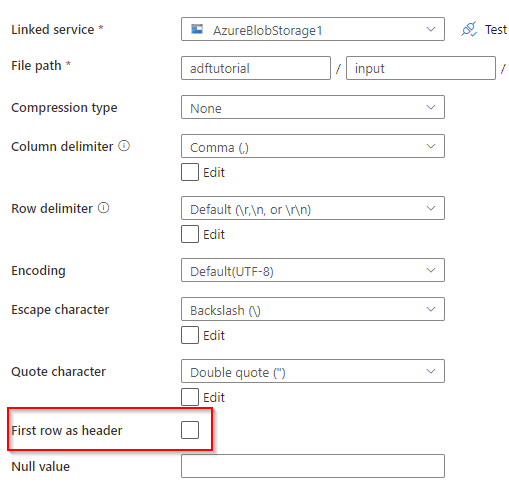
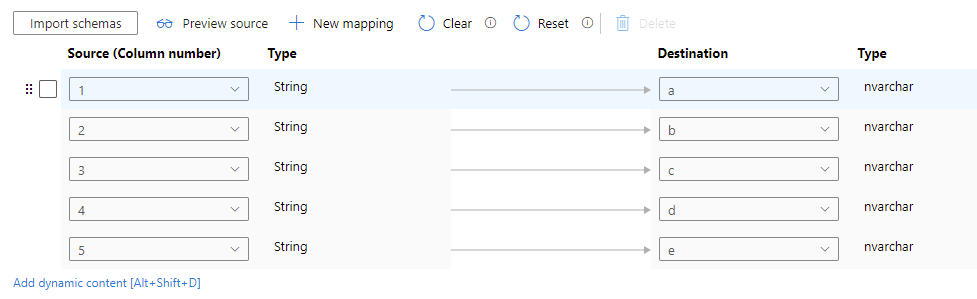
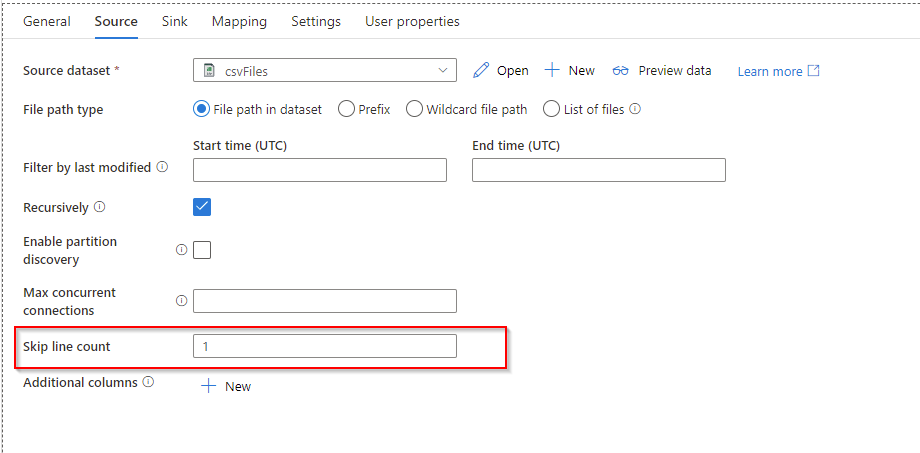
Yes, you need to do the below to pull the data -
I am also checking internally if any alternatives and get back to you.
Thanks
Saurabh
' cx='32' cy='32' r='32' /%3E%3Ctext x='50%25' y='55%25' dominant-baseline='middle' text-anchor='middle' fill='%23FFF' %3ES%3C/text%3E%3C/svg%3E)
Hello,
Is there any solution to this problem ? Any updates on this solutions ? Anyone has implemented and tried this solution yet ?
Thanks,
SK
HI @ SaurabhSharma-msft
I just tried the above solution. It works fine. If you do not want to copy paste a lot of Column Names in the Destination then what you could do is that in Source Dataset select "First Row as Header" , in Source Tab of Copy activity DO NOT check "Skip Line Count" and do normal mapping first. once column names shows up then go back to Source Dataset and unselect "First Row as Header" and in Source Tab of Copy activity Select "Skip Line Count" = 1. Go back to Mapping Tab and now in the Source manually change the Column Names to Numbers 1, 2, ....
This way you will be saving a lot of time Typing or pasting Destination Column Names.
Hope this helps everyone who encounters Duplicate Column Name issue in Source file..
Thanks,
SK
' cx='32' cy='32' r='32' /%3E%3Ctext x='50%25' y='55%25' dominant-baseline='middle' text-anchor='middle' fill='%23FFF' %3EAO%3C/text%3E%3C/svg%3E)
How will this work if the source file is xlsx. Because i dont see the "skip row count". And the source file now shows two headers rows
Hi Anuja,
can you pls attach the demo file ?
Tnx
SK
Here is the sample dataset: the column name DC is duplicated in the source file. I want to copy this file from my Shared drive to Datalake and would like to rename the columns as DC_Long and DC_Short.

' cx='32' cy='32' r='32' /%3E%3Ctext x='50%25' y='55%25' dominant-baseline='middle' text-anchor='middle' fill='%23FFF' %3EDP%3C/text%3E%3C/svg%3E)
Hi Anuja Ogale, for renaming the column you need to use Data Flow activity.
Under Data Flow Activity please use Select transformation activity after Source activity. In Select transformation, use replace activity like
iif(startsWith($$,columnname),replace($$,columnname,newcolumnname),$$).
This will check the columnname and if the starting of columnname matches with yours then it will replace the columnname with the new columnname.
Let me know if this helps