Microsoft 365 and Office | Install, redeem, activate | For business | MacOS
Processes in Microsoft 365 for setting up Office apps, redeeming product keys, and activating licenses.

This browser is no longer supported.
Upgrade to Microsoft Edge to take advantage of the latest features, security updates, and technical support.
' cx='32' cy='32' r='32' /%3E%3Ctext x='50%25' y='55%25' dominant-baseline='middle' text-anchor='middle' fill='%23FFF' %3EJW%3C/text%3E%3C/svg%3E)
I have a list of about 300 dates that I wish to reformat. Some are displayed as dd-mm-yyyy and others as ddd/mm/yyyy. I need to change to mm/dd/yyyy in mass (not one at a time). Can anyone help?

Could you please check which cell format do you set for these dates? Such as General, Date, Custom.
Besides, do you mean one date format is "dd-mm-yyyy", and the another one is "dd/mm/yyyy"?
If yes, you could try the formulas to convert the date format.
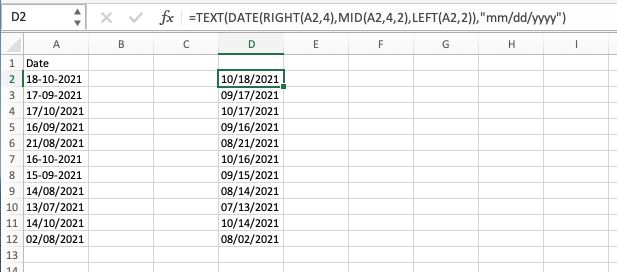
I creat a simple sample as following.
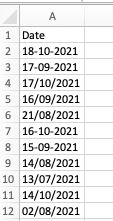
The formula could be =Text(Date(Right(A2,4),Mid(A2,4,2),Left(A2,2)),"mm/dd/yyyy").
If the answer is helpful, please click "Accept Answer" and kindly upvote it. If you have extra questions about this answer, please click "Comment".
Note: Please follow the steps in our documentation to enable e-mail notifications if you want to receive the related email notification for this thread.
Hi @J W Norris
Do I have any misunderstanding on your issue?
If you have any updates, please feel free to let me know.