Azure Data Factory
An Azure service for ingesting, preparing, and transforming data at scale.
This browser is no longer supported.
Upgrade to Microsoft Edge to take advantage of the latest features, security updates, and technical support.
' cx='32' cy='32' r='32' /%3E%3Ctext x='50%25' y='55%25' dominant-baseline='middle' text-anchor='middle' fill='%23FFF' %3ERV%3C/text%3E%3C/svg%3E)
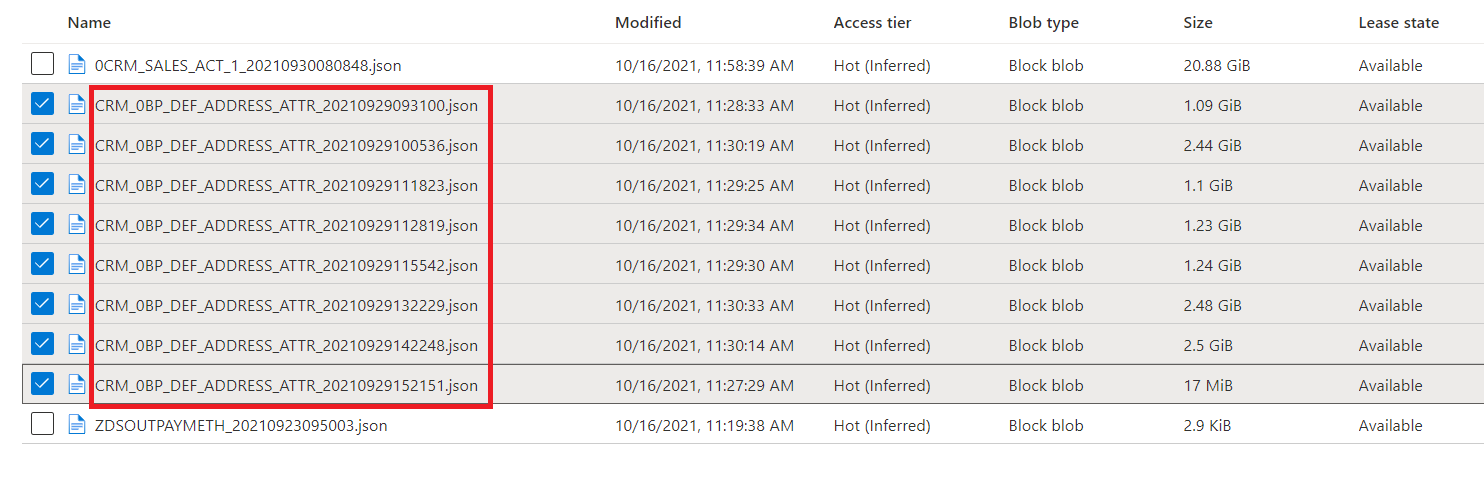
There are a lot of files with timestamp suffixed in their filename. I keep getting few of those files each day, and some of those few files have multiple copies of them with different timestamp (hh or mm or ss component of timestamp differ on each day).
I have a pipeline that copies each of those files everyday into time partitioned folders with a granularity of "yyyy/mm/dd" and so if there are multiple copies of a files present on a day with different timestamp, they get overwritten when copied into time-partitioned folder.
I am thinking of merging all copies of a file during copy as well as remove duplicate rows after merge and suffix the merged filename with most recent timestamp among all copies of the file.
How can I achieve this please ?
Sample file in a container -
' cx='32' cy='32' r='32' /%3E%3Ctext x='50%25' y='55%25' dominant-baseline='middle' text-anchor='middle' fill='%23FFF' %3ESM%3C/text%3E%3C/svg%3E)
Hello @Ranjan, Vineet ,
Welcome to the Microsoft Q&A platform.
Just slightly need one clarification. You mentioned that the pipelines are copying and overwriting at the destination. Currently, how are you getting the files to be copied? I do see there other files.json - is there any wild card you are making use of ? Or you looking for ideas in filtering the files? Also, currently what are you making use to copy the data - copy activity / mapping data flow ?
Hi Sathyamoorthy,
Thanks for looking into this. truly appreciate it.
I am developing in PRE-PROD now where SAP extract jobs are failing and hence they are sending multiple copies of few files with different HHMMSS component of timestamp unfortunately.
There was no issues in DEV and QA environments and hence I did not face this issue.
In PRE-PROD, I am copying each filename-copy separately and once loaded into SQLDB at the end of the flow, I come back and lift subsequent copy of the filename and process them. Fortunately, there are only few files having multiple copies on a day, but I still need to absorb the use case in my pipeline so when I schedule them, pipelines work in all scenario.
I am thinking on below lines at the moment.
At the Sink tab of above "Copy" , I will choose "Merge files" for Copy behaviour and also pass the merged filename as <file>_<latest_timestamp>.json and write to another container of the storage.
Please do advise how this sounds, It alright then I need to find how to do all of the steps in ADF code.
Thanks
Vineet