Azure Database Migration service
An Azure service designed to help simplify, guide, and automate database migrations to Azure.
This browser is no longer supported.
Upgrade to Microsoft Edge to take advantage of the latest features, security updates, and technical support.
' cx='32' cy='32' r='32' /%3E%3Ctext x='50%25' y='55%25' dominant-baseline='middle' text-anchor='middle' fill='%23FFF' %3ESM%3C/text%3E%3C/svg%3E)
Hi ,
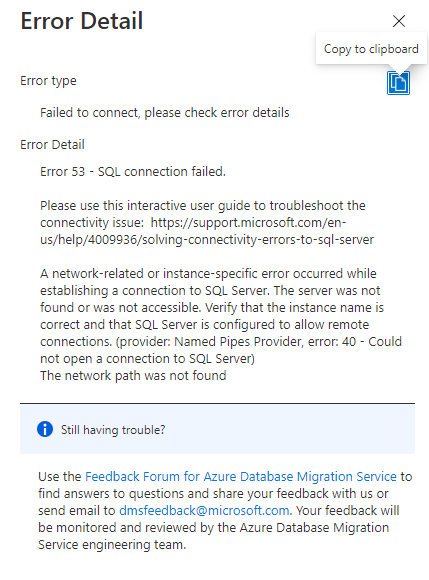
We are planning to migrate SQL Server On-Premise to Azure SQL DB MI instance. We are going to use DMS for this for this migration. Im getting error when I try to connect source server using DMS. Can someone pls help on this issue? Please note that I have enabled TCP/IP protocol and configured firewall. I could able to connect source server from DMA for assessment.
Thanks,
Santha
' cx='32' cy='32' r='32' /%3E%3Ctext x='50%25' y='55%25' dominant-baseline='middle' text-anchor='middle' fill='%23FFF' %3EYM%3C/text%3E%3C/svg%3E)
If the reply above was helpful please mark as accepted answer so it can be helpful for other community members with same questions.
Hi @Santhamoorthy M ,
This issue happens when the source SQL Server instance that Azure Database Migration Service tries to connect to either has a dynamic port or is using a named instance. The SQL Server Browser service listens to UDP port 1434 for incoming connections to a named instance or when using a dynamic port. The dynamic port may change each time SQL Server service restarts. You can check the dynamic port assigned to an instance via network configuration in SQL Server Configuration Manager.
Please verify that Azure Database Migration Service can connect to the source SQL Server Browser service on UDP port 1434 and the SQL Server instance through the dynamically assigned TCP port as applicable.
https://learn.microsoft.com/en-us/azure/dms/known-issues-troubleshooting-dms#error-connecting-to-source-sql-server-when-using-dynamic-port-or-named-instance
-------
If the answer is the right solution, please click "Accept Answer" and kindly upvote it. If you have extra questions about this answer, please click "Comment".