Developer technologies | Windows Presentation Foundation
A part of the .NET Framework that provides a unified programming model for building line-of-business desktop applications on Windows.
This browser is no longer supported.
Upgrade to Microsoft Edge to take advantage of the latest features, security updates, and technical support.
' cx='32' cy='32' r='32' /%3E%3Ctext x='50%25' y='55%25' dominant-baseline='middle' text-anchor='middle' fill='%23FFF' %3ESG%3C/text%3E%3C/svg%3E)
This screenshot the button is on the webbrowser but the button is hidden maybe the button is on the main window ? the main window is under the webbrowser.

And when I'm doing this in the MainWindow code :
public partial class MainWindow : Window
        {
            public MainWindow()
            {
                InitializeComponent();

                webBrowser1.Navigate("https://test.com");
                webBrowser1.LoadCompleted += WebBrowser1_LoadCompleted;
            }

            private void WebBrowser1_LoadCompleted(object sender, NavigationEventArgs e)
            {
                SomeMethod();
            }
When it's getting to the LoadCompleted it does the code inside SomeMethod() but the webbrowser is white empty. It's no getting to the completed when the page loaded.
It's getting to the completed event before the website loaded. After it's getting to the completed event I'm using a breakpoint and doing continue then it's loading the site in the webbrowser.
Now the button is on the mainwindow and I resized the webbrowser to be a bit smaller so I see the button but the webbrowser too small now :

What I'm trying to archive is too things :
When I try to resize at runtime with the mouse the webbroswer it's covering the button because the button is on the mainwindow how can I make that the button will move down when resizing up/down the webbrowser ?
' cx='32' cy='32' r='32' /%3E%3Ctext x='50%25' y='55%25' dominant-baseline='middle' text-anchor='middle' fill='%23FFF' %3EHL%3C/text%3E%3C/svg%3E)
Hi,@ShalvaGabriel-1621 .May I know if you have a chance to check my answer? If you have any questions, I will be happy to help you.
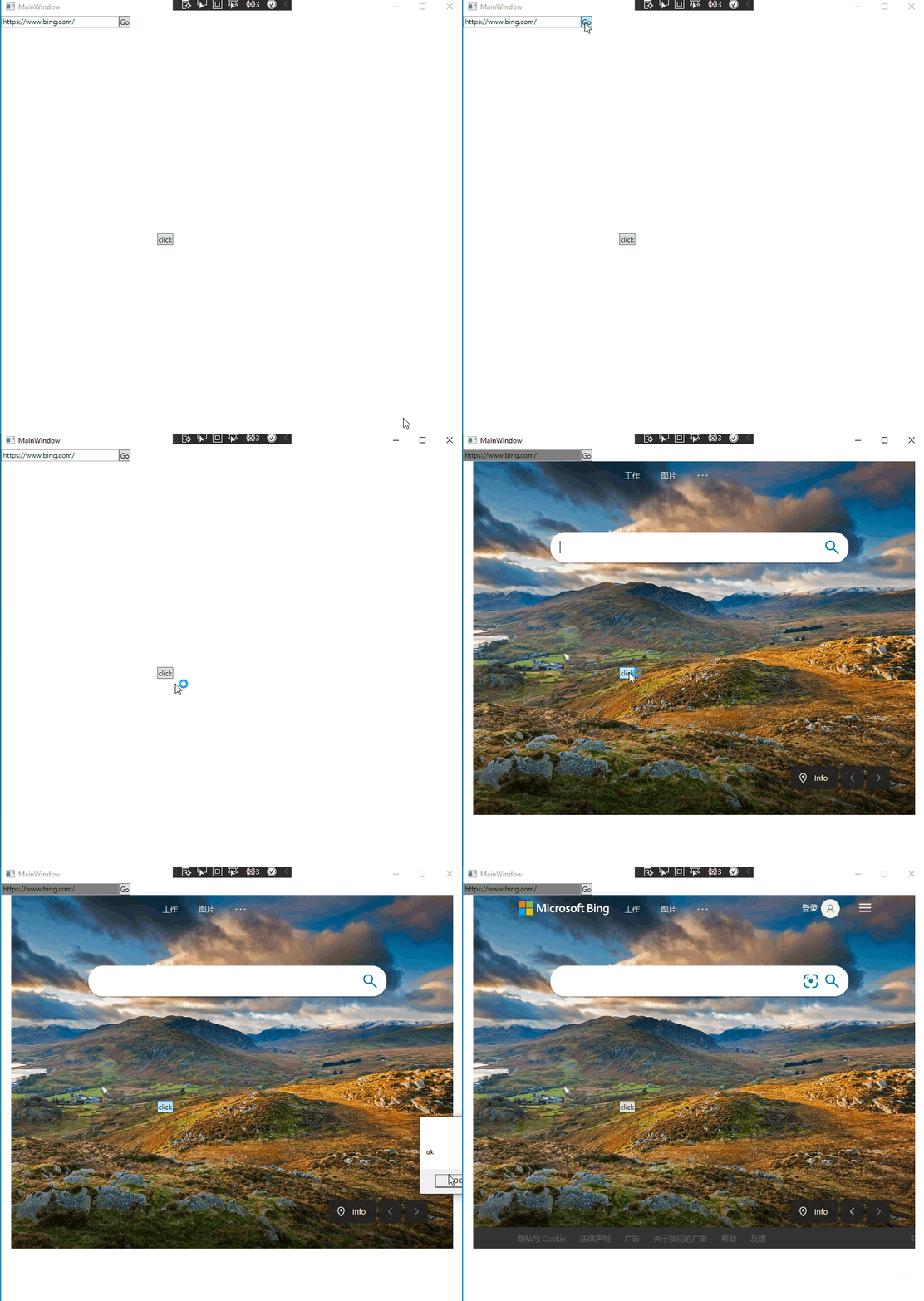
It is not possible to display the controls directly on the WebBrowser.The WebBrowser control is a wrapper for the Internet Explorer COM control. This means that it has its own HWND and does not allow WPF to draw anything on it. It has the same restrictions as hosting any other Win32 or WinForms control in WPF. You could try Popup so that the button can be displayed on the WebBrowser.
The code of xaml:
<StackPanel>
        <StackPanel Orientation="Horizontal">
            <TextBox x:Name="addressTextBox" Width="200" />
            <Button Click="goNavigateButton_Click">Go</Button>
        </StackPanel>
        <WebBrowser x:Name="webBrowser1"  Width="750" Height="600"/>
        <Popup IsOpen="True" Placement="Center"   AllowsTransparency="True"
              Width="{Binding ActualWidth,
                              ElementName=WebBrowser1,
                              Mode=OneWay}"
              Height="{Binding ActualHeight,
                               ElementName=WebBrowser1,
                               Mode=OneWay}"
              PlacementTarget="{Binding ElementName=WebBrowser1}">

              <Button Click="Button_Click" Content="click"/>

        </Popup>
    </StackPanel>
The code of xaml.cs:
public partial class MainWindow : Window
  {
    public MainWindow()
    {
      InitializeComponent();

      webBrowser1.LoadCompleted += WebBrowser1_LoadCompleted;
    }

    private void WebBrowser1_LoadCompleted(object sender, NavigationEventArgs e)
    {
      addressTextBox.Background = Brushes.Gray;
    }
    private void Button_Click(object sender, RoutedEventArgs e)
    {
      MessageBox.Show("ok");
    }
    private void goNavigateButton_Click(object sender, RoutedEventArgs e)
    {
      Uri uri = new Uri(this.addressTextBox.Text, UriKind.RelativeOrAbsolute);
      if (!uri.IsAbsoluteUri)
      {
        MessageBox.Show("The Address URI must be absolute. For example, 'http://www.microsoft.com'");
        return;
      }
      this.webBrowser1.Navigate(uri);
    }
  }
The picture of result:
If the answer is the right solution, please click Accept Answer and kindly upvote it. If you have extra questions about this answer, please click Comment.
Note: Please follow the steps in our documentation to enable e-mail notifications if you want to receive the related email notification for this thread.