Microsoft Security | Microsoft Entra | Microsoft Entra ID
A cloud-based identity and access management service for securing user authentication and resource access

This browser is no longer supported.
Upgrade to Microsoft Edge to take advantage of the latest features, security updates, and technical support.
' cx='32' cy='32' r='32' /%3E%3Ctext x='50%25' y='55%25' dominant-baseline='middle' text-anchor='middle' fill='%23FFF' %3ET%3C/text%3E%3C/svg%3E)
Hello,
On windows10 box, when any desktop app registered with Azure-AD requires to open the browser to complete the authentication with AAD using ADAL or MSAL, my understanding is that browser is basically MS-EDGE
Is it possible to change this behavior (may be by sending some params to ADAL or MSAL etc) so that the browser-context that I see is Chrome ?
Thanks.
' cx='32' cy='32' r='32' /%3E%3Ctext x='50%25' y='55%25' dominant-baseline='middle' text-anchor='middle' fill='%23FFF' %3EA%3C/text%3E%3C/svg%3E)
Hi, we are investigating your issue and will update you soon.
Best,
James
Hi @testuser7 , is Edge your default browser? Could you try changing your default browser to Chrome and seeing if this fixes your problem? 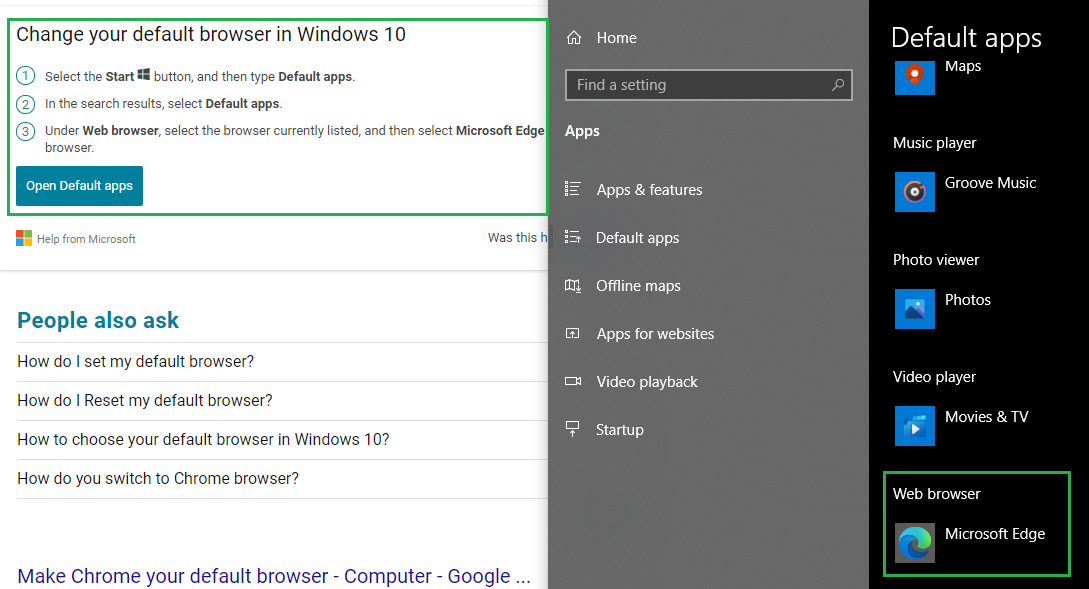
Please let me know if this works or if you have any questions!
If this answer helped you please mark it as "Verified" so other users may reference it.
Thank you,
James