Developer technologies | Transact-SQL
A Microsoft extension to the ANSI SQL language that includes procedural programming, local variables, and various support functions.
This browser is no longer supported.
Upgrade to Microsoft Edge to take advantage of the latest features, security updates, and technical support.
' cx='32' cy='32' r='32' /%3E%3Ctext x='50%25' y='55%25' dominant-baseline='middle' text-anchor='middle' fill='%23FFF' %3ECS%3C/text%3E%3C/svg%3E)
I have a large table (10's of millions of rows per day) which is partitioned by time and includes a geography column with a spatial index.
The following query,
    DECLARE @polygon geography = geography::STGeomFromText('POLYGON((-2.797749 30.595396, 40.908162 30.595396, 40.908162 40.523745, -2.797749 40.523745, -2.797749 30.595396))', 4326);
    SELECT * FROM Locations WHERE Time > '2021-01-01T23:59:59.997' AND Time <= '2021-01-02T23:59:59.997' AND @polygon.STContains(Location) = 1;
according to the SSMS query statistics, first uses the spatial index but doesn't apply partition elimination to the index which will result in looking over billions of rows.
According to the following, https://support.microsoft.com/en-us/topic/kb4089950-update-to-support-partition-elimination-in-query-plans-that-have-spatial-indexes-in-sql-server-2016-and-2017-d1f87c36-4738-cd04-1e2c-baf455288f50, an update was released to allow this to function properly but even after applying I'm still having the issue of no partition elimination occurring on the spatial index.
Partition elimination works as expected for partitioned views, but I'd rather not use them if possible.
Is it possible to use partition elimination using spatial indexes in SQL Server 2016?
Thanks in advance

Would it be possible for you to produce a repro that demonstrates the issue? That is a script that creates a partition function, partition function, a table and loads with some data and a sample query that demonstrates the issue?
Table Creation:
142575-table-creation.txt
Partition Creation:
142576-partition-creation.txt
Spatial Index:
142596-spatial-index.txt
Inserts:
142558-partiton-inserts.txt
Query:
142577-query.txt
The execution plan can be used to see if partition elimination is used.
This works on SQL2019 but doesn't use partition elimination on 2016
' cx='32' cy='32' r='32' /%3E%3Ctext x='50%25' y='55%25' dominant-baseline='middle' text-anchor='middle' fill='%23FFF' %3ESX%3C/text%3E%3C/svg%3E)
Hi @Chris Singleton ,
Could you check this article for some ideas:
https://www.littlekendra.com/2015/11/17/did-my-query-eliminate-table-partitions-sql-server/
BTW, did you have any error message?
Best regards,
Seeya
If the answer is the right solution, please click "Accept Answer" and kindly upvote it. If you have extra questions about this answer, please click "Comment".
Note: Please follow the steps in our documentation to enable e-mail notifications if you want to receive the related email notification for this thread.
Could you check this article for some ideas:
https://www.littlekendra.com/2015/11/17/did-my-query-eliminate-table-partitions-sql-server/
Following the steps in the article I can see from this query on a table partitioned daily with 7 partitions
(<= 2020-12-31 23:59:59.997 -> <= 2021-01-05 23:59:59.997, plus the end partition)
SELECT * FROM test WHERE Time > '2021-01-01T23:59:59.997' AND Time <= '2021-01-02T23:59:59.997';
That the partition elimination is occuring correctly, with the execution plan showing
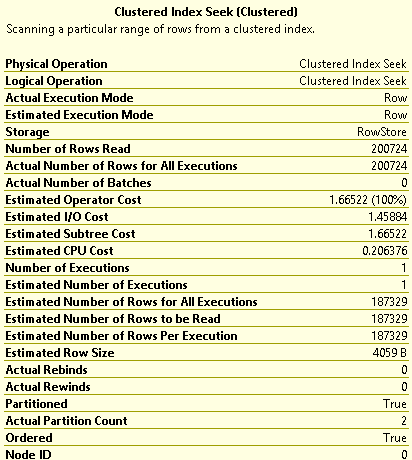
However when a spatial calculation is added to the end of the query
SELECT * FROM test WHERE Time > '2021-01-01T23:59:59.997' AND Time <= '2021-01-02T23:59:59.997' AND @polygon.STContains(Location) = 1;
The execution plan shows the following for the spatial index
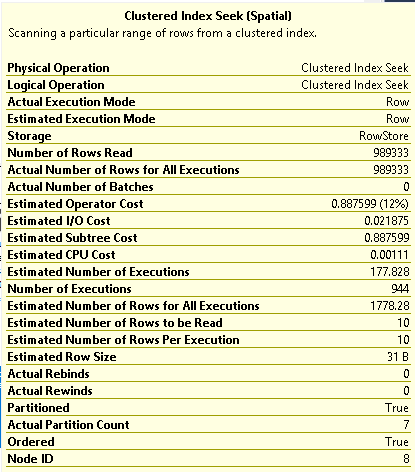
BTW, did you have any error message?
I do not
Also I am running SQL Server 13.0.4474.0 in case its any help (updated to version shown in link in my original question)
It seems to me that the issue is there is no 'Predicate' in the execution plan for the spatial index.
When tested on a 2019 instance the spatial index has a predicate applied and only the one partition is queried as expected