Exchange | Exchange Server | Management
The administration and maintenance of Microsoft Exchange Server to ensure secure, reliable, and efficient email and collaboration services across an organization.
This browser is no longer supported.
Upgrade to Microsoft Edge to take advantage of the latest features, security updates, and technical support.
' cx='32' cy='32' r='32' /%3E%3Ctext x='50%25' y='55%25' dominant-baseline='middle' text-anchor='middle' fill='%23FFF' %3ES%3C/text%3E%3C/svg%3E)
Need custom scripting for
2) is there any limit to add mailboxes in 1 eDiscovery hold
The administration and maintenance of Microsoft Exchange Server to ensure secure, reliable, and efficient email and collaboration services across an organization.

@JustinMicheal-7973
I am writing here to confirm with you any update about this thread now?
If the suggestion below helps, please be free to accept it as an answer for helping more people.
Query 1: I want You to run the below script in your test tenant only for the exchange mailboxes (removing SPO and public folder locations) | Use a script to add users to a hold in a Core eDiscovery case - Microsoft 365 Compliance | Microsoft Learn
Query 2: PowerShell command to pull exchange locations added per hold
Based on my searching, this script may be useful to you. For more detailed information, you could open a service request to check with Office 365 teams.
Please Note: Since the web site is not hosted by Microsoft, the link may change without notice. Microsoft does not guarantee the accuracy of this information.
Answer accepted by question author
@JustinMicheal-7973
1) The -SourceMailboxes in Set-MailboxSearch command doesn't support the "add" action:
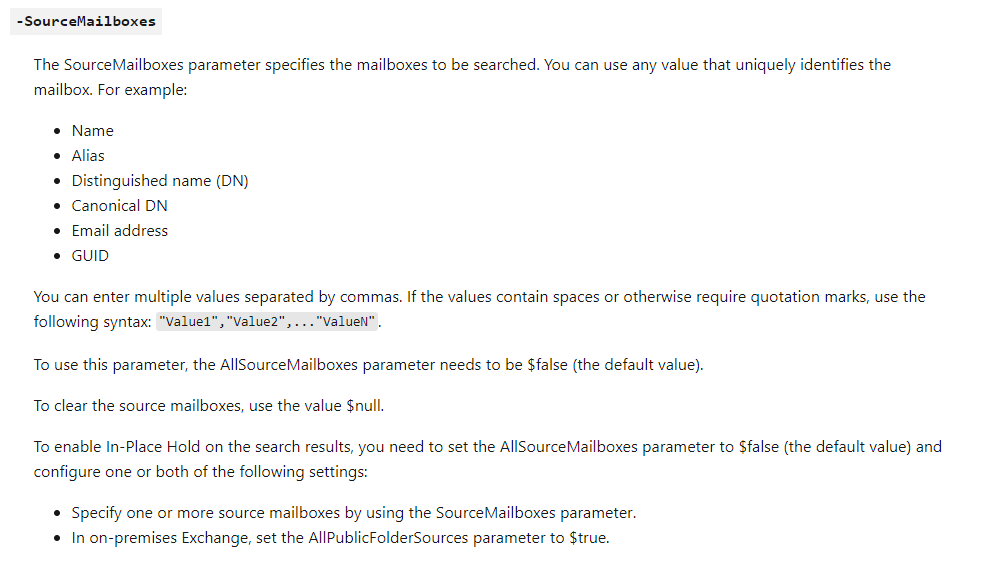
You need to set the value directly: Set-MailboxSearch holdName -SourceMailboxes user1,user2,user3,user4
Here is a example for parameter which supported ”add“ action: -EmailAddresses
2) There doesn't exist limitation about it, you could contain all mailboxes in one hold.
If the answer is helpful, please click "Accept Answer" and kindly upvote it. If you have extra questions about this answer, please click "Comment".
Note: Please follow the steps in our documentation to enable e-mail notifications if you want to receive the related email notification for this thread.