How share header & source codes in VC++

drjackool 996 Reputation points
2026-09-06T05:14:59.1+00:00

Hi

In Visual C++, I have several headers and sources that I want use them in several projects and they are common.

I put them in a folder named 'Common' in my projects folder like below:

[My Projects]
+--[Common]
   +--MyCode.h
   +--MyCode.cpp
+--[Project 1]
+--[Project 2]
...

And in project settings in VC Directories I add 'Common' folder location in "include" ans "source" folders. But problem is when compiling the project I get "Unresolved external symbol" because the compiler not compiles the source codes 'MyCode.cpp'. How to solve this problem?

I alters 'MyCode.cpp' some times and I do not want build MyCode.lib.

Also I do not want add files in Solution Explorer. I want use my common codes like VC++ headers

Thanks

Developer technologies | C++

A high-level, general-purpose programming language, created as an extension of the C programming language, that has object-oriented, generic, and functional features in addition to facilities for low-level memory manipulation.

0 comments No comments

2 answers

Sort by: Most helpful
  1. RLWA32 52,811 Reputation points
    2026-09-06T07:31:32.6933333+00:00

    You can use a Directory.Build.props file as described in Customize C++ builds. The props will be applied to every C++ project created under the folder tree containing the file. It can provide those projects with the common headers and can also be used to provide MyCode.cpp to the projects.

    Folders -
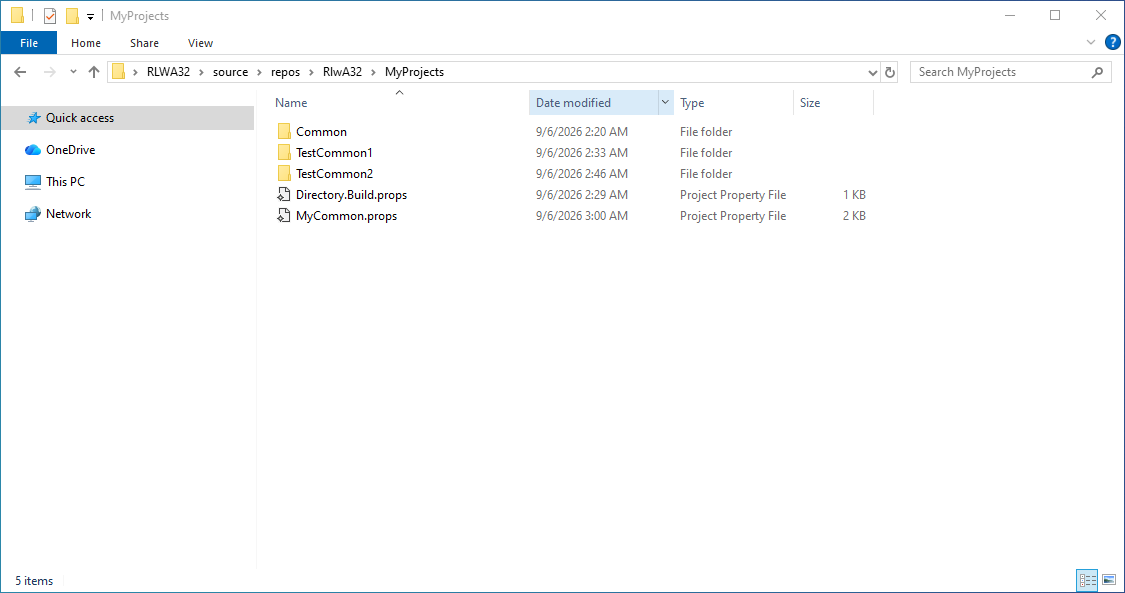
    folders

    For example, the Common folder contains func1.h, func2.h and MyCode.cpp (definitions of func1 and func2).

    Directory.Build props contains -

    <Project ToolsVersion="4.0" xmlns="http://schemas.microsoft.com/developer/msbuild/2003">
      <PropertyGroup>
         <ForceImportAfterCppProps>$(MsbuildThisFileDirectory)\MyCommon.props</ForceImportAfterCppProps>
      </PropertyGroup>
    </Project>
    

    MyCommon.props contains -

    <?xml version="1.0" encoding="utf-8"?>
    <Project ToolsVersion="4.0" xmlns="http://schemas.microsoft.com/developer/msbuild/2003">
      <ImportGroup Label="PropertySheets" />
      <PropertyGroup Label="UserMacros" />
      <PropertyGroup />
      <ItemDefinitionGroup Condition="'$(Configuration)|$(Platform)'=='Debug|Win32'">
        <ClCompile>
          <AdditionalIncludeDirectories>C:\Users\RLWA32\source\repos\RlwA32\MyProjects\Common;%(AdditionalIncludeDirectories)</AdditionalIncludeDirectories>
        </ClCompile>
      </ItemDefinitionGroup>
      <ItemDefinitionGroup Condition="'$(Configuration)|$(Platform)'=='Release|Win32'">
        <ClCompile>
          <AdditionalIncludeDirectories>C:\Users\RLWA32\source\repos\RlwA32\MyProjects\Common;%(AdditionalIncludeDirectories)</AdditionalIncludeDirectories>
        </ClCompile>
      </ItemDefinitionGroup>
      <ItemDefinitionGroup Condition="'$(Configuration)|$(Platform)'=='Debug|x64'">
        <ClCompile>
          <AdditionalIncludeDirectories>C:\Users\RLWA32\source\repos\RlwA32\MyProjects\Common;%(AdditionalIncludeDirectories)</AdditionalIncludeDirectories>
        </ClCompile>
      </ItemDefinitionGroup>
      <ItemDefinitionGroup Condition="'$(Configuration)|$(Platform)'=='Release|x64'">
        <ClCompile>
          <AdditionalIncludeDirectories>C:\Users\RLWA32\source\repos\RlwA32\MyProjects\Common;%(AdditionalIncludeDirectories)</AdditionalIncludeDirectories>
        </ClCompile>
      </ItemDefinitionGroup>
      <!-- Comment out the following ItemGroup to prevent MyCode.cpp from automatic inclusion in projects -->
      <ItemGroup>
        <ClCompile Include="C:\Users\RLWA32\source\repos\RlwA32\MyProjects\Common\MyCode.cpp" />
      </ItemGroup>
    </Project>
    

    For example, the TestCommon1 project appears like this -
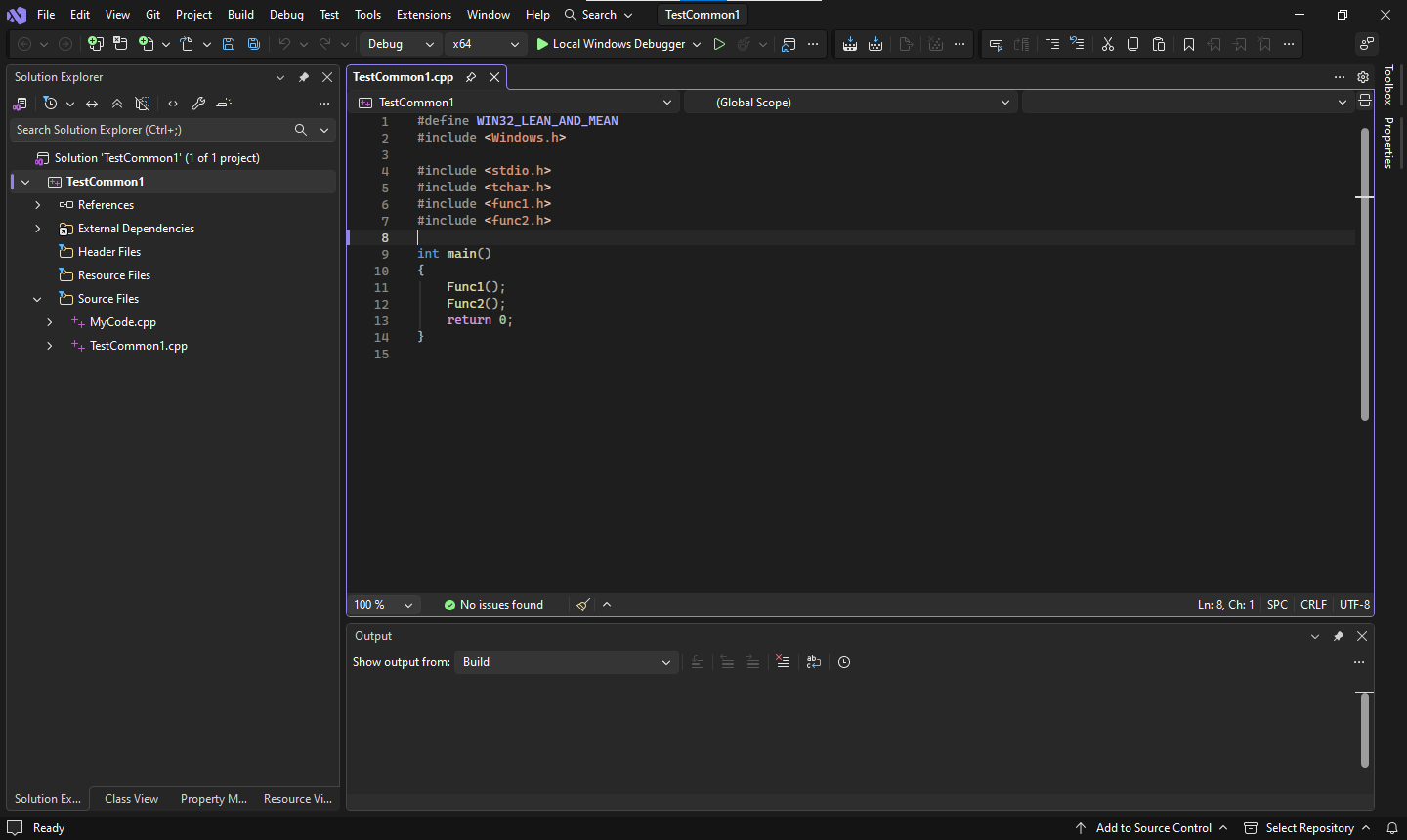
    TestCommon1

    Note that MyCode.cpp was automatically included in your project without any manual intervention. And it would be included in every other project created under the folder tree.

    If this is undesirable, comment out the ItemGroup as described above. If you want to include MyCode.cpp in some projects but not others you would need to manually cause it to be included. An ugly way of accomplishing the would be to use the #include directive for MyCode.cpp.

    For example,
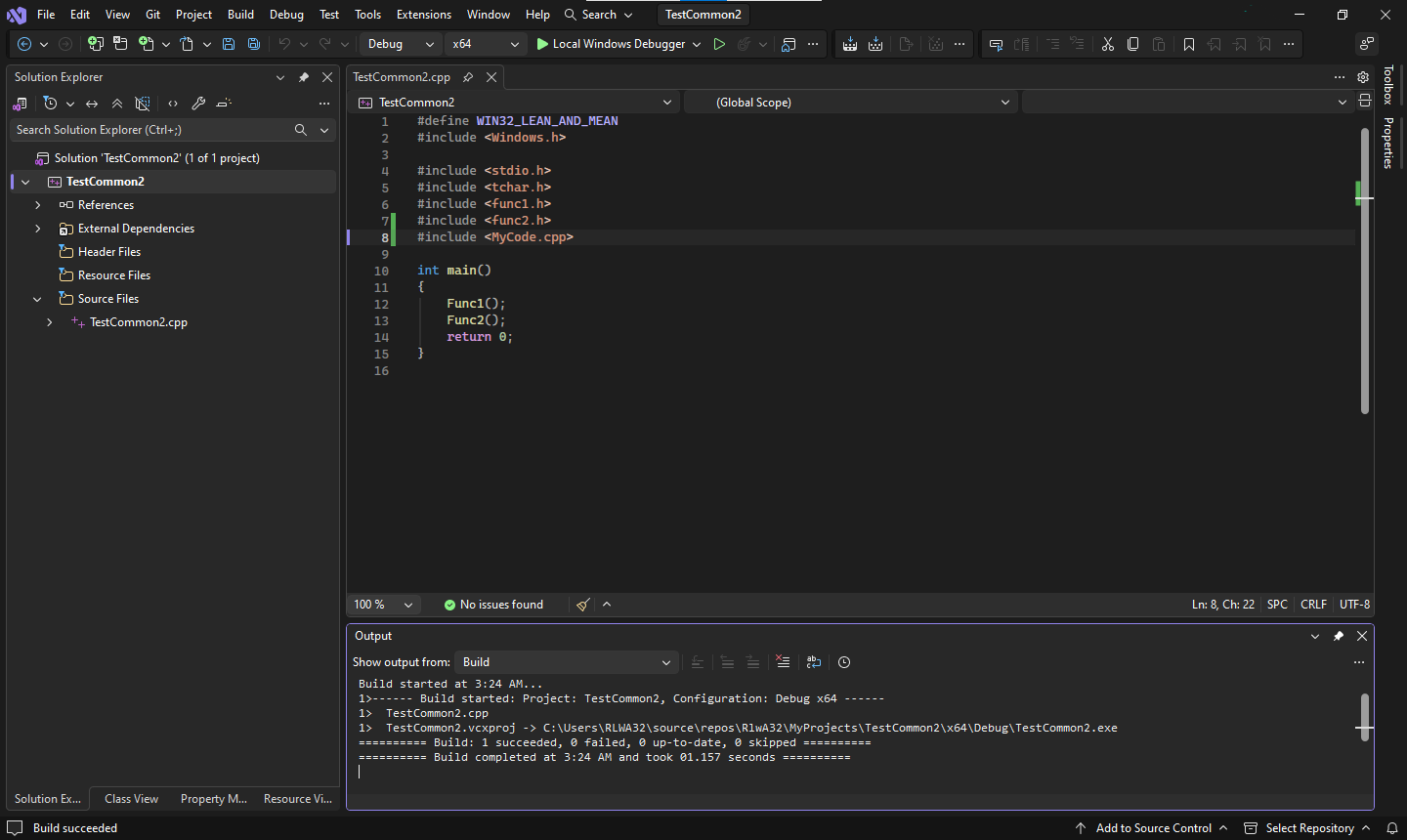
    TestCommon2

    Was this answer helpful?

    0 comments No comments

  2. AI answer

    2026-09-06T05:15:13.8466667+00:00

    Adding the Common folder to Include Directories only makes headers visible to the compiler. It does not cause MyCode.cpp to be compiled or linked, which is why unresolved external symbol occurs.

    Use one of these supported approaches:

    1. Add the shared .cpp file to each project
      • A file is compiled only when it is part of the project.
      • Files shown in Solution Explorer are added to all configurations for that project.
      • If MyCode.cpp is not in the project, Visual C++ does not build it just because its folder is listed in VC++ Directories.
    2. Create a separate project for the common code
      • Put MyCode.cpp and MyCode.h in a static library or DLL project.
      • Then set project dependencies so dependent projects build in the correct order and can find the outputs at link time.
      • This is the recommended way to share native code across multiple projects.
    3. If only headers are shared, keep using Include Directories
      • Header files can be shared through the include path.
      • Source files cannot be shared that way; they must be compiled as part of a project or library.

    If the goal is to avoid building a separate .lib, the practical option is to add MyCode.cpp into each consuming project so it gets compiled there. If the goal is to maintain one compiled copy reused by many projects, use a separate library project.

    Also check these project settings if the file is already present but still not found:

    • Configuration Properties > VC++ Directories > Include Directories for MyCode.h
    • Configuration Properties > Linker > Input > Additional Dependencies and Linker > General > Additional Library Directories if using a .lib

    VC++ Directories does not provide a general “source search path” that makes .cpp files compile automatically.


    AI-generated content may be incorrect. Read our transparency notes for more information.

    Was this answer helpful?

Your answer

Answers can be marked as 'Accepted' by the question author and 'Recommended' by moderators, which helps users know the answer solved the author's problem.