Exchange Online
A Microsoft email and calendaring hosted service.
6,181 questions
This browser is no longer supported.
Upgrade to Microsoft Edge to take advantage of the latest features, security updates, and technical support.
' cx='32' cy='32' r='32' /%3E%3Ctext x='50%25' y='55%25' dominant-baseline='middle' text-anchor='middle' fill='%23FFF' %3ELA%3C/text%3E%3C/svg%3E)
I have Active Directory server on-premise, and exchange online in office 365, they are connected to each other using the free version of the ad azure connect server.
I delete the AD user and their mailbox, when I restore the mailbox, the AD User does not join the restore. how do restore AD user to stay connected to exchange online mailbox in office 365?


@lucky alqodar
I am writing here to confirm with you any update about this thread now?
If the suggestion below helps, please be free to accept it as an answer for helping more people.
For local AD account, you cannot recover it. But you could recreate a new account to reconnect to Azure AD account:
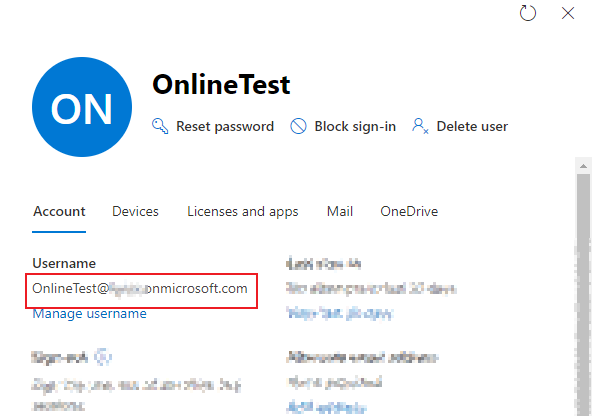
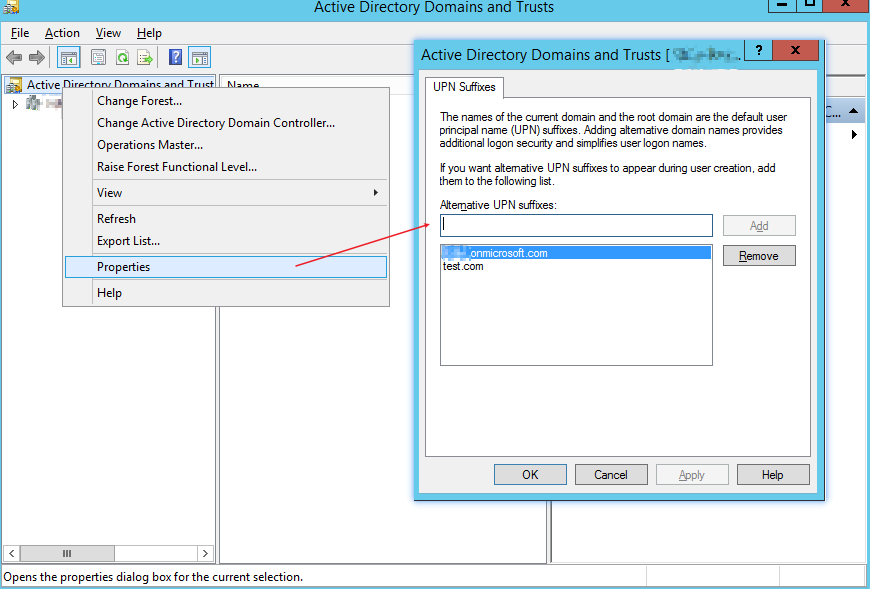
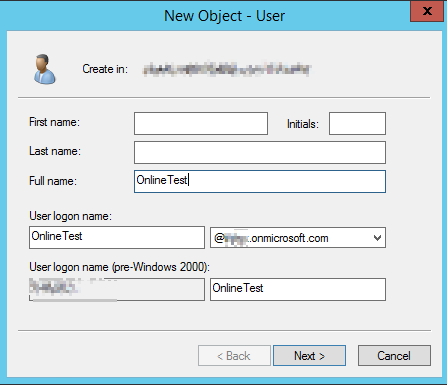
After that, this Azure account will connect and sync to local AD account. For more detailed information, you could have a look about this article.
Please Note: Since the web site is not hosted by Microsoft, the link may change without notice. Microsoft does not guarantee the accuracy of this information.
If the answer is helpful, please click "Accept Answer" and kindly upvote it. If you have extra questions about this answer, please click "Comment".
Note: Please follow the steps in our documentation to enable e-mail notifications if you want to receive the related email notification for this thread.