Developer technologies | .NET | Other
Microsoft Technologies based on the .NET software framework. Miscellaneous topics that do not fit into specific categories.
This browser is no longer supported.
Upgrade to Microsoft Edge to take advantage of the latest features, security updates, and technical support.

Hi,
I have implemented an asp.net web API with the code first approach. Now I need to add a property to some of the models. I alter the DB table and add a field, I got this error:
System.InvalidOperationException HResult=0x80131509 Message=The model backing the 'GameContext' context has changed since the database was created. Consider using Code First Migrations to update the database (http://go.microsoft.com/fwlink/?LinkId=238269). Source=<Cannot evaluate the exception source> StackTrace: <Cannot evaluate the exception stack trace>
I googled and came across adding below to the global.asax:
Database.SetInitializer<ApplicationDbContext>(null);
I wonder is it OK to use this on the production? Any suggestions would be great.
Thanks in advance.
@Jack J Jun thank you for your answer. Assume I did what you have said above in my development environment. How can I adapt it to my production? Code is already changed and I need to manually alter the table in my DB. Any ideas?

@Cenk , based on my test, you could try the following steps to add a new property to a model and the related database.
First, Please add the property in the model class.
 public class Student
        {
            [Key]
            public int ID { get; set; }

            public string Name { get; set; }
            public int Age { get; set; }

            public string Address { get; set; }

            public int Score { get; set; }    // Added property


        }
Second, Please execute the following commands in sequence in the Package Console below.
Enable-Migrations

Add-Migration AddFileld

Update-Database
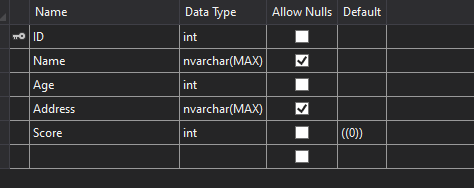
Finally, you could see the results in the code and database.
Code:
public partial class AddFileld : DbMigration
    {
        public override void Up()
        {
            AddColumn("dbo.Students", "Score", c => c.Int(nullable: false));
        }

        public override void Down()
        {
            DropColumn("dbo.Students", "Score");
        }
    }
Result:
If the answer is the right solution, please click "Accept Answer" and kindly upvote it. If you have extra questions about this answer, please click "Comment".
Note: Please follow the steps in our documentation to enable e-mail notifications if you want to receive the related email notification for this thread.
@Cenk , there is no need to manually alter the table in your db, after executing the above commands the Score Field can be added to the database automatically.
@Jack J Jun But I don't get it, I am doing it on my local development machine. How this additional field will be added to the database on my production machine?
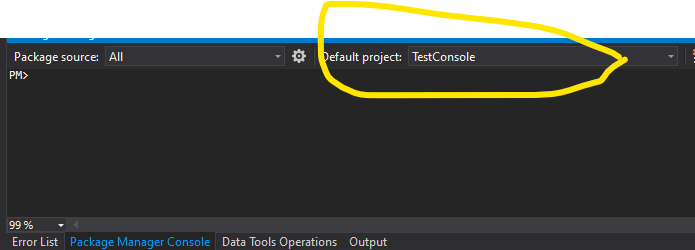
@Cenk , If you want to add the field to other machine database, we need to specify both the project name in Package Console and the specified database in code.
Code:
 public StudentContext() : base(@"Connstr")
        { }
@Jack J Jun sometimes it is tedious dealing with EF migrations. That's why I am trying to figure it out using
Database.SetInitializer<ApplicationDbContext>(null);
cause any harm?
@Cenk , Sorry for the late response, Based on my further research, I find that Database.SetInitializer is often used to do code first. Therefore, I still recommend that you could use Package Command to add the new property.
' cx='32' cy='32' r='32' /%3E%3Ctext x='50%25' y='55%25' dominant-baseline='middle' text-anchor='middle' fill='%23FFF' %3EAP%3C/text%3E%3C/svg%3E)
@Jack J Jun I have the same issue. I'm learning asp.net MVC . when I watched the video, I wrote my codes like that but after a couple of days, when I came back and ran my code I got this error. As you say I used "add-migration" and updated my database but I still have this problem. I am so confused because My database was really updated ( for example I set one of my properties [required] and the database changed) .
I thought it would be better to delete all my previous migrations and my database and tried again (started from the beginning like it was the first time I wanted to create my database using migration) but it still does not work :( I don't know why but isn't it obvious that my database and my model match together after I created it again?What is the difference between creating a database from the beginning and now?
**There is one point that I can not understand , if I delete all files in my migration folder or delete the migration table in the database it would be ok but you know... it doesn't make sense and bother me . I'll pleased if you explain to me why that happens