Microsoft 365 and Office | SharePoint | For business | Windows
A group of Microsoft Products and technologies used for sharing and managing content, knowledge, and applications.

This browser is no longer supported.
Upgrade to Microsoft Edge to take advantage of the latest features, security updates, and technical support.
' cx='32' cy='32' r='32' /%3E%3Ctext x='50%25' y='55%25' dominant-baseline='middle' text-anchor='middle' fill='%23FFF' %3EBA%3C/text%3E%3C/svg%3E)
I have been working on creating a process in SharePoint where someone on my Lenovo team can submit a request in SharePoint, the request will go thru Power Automate and then create a task in Microsoft Planner. By mistake, I added my project in Sharepoint under an already existing project within my folder. I need to move the project from being associated with another project to stand on its own. It will stay under me, stay within my account, just not be under an already existing project. Can I move a project that I am working on so that it is not under project but to be by itself?
A group of Microsoft Products and technologies used for sharing and managing content, knowledge, and applications.
This answer has been deleted due to a violation of our Code of Conduct. The answer was manually reported or identified through automated detection before action was taken. Please refer to our Code of Conduct for more information.
Comments have been turned off. Learn more
' cx='32' cy='32' r='32' /%3E%3Ctext x='50%25' y='55%25' dominant-baseline='middle' text-anchor='middle' fill='%23FFF' %3EI%3C/text%3E%3C/svg%3E)
Hi Brent,
If you created the project as a subsite beneath an existing SharePoint site, SharePoint does not provide a simple "Move Site" button.
When your migration is in the same site collection, you could visit "http://yoursite/_layouts/sitemanager.aspx", you'll see a site manager, where you can do a move operation of all pages. 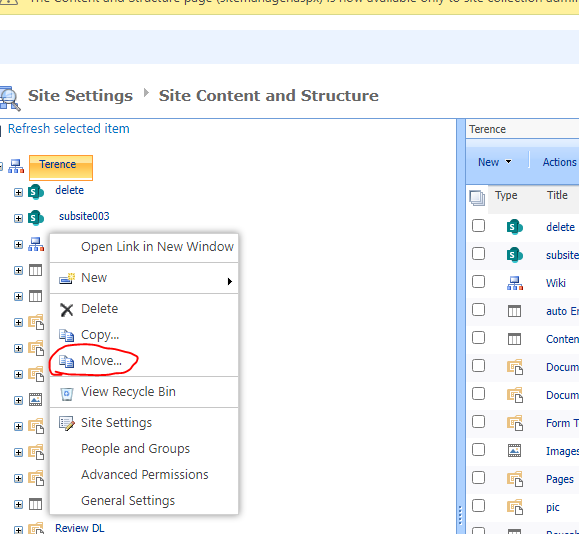
When you migrate subsite to another site collection, a convince way to migrate a subsite, you could save the origin subsite as a site template first, and then create a subsite in destination site using this site template. If you cannot find Save site as template option in site settings page, you should enable the Custom Script feature in SharePoint admin center ->Settings -> classic settings page -> Custom script -> Allow... 
For more information about how to save site as a site template you could consult to this answer How can I copy or clone my sharepoint site? - Microsoft Q&A
Then you will have to update any Power Automate flows that reference the old site and verify that Planner tasks and connections are pointing to the new location.
If the project is simply a folder or document library that was created in the wrong location:
If your project is a Microsoft List used by Power Automate, (the request form is a Microsoft List within a SharePoint site)
I hope this provides enough clarity and helps you stay inform with your current situation.
If you have any questions or need further assistance, please feel free to share them in the comments on this post so I can continue to support you.
If the answer is helpful, please click 'Yes' and kindly upvote it.
Note: Please follow the steps in the forum documentation to enable e-mail notifications if you want to receive the related email notification for this thread.
I went into CHATGPT and found a resolution. Thank you.