Microsoft Teams | Development
Building, integrating, or customizing apps and workflows within Microsoft Teams using developer tools and APIs

This browser is no longer supported.
Upgrade to Microsoft Edge to take advantage of the latest features, security updates, and technical support.
' cx='32' cy='32' r='32' /%3E%3Ctext x='50%25' y='55%25' dominant-baseline='middle' text-anchor='middle' fill='%23FFF' %3EA%3C/text%3E%3C/svg%3E)
I am new to Microsoft Teams APIs and am trying to programmatically obtain the list of attendees of one of my Teams Meeting, during the meeting.
A couple of questions:
(1) To confirm, is the onlineMeetings ID, the same as "Phone Conference ID"?
(2) I am trying to use the Graph Explorer UX (at https://developer.microsoft.com/en-us/graph/graph-explorer)
Thanks,
AV
Building, integrating, or customizing apps and workflows within Microsoft Teams using developer tools and APIs
An API that connects multiple Microsoft services, enabling data access and automation across platforms

Additional features, settings, or issues not covered by specific Microsoft Teams categories
' cx='32' cy='32' r='32' /%3E%3Ctext x='50%25' y='55%25' dominant-baseline='middle' text-anchor='middle' fill='%23FFF' %3EJM%3C/text%3E%3C/svg%3E)
Hi @AV
To confirm, is the onlineMeetings ID, the same as "Phone Conference ID"?
Online Meeting is not the same as Phone conference ID. For more details about these two attributes, you could get it from videoTeleconferenceId and meeting ID
Considering your second question is also related to Teams API, which is not in our support scope. I will also add office-teams-app-dev tag to your thread. Thanks for your understanding.
Thanks JimmyYang-MSFT. I had already created the meeting in question manually. I see a "Phone Conference ID" (337 771 684#) but I don't see a videoTeleconferenceId. Which of these is the onlineMeeting Id or how can I find the same?
Unfortunately, @ChetanSharmamsft , I haven't been able to resolve this issue. Haven't been able to get the permissions to try out the suggestion.
' cx='32' cy='32' r='32' /%3E%3Ctext x='50%25' y='55%25' dominant-baseline='middle' text-anchor='middle' fill='%23FFF' %3EPM%3C/text%3E%3C/svg%3E)
Hi @AV ,
You can obtain the list of attendees by running this query as well.
To get JoinWebUrl refer this:
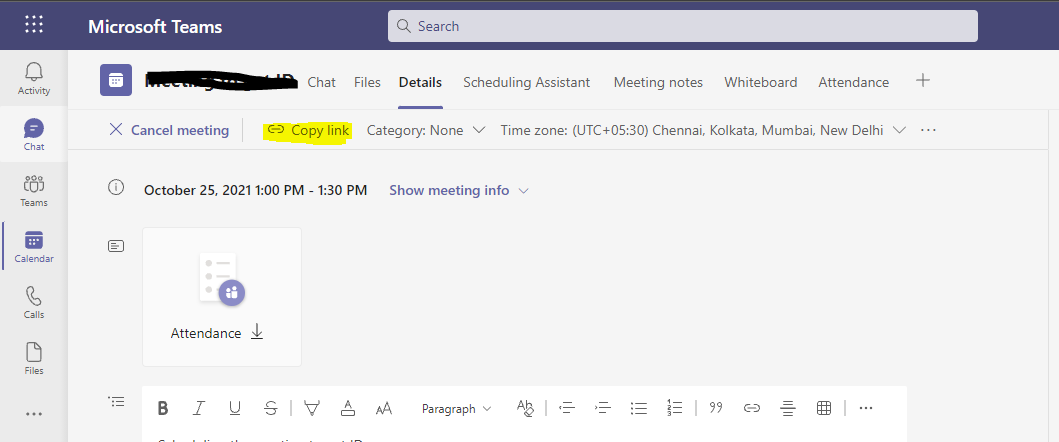
3.There are few permissions which need Admin Consent. So you can ask your tenant admin to grant consent for those permissions.
Thanks,
Prasad Das
If the response is helpful, please click "Accept Answer" and upvote it. You can share your feedback via Microsoft Teams Developer Feedback link. Click here to escalate.
Thank you Prasad --- Is there an alternate way in which I can run the query without first getting the admin consent?
I am the owner of this meeting that I am testing with and will also be the owner of any future meetings whose attendees I need.
To get attendee details ,you need below graph permissions, which doesn't require any Admin consent.

Thanks Prasad --- I tried multiple times and from different browsers, but am getting prompted for Admin approval when I try to Consent (screenshot below) Could you please let me know what I am doing wrong?
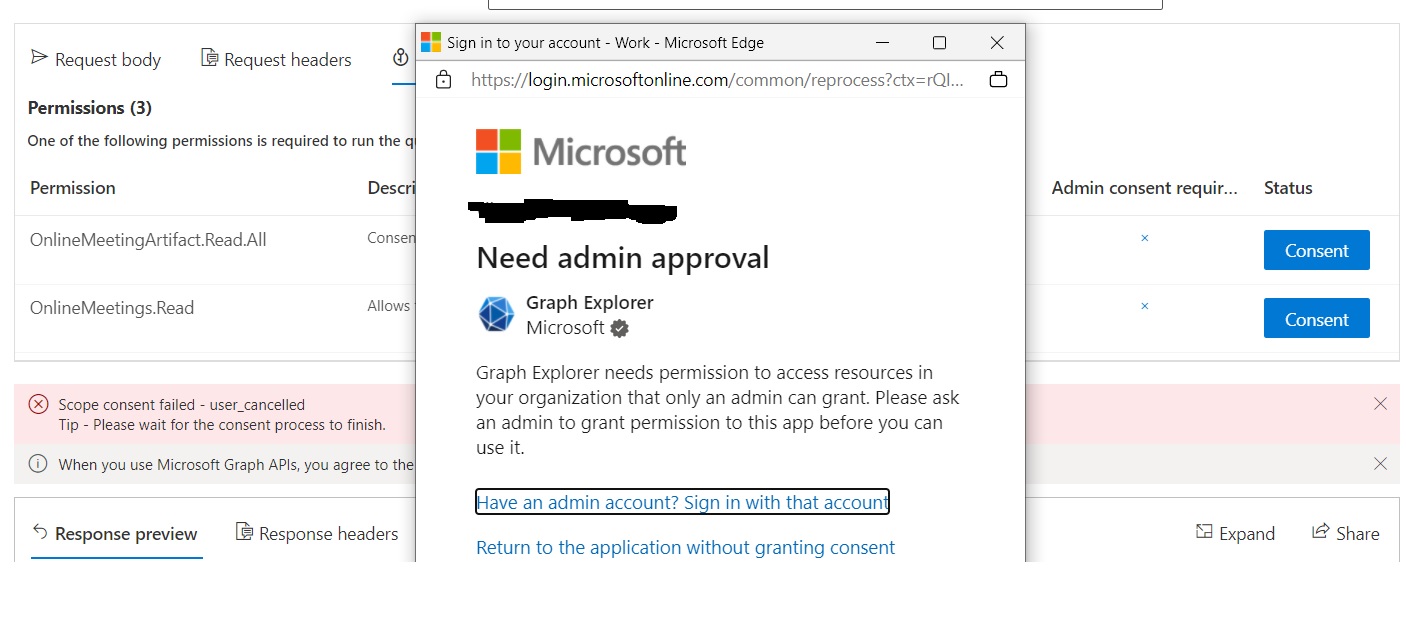
@AV , Are you getting this admin consent popup on clicking those 'Consent' buttons? If so could you please login via any Admin account of the tenant and grant the permissions
@Prasad-MSFT , yes, the admin consent popup is coming up on clicking the "Consent" buttons. Let me try to figure out who owns the Admin account of our tenant. Thanks...
' cx='32' cy='32' r='32' /%3E%3Ctext x='50%25' y='55%25' dominant-baseline='middle' text-anchor='middle' fill='%23FFF' %3EC%3C/text%3E%3C/svg%3E)
@AV - Could you please confirm if your issue has resolved with above suggestion or still looking for any help?