Developer technologies | Universal Windows Platform (UWP)
A Microsoft platform for building and publishing apps for Windows devices.
This browser is no longer supported.
Upgrade to Microsoft Edge to take advantage of the latest features, security updates, and technical support.
' cx='32' cy='32' r='32' /%3E%3Ctext x='50%25' y='55%25' dominant-baseline='middle' text-anchor='middle' fill='%23FFF' %3EXS%3C/text%3E%3C/svg%3E)
Hello MS-Guys,
Please see the following code sample:
<StackPanel>
        <TextBox MinHeight="50" Text="その他その他その他その他1234567890123456789012" Width="500" TextWrapping="Wrap"/>

        <TextBox MinHeight="50" Text="その他その他その他その他12345678901234567890123" Width="500" TextWrapping="Wrap"></TextBox>

        <TextBox MinHeight="50" Text="Otherotherother12345678901234567890123456789012345678901234567890123456789012345678901234567890" Width="500" TextWrapping="Wrap"></TextBox>
    </StackPanel>
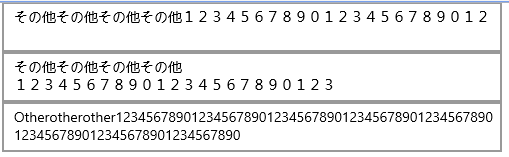
When the text of TextBox is Japanese, the 'Wrap' doesn't seem to render it correctly. You could see the second TextBox, it did not take up the whole line and the wrap it up. But the third TextBox with the english words, it rendered correctly.
I wanted to konw if it's a bug or a known issue. My project target version is 16299 . I also have tested this issue with the target version 18362.
Best Reagrds,
Xavier
A Microsoft platform for building and publishing apps for Windows devices.
Answer accepted by question author

Hello,
Welcome to Microsoft Q&A.
The text wrap of TextBox will be based on the current input language. This is the design of the control and cannot be interfered currently.
Thanks.