Microsoft Teams | Microsoft Teams for business | Other
Additional features, settings, or issues not covered by specific Microsoft Teams categories

This browser is no longer supported.
Upgrade to Microsoft Edge to take advantage of the latest features, security updates, and technical support.
' cx='32' cy='32' r='32' /%3E%3Ctext x='50%25' y='55%25' dominant-baseline='middle' text-anchor='middle' fill='%23FFF' %3EUJ%3C/text%3E%3C/svg%3E)
Microsoft Teams user activity report doesn't display names
' cx='32' cy='32' r='32' /%3E%3Ctext x='50%25' y='55%25' dominant-baseline='middle' text-anchor='middle' fill='%23FFF' %3EJM%3C/text%3E%3C/svg%3E)
Hi @User-JS ,
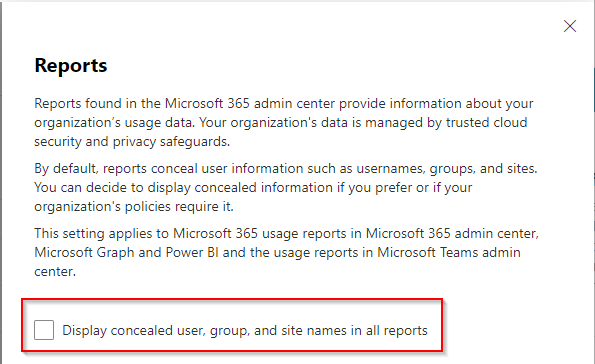
It maybe reports conceal user information. In this case, it recommends you check if you have enabled the box for ‘Display concealed user, group, and site names in all reports‘. To check it, you could follow these steps:
It has been a while, how is everything going?
If you have any update about this issue, please feel free to post back.