Viva Connections
A Microsoft Viva module that provides a gateway to a modern engagement experience.
86 questions
This browser is no longer supported.
Upgrade to Microsoft Edge to take advantage of the latest features, security updates, and technical support.
' cx='32' cy='32' r='32' /%3E%3Ctext x='50%25' y='55%25' dominant-baseline='middle' text-anchor='middle' fill='%23FFF' %3ES%3C/text%3E%3C/svg%3E)
HI Emily Du,
I followed first 5 steps to get the MS viva default app and applied all things after clicking on customize, but 24 hours over I am not seeing viva icon, am i missing something ?
since it did not work I have implemented next 2 steps also , which are adding the app under pins and installed apps in the set up policy area but still app is not coming up in the teams app.
FYI: I can see the app under managed apps under teams admin center with allowed status.
please help why we are not able to see viva app even after followed every thing correctly from below blog.
I have attached app details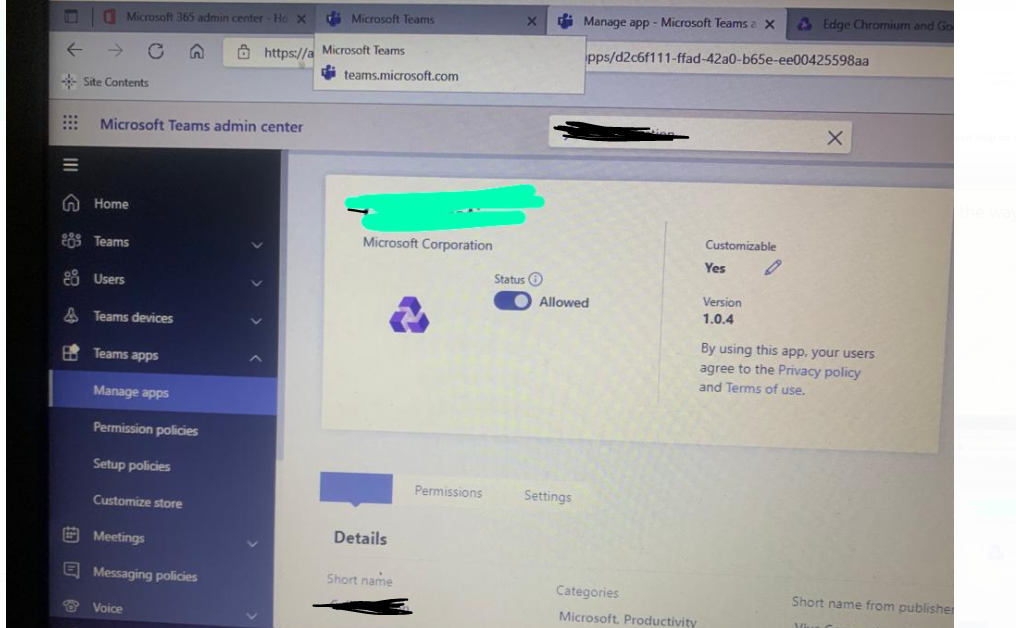

@sns ,
please help why we are not able to see viva app even after followed every thing correctly from below blog.
It seems that you forget to attach the link of blog. Please feel free to attach it again.
The following steps are provided by official document. You can compare with the blog to check if something is omitted.
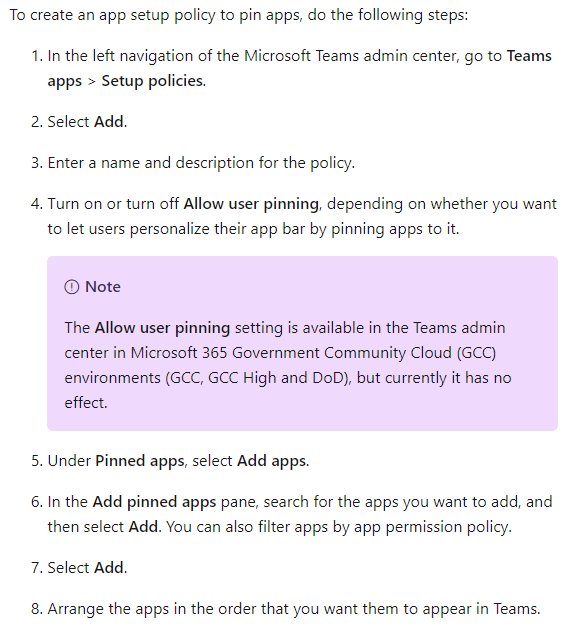
For more details, please refer to the Pin apps part in this article.
HI Sharon Zhao,
Thank you for the response.
Below is the blog I have used:
https://learn.microsoft.com/en-us/SharePoint/add-viva-connections-app
I have already added the app in the pinned and installed apps under Global policy, what you have suggested but still not showing up.
Please help,
HI Sharon Zhao,
Just want to check, Did you have a chance to look in to my previous thread?
@sns ,
I followed first 5 steps to get the MS viva default app and applied all things after clicking on customize, but 24 hours over I am not seeing viva icon, am i missing something ?
Do you mean the Viva Connection app cannot be found in Teams client?
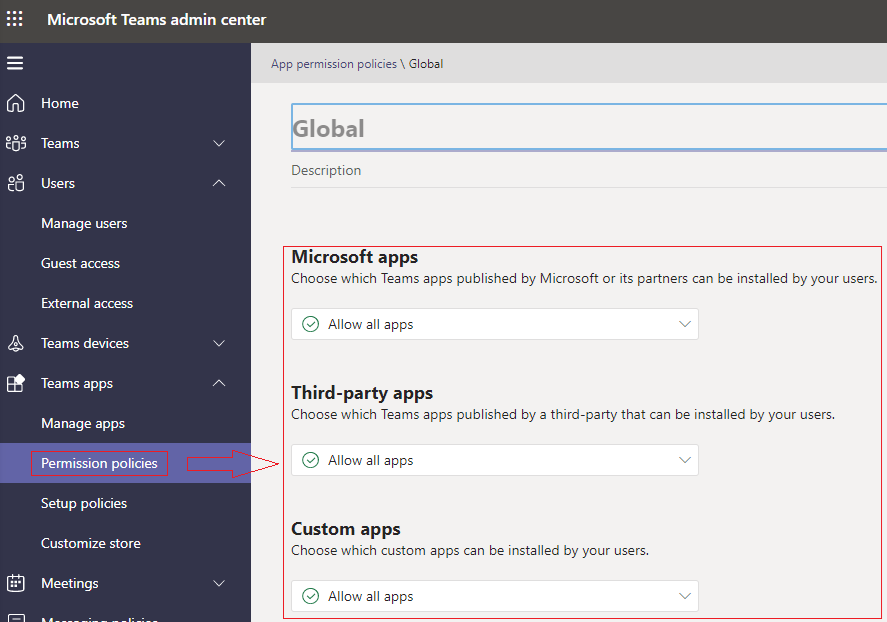
Please check if the applied App permission policies allow all apps can be installed by users.
Hi Sharon Zhao,
Yes, Viva Connection app not found in Teams client.
Yes, It is same settings applied under permission policy which u r showing. but still it is not found in Teams client.
@sns ,
I added Viva Connection app in Microsoft Teams admin center yesterday. Now, when I check it in my Teams client, it shows correctly as below:

Perhaps, you could check if all the users are assigned the Global App permission policy.
Hi Sharon Zhao,
Thank you for the continues support.
I am already there under part of manage users under global app permission policy, But still why I am not able to see, I also waited for 1 day, but did not find viva icon.
one more question, by default all users present in the Global app permission policy? am i correct?
if not how to add all organization users in manage users under global app permission policy at one shot?
how do we check whether all users are present or not in global permission policy? I can check users randomly but how do we check all are there or not?
Hi Sharon Zhao,
Just want to check, Did u have a chance to look in to below email
@sns ,
by default all users present in the Global app permission policy? am i correct?
Yes, you’re right.
if not how to add all organization users in manage users under global app permission policy at one shot?
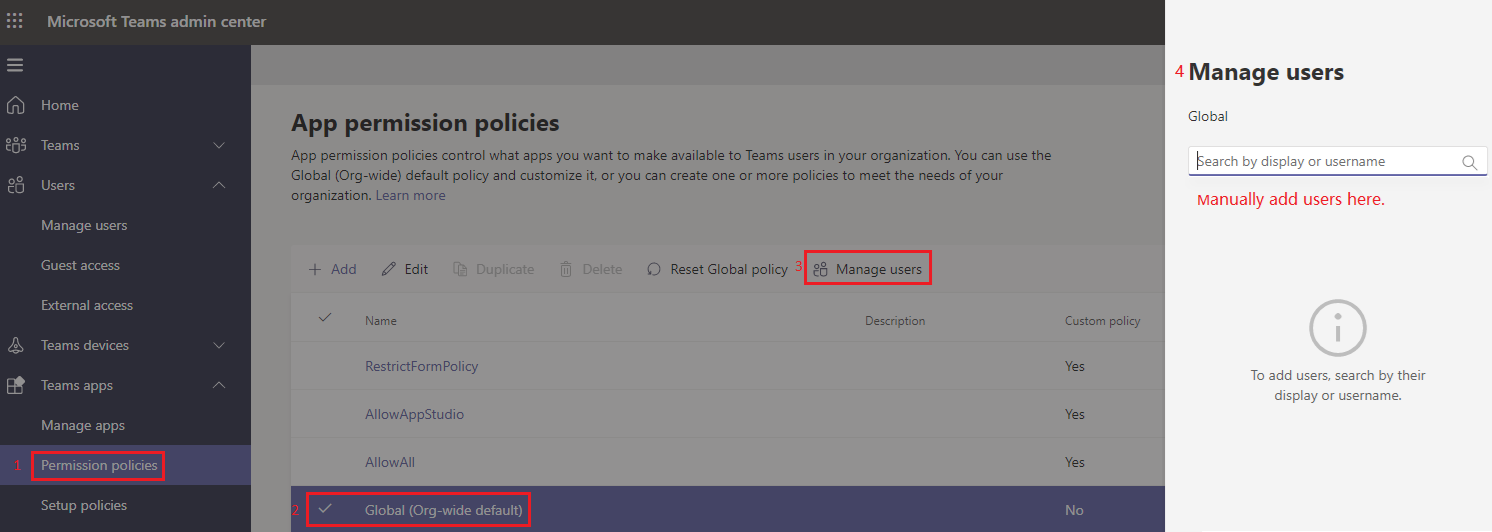
You can assign a policy to all users by manually adding these users as below:
Go to Microsoft Teams admin center > Teams apps: Permissions policies > Select Global(Org-wide default) policy > Click Manage users > Then, add all users one by one > Click Apply button.
how do we check whether all users are present or not in global permission policy?
It has no direct way to get this data for Global policy.
For custom policies, you can use Filter to create conditions to get the list of users who are assigned the policies.

Hi SHaron Zhao,
But Thank u for for sharing the details,
Coming to our first issue, still I am not able to see even setting is in place correctly? Please help me on this further,
@sns ,
Sure. There is little progress on this problem now.
I'm doing more researches on it and any update I will share with you as soon as possible.
Have a nice day!
@sns ,
What is your admin role?
It needs enough permission to succeed in adding Viva connection app in Microsoft Teams.
Hi Sharon Zhao,
I am a Global admin and SHarePoint admin.
With these roles only I have tried to add the Viva connection app in Microsoft Teams.
@sns ,
It seems much more complicated than we think.
To get more efficient help, we recommend you to open a Service Request as the Online support section described in this [article][1].
The support engineer will collect your backend log file and analyze this problem exactly.
Meanwhile, we will continue pay attention to this problem. Any update I will post here.
Thanks for your understanding.
HI Sharon Zhao,
I have fixed it.
I have blocked and unblocked again. then it started working
I know it is weird but it worked.
Thanks for your sharing. It's really good news.
I converted your reply to answer. Then, you are free to accept it as answer to benefit other people with the same problem.
Have a good day!