Microsoft 365 and Office | SharePoint | Development
The process of building custom applications and tools that interact with Microsoft SharePoint, including SharePoint Online in Microsoft 365.

This browser is no longer supported.
Upgrade to Microsoft Edge to take advantage of the latest features, security updates, and technical support.
' cx='32' cy='32' r='32' /%3E%3Ctext x='50%25' y='55%25' dominant-baseline='middle' text-anchor='middle' fill='%23FFF' %3EAH%3C/text%3E%3C/svg%3E)
Hi all,
I'm looking for some help with PnP PowerShell. I have a script which takes a CSV file and uploads each row as an item to SharePoint Online (see below). My question is, how do I get the script to skip items that already exist in the SharePoint Online list? Currently the script just uploads all rows within the CSV and creates some duplicates.
$SiteUrl = "{site}"
$ListName = "iPhone"
$CSVPath = "C:\Users{user}\Documents\PowerShell\Upload SharePoint items from CSV\iphoneexport.csv"
$CSVData = Import-CsV -Path $CSVPath
Connect-PnPOnline $SiteUrl -Interactive
ForEach ($Row in $CSVData)
{
Write-Host "Adding Item $($Row.'Asset Number')"


#Add List Items - Map with Internal Names of the Fields!

Add-PnPListItem -List $ListName -Values @{"Title" = $($Row.'Asset Number');

                        "User" = $($Row.User);

};
}
I'd be grateful for any advice anyone can give.
Many thanks,
Alex.

I am currently looking into this issue and will give you an update as soon as possible.
Thank you for your understanding and support.
We can check the item by CAML+ PNP PowerShell, if the Title in list already exists, it will be ignored, check as following:
$Username='******@tenant.onmicrosoft.com'
$Password = 'Doh76594'

#region Credentials
[SecureString]$SecurePass = ConvertTo-SecureString $Password -AsPlainText -Force
[System.Management.Automation.PSCredential]$PSCredentials = New-Object System.Management.Automation.PSCredential($Username, $SecurePass)
#endregion Credentials

#connect to site
$consite=Connect-PnPOnline -Url 'https://tenant.sharepoint.com/sites/Team1' -Credentials $PSCredentials

$listName = "list1022"
$FilePath= "C:\Temp\Test1028.csv"
$CSVData = Import-CsV -Path $FilePath


Import-Csv -Path $FilePath|%{

    $checkitem = $null
    $tarTitle= $_."Asset Number"
    $tarUser = $_.User

$caml=@"
    <View>
        <Query>
            <Where><Eq><FieldRef Name='Title' /><Value Type='Text'>$tarTitle</Value></Eq></Where>
        </Query>
    </View>
"@

   $checkitem= Get-PnPListItem -List $listName -Query $caml

   if($checkitem){
        Write-Host "this item exists:" $($tarTitle)
   }else{
        Write-Host "this item does not exist:" $($tarTitle)
        Add-PnPListItem -List $ListName -Values @{"Title" = $($tarTitle);
                         "Active" = $($tarUser );}
   }
}
Before:
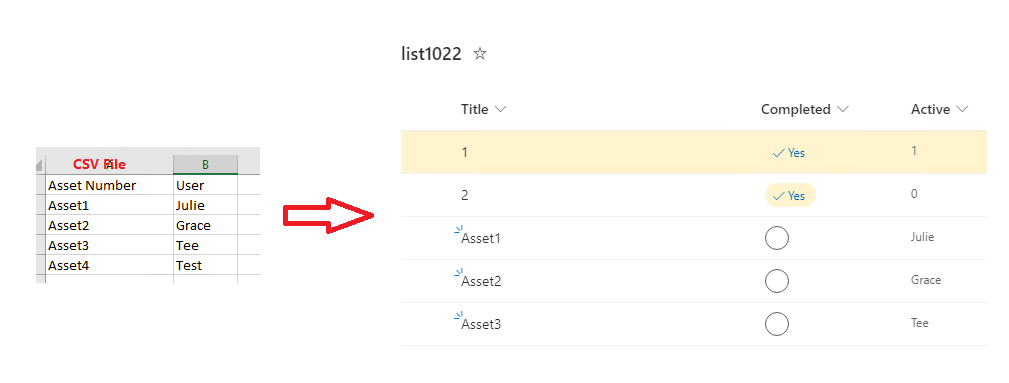
After:
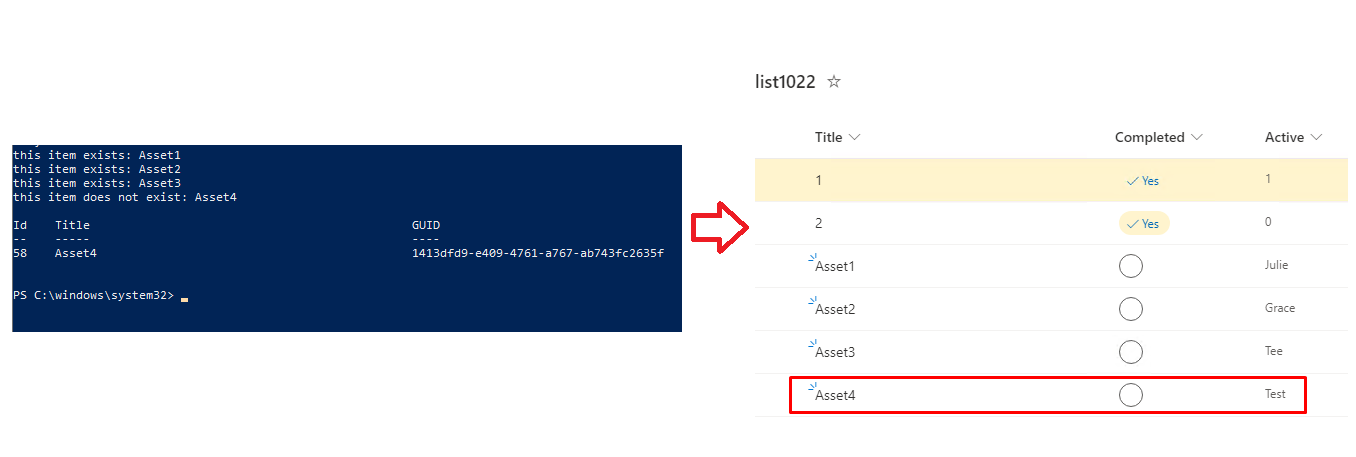
Simialr issue for your reference:
If the answer is helpful, please click "Accept Answer" and kindly upvote it. If you have extra questions about this answer, please click "Comment".
Note: Please follow the steps in our documentation to enable e-mail notifications if you want to receive the related email notification for this thread.
Do you have any progress on this issue?
Please remember to update this thread if you need further assistance.

Hello @Alex Hannah ,
If Julie's reply helps you, please remember to accept her reply as answer via the "Accept Answer" button, it will be beneficial to others in this forum who meet the same issue in the future. Thanks for your understanding and cooperation.
Thanks,
Echo Du
