Hi @tjs275x ,
Welcome to our forum!
But after this is done there is nothing showing in the archive panel when you click in it.
Do you mean the Archives folder?
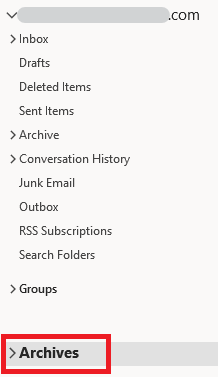
If so, as I know, if you confirm that the archive is successful and there are messages in the archive file, the archive folder can be displayed normally. Please check the if you archive is successful, such as if you archived the folder which was set "Do not archive items in this folder", or confirm the date.
On the other hand, it's suggested that you could find the archive file and check if there're something wrong(such as no such a file or archive file size too small). The path of the archive file can be found when you try to manually archive.

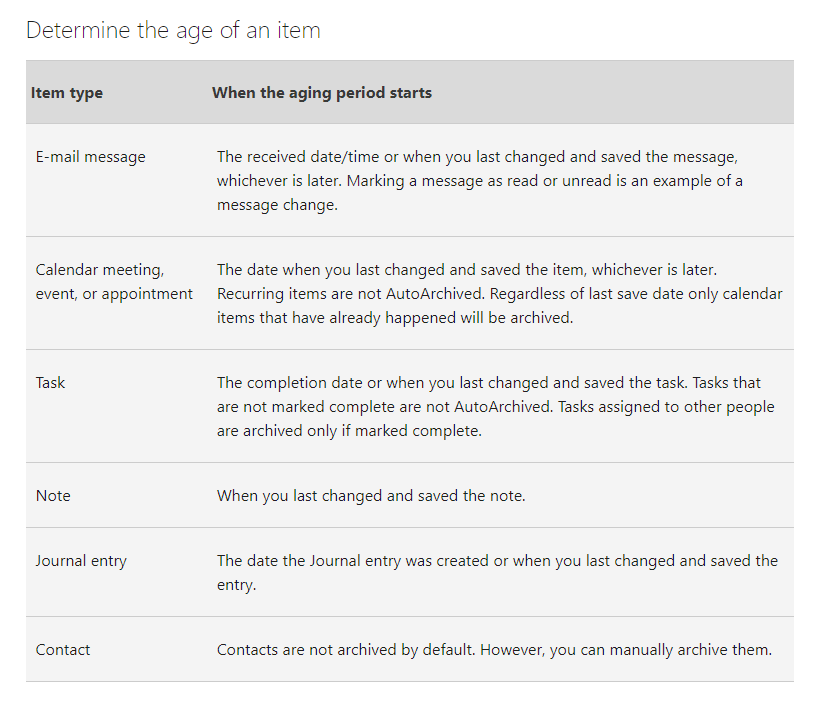
If you confirm you have archived successfully, as far as I know, the archive date is calculated according to the last change of items and the time when the message is saved, rather than the fixed time of the first reception or creation. Considering the impact of the items' age, please check if the items you want to archive were last changed or saved after the date you set.
Hope the above help!
If the answer is helpful, please click "Accept Answer" and kindly upvote it. If you have extra questions about this answer, please click "Comment".
Note: Please follow the steps in our documentation to enable e-mail notifications if you want to receive the related email notification for this thread.
' cx='32' cy='32' r='32' /%3E%3Ctext x='50%25' y='55%25' dominant-baseline='middle' text-anchor='middle' fill='%23FFF' %3ET%3C/text%3E%3C/svg%3E)

' cx='32' cy='32' r='32' /%3E%3Ctext x='50%25' y='55%25' dominant-baseline='middle' text-anchor='middle' fill='%23FFF' %3ECM%3C/text%3E%3C/svg%3E)