
Duplicate two displays optionally
' cx='32' cy='32' r='32' /%3E%3Ctext x='50%25' y='55%25' dominant-baseline='middle' text-anchor='middle' fill='%23FFF' %3EN%3C/text%3E%3C/svg%3E)
Nouman
1
Reputation point
I have an issue duplicating two displays optionally, I followed this solution:
it seems to work when duplicating any two external displays into each other, but it does not work/duplicate the host/main display into an external one. could you please help me on this one.
Windows development | Windows API - Win32
{count} votes
-
' cx='32' cy='32' r='32' /%3E%3Ctext x='50%25' y='55%25' dominant-baseline='middle' text-anchor='middle' fill='%23FFF' %3EXY%3C/text%3E%3C/svg%3E) Xiaopo Yang - MSFT 12,736 Reputation points Microsoft External Staff
Xiaopo Yang - MSFT 12,736 Reputation points Microsoft External Staff2021-11-01T02:12:53.283+00:00 Have you seen the CCD example pseudocode?
-
Nouman 1 Reputation point
2021-11-01T02:44:03.347+00:00 I'm pretty sure this script covers some of what's in the pseudocode, I know that my external display is on index 1 and the host display is on index 0. but it still does not work for me.
could you please assist me on getting a working script, I know that I'm not too far from getting it to work.
I appreciate you help, thanks!
include <iostream>
include <windows.h>
include <vector>
int main()
{
UINT32 pathSize;
UINT32 modeSize;
GetDisplayConfigBufferSizes(QDC_ALL_PATHS, &pathSize, &modeSize);std::vector<DISPLAYCONFIG_PATH_INFO> pathArray(pathSize); std::vector<DISPLAYCONFIG_MODE_INFO> modeArray(modeSize); QueryDisplayConfig(QDC_ALL_PATHS, &pathSize, &pathArray[0], &modeSize, &modeArray[0], NULL); pathArray[1].sourceInfo.id = pathArray[0].sourceInfo.id; pathArray[1].sourceInfo.modeInfoIdx = pathArray[0].sourceInfo.modeInfoIdx; UINT8 flags = SDC_APPLY | SDC_SAVE_TO_DATABASE | SDC_ALLOW_CHANGES | SDC_USE_SUPPLIED_DISPLAY_CONFIG; SetDisplayConfig(static_cast<UINT32>(pathArray.size()), &pathArray[0], static_cast<UINT32>(modeArray.size()), &modeArray[0], flags); return 0;}
-
Xiaopo Yang - MSFT 12,736 Reputation points Microsoft External Staff
2021-11-01T07:11:39.723+00:00 Why do you implement this with (Windows+P) worked?
Is your application a driver or console?
Has your application worked when only two display supplied? and display setting screenshot attached is preferable. -
Nouman 1 Reputation point
2021-11-02T01:04:10.343+00:00 I'm developing a console application and I need to optionally select the two displays I'm duplicating.
for example, if my host display is (A) and I have another external display (B) and another external display (C), my goal is to optionally clone A to B or A to C and so on.
but the script above worked only when cloning external displays into each other, for example, it worked when cloning B to C but does not work when cloning A to B or A to C.
I'm developing a console application and I can't use (windows+P) because it does not give control on selecting the two displays for cloning.
Regards,
-
Xiaopo Yang - MSFT 12,736 Reputation points Microsoft External Staff
2021-11-02T01:15:01.43+00:00 OK, Has your application worked when only two display supplied? and Perhaps It involves display setting, so display setting screenshot attached is preferable.
We cannot assume that:I know that my external display is on index 1 and the host display is on index 0.
-
Nouman 1 Reputation point
2021-11-02T02:55:46.85+00:00 the pathArray[index].flags returns 1 for connected displays which in my case index 0 and 1 return 1. from that I knew it's index 0 and 1.
the application did not work on two displays only.
i don't have the displays settings logs, but this is a screenshot on windows display settings after running the script.
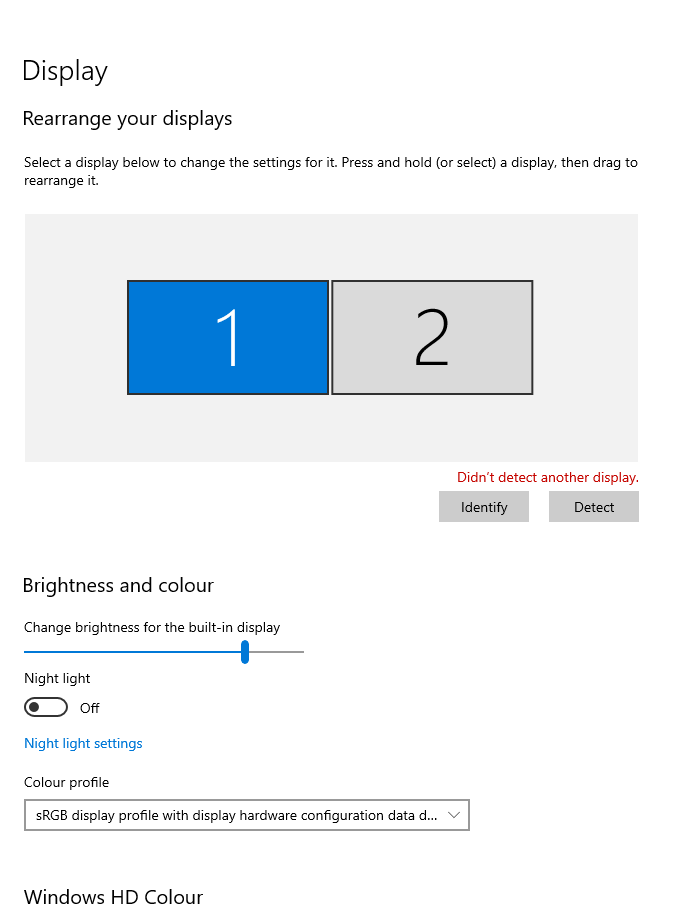
-
Xiaopo Yang - MSFT 12,736 Reputation points Microsoft External Staff
2021-11-02T07:03:35.207+00:00 Try
pathArray[1].flags |= DISPLAYCONFIG_PATH_ACTIVE;to enable this path. And according to the question, fine tune theSetDisplayConfigflagsto make it, such asSDC_APPLY | SDC_TOPOLOGY_CLONEetc. -
Nouman 1 Reputation point
2021-11-02T09:09:23.967+00:00 I added that line to make sure that the path is active, but didn't work too.
UINT32 pathSize;
UINT32 modeSize;
GetDisplayConfigBufferSizes(QDC_DATABASE_CURRENT, &pathSize, &modeSize);

std::vector<DISPLAYCONFIG_PATH_INFO> pathArray(pathSize);
std::vector<DISPLAYCONFIG_MODE_INFO> modeArray(modeSize);

QueryDisplayConfig(QDC_ONLY_ACTIVE_PATHS, &pathSize, &pathArray[0], &modeSize, &modeArray[0], NULL);


pathArray[1].flags |= DISPLAYCONFIG_PATH_ACTIVE;

pathArray[1].sourceInfo.id = pathArray[0].sourceInfo.id;
pathArray[1].sourceInfo.modeInfoIdx = pathArray[0].sourceInfo.modeInfoIdx;
pathArray[1].sourceInfo.cloneGroupId = pathArray[0].sourceInfo.cloneGroupId;
UINT8 flags = SDC_APPLY | SDC_SAVE_TO_DATABASE | SDC_ALLOW_CHANGES | SDC_USE_SUPPLIED_DISPLAY_CONFIG;
SetDisplayConfig(static_cast<UINT32>(pathArray.size()), &pathArray[0], static_cast<UINT32>(modeArray.size()), &modeArray[0], flags);

return 0;
also, I referred to that question before, SDC_APPLY | SDC_TOPOLOGY_CLONE does not allow control on which two displays to clone it kind of calls the last configuration.
-
Nouman 1 Reputation point
2021-11-10T05:17:36.913+00:00 I knew what the issue is, my computer has two graphic cards, one integrated to the CPU (Intel) and another Nvidia card.
for that reason pathArray1.sourceInfo.id and pathArray[0].sourceInfo.id are always = 0 because my internal display is attached to the Intel card and the external display is attached to Nvidia card.Have a look for the adapterName on the sourceInfo at the the attached image.
Now I know the issue but I do not know how to solve it, could you help me.

-
Xiaopo Yang - MSFT 12,736 Reputation points Microsoft External Staff
2021-11-10T05:42:09.707+00:00 Do you mean duplicating Intel integrated Graphics display A to Nvidia Graphics display B? Why do you do that? And It seems duplicating Nvidia Graphics display B to Nvidia Graphics display C is OK.
-
Nouman 1 Reputation point
2021-11-10T05:46:15.767+00:00 my main goal is to duplicate any two displays optionally, the script I sent above works fine on some computers but it does not work on some computers.
on the computers where it didn't work, I found that the computers have two graphic cards that is why I was not able to optionally duplicate my internal display (attached to Intel graphic card) to any external display.yes duplicating Nvidia graphics display B to Nvidia Graphics display C works fine. but duplicating Intel integrated Graphics display A to Nvidia Graphics display B or C does not work.
display A is my internal display and it's normally how what you duplicate, and this how it works from windows>settings>display
-
Xiaopo Yang - MSFT 12,736 Reputation points Microsoft External Staff
2021-11-10T06:10:11.803+00:00 It‘s needed to duplicate Main display to Others. Can you give the problem PC(3 displays) display setting snapshot? And Can you do this with Windows+P? Normally, If Windows+P succeeded, SetDisplayConfig will. Also have a look at How to properly use SetDisplayConfig with multiple monitors?
Sign in to comment
Sign in to answer