
WSUS | Last Report Status not up to date
' cx='32' cy='32' r='32' /%3E%3Ctext x='50%25' y='55%25' dominant-baseline='middle' text-anchor='middle' fill='%23FFF' %3ERI%3C/text%3E%3C/svg%3E)
Ricardo Ito
191
Reputation points
Hello Community!
I have WSUS (Windows 2019) and the most clients show last report status not up to date but the last contact is up to date.
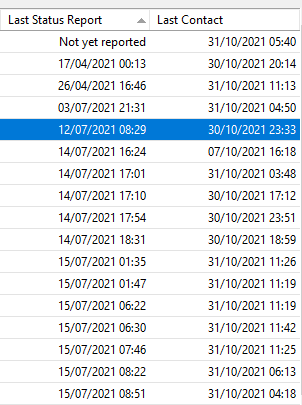
This behavior started after we separated application and database servers. Do you have any idea?
Windows for business | Windows Server | User experience | Other
{count} votes
-
' cx='32' cy='32' r='32' /%3E%3Ctext x='50%25' y='55%25' dominant-baseline='middle' text-anchor='middle' fill='%23FFF' %3ERH%3C/text%3E%3C/svg%3E) Rita Hu -MSFT 9,661 Reputation points
Rita Hu -MSFT 9,661 Reputation points2021-11-01T01:00:23.28+00:00 @Ricardo Ito
Thanks for your posting on Q&A.To avoid misunderstanding and help me research further, please help to describe what you did in detail. Thanks for your cooperation.
This behavior started after we separated application and database serversRegards,
Rita -
Ricardo Ito 191 Reputation points
2021-11-01T14:44:49.997+00:00 Hi Rita!
The first time we deployed the WSUS server it was on a single server. 6 months ago we separated the application server (WSUS) from the database (SQL Server). After this procedure we noted this behavior
-
Rita Hu -MSFT 9,661 Reputation points
2021-11-02T06:19:54.283+00:00 Have you tried to run the
wsusutil.exe postinstallcommand on the WSUS server? If not, please try to run this command and feedback the result with me.Thanks for your understandingn and cooperation.
Regards,
Rita -
Ricardo Ito 191 Reputation points
2021-11-03T12:55:13.703+00:00 Hi Rita!
I run wsusutil postinstall and this is the result:C:\Program Files\Update Services\Tools>wsusutil.exe postinstall
Log file is located at C:\Users\rti\AppData\Local\Temp\WSUS_PostInstall_20211103T124725.log
Post install is starting
Fatal Error: Since the SQL instance name does not already exist in the registry and
the WID role service is not installed, the instance name must be specified on
the command line.Also I attached .log file
Have good day.
-
Rita Hu -MSFT 9,661 Reputation points
2021-11-04T02:39:37.33+00:00 @Ricardo Ito
Thanks for your response.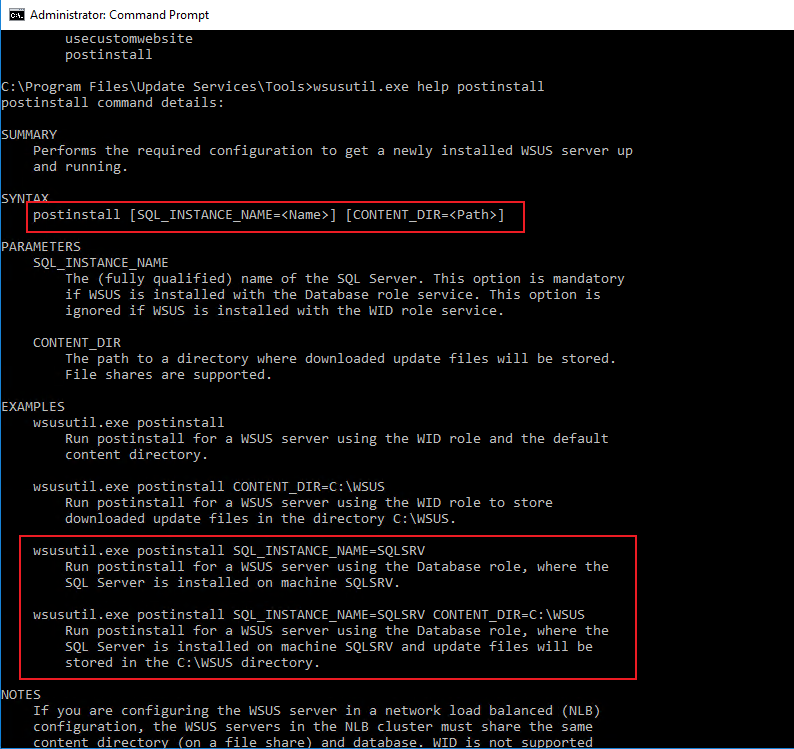
Run the
wsusutil.exe postinstall SQL_INSTANCE_NAME=SQLSRVor
wsusutil.exe postinstall SQL_INSTANCE_NAME=SQLSRV CONTENT_DIR=C:\WSUSPlease feedback the result with me if there are any updates.
Thanks for your time.
Regards,
Rita -
Ricardo Ito 191 Reputation points
2021-11-04T21:33:27.957+00:00 Hi Rita!
I ran the command and this is the result:C:\Program Files\Update Services\Tools>wsusutil.exe postinstall SQL_INSTANCE_NAME=SRVBDSQL01\WSUS
Log file is located at C:\Users\rti\AppData\Local\Temp\WSUS_PostInstall_20211104T130201.log
Post install is starting
Post install has successfully completed146673-wsus-postinstall-20211104t130201.log

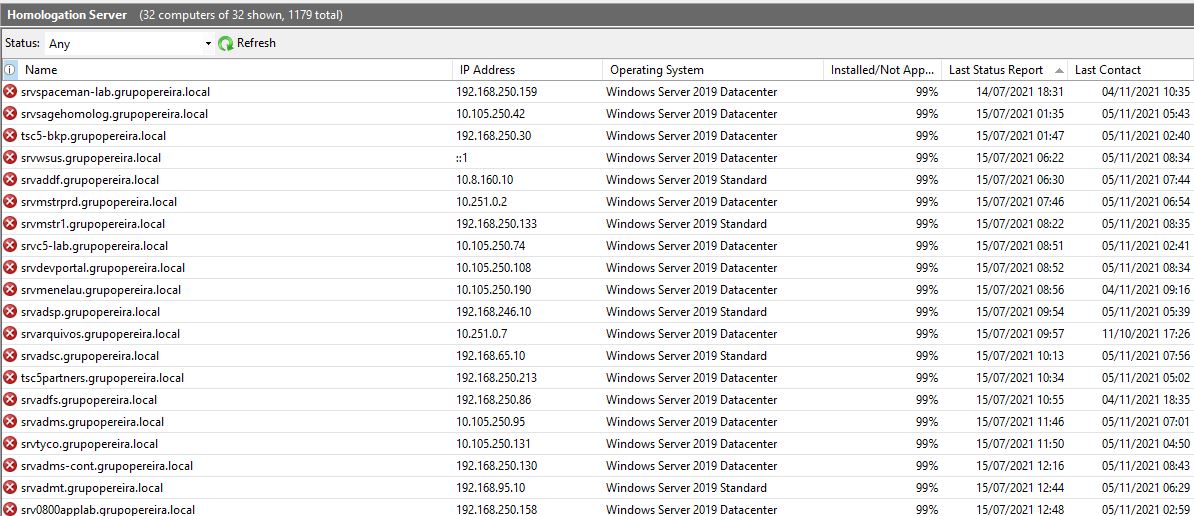
But still some servers with "not reported xxx days"
-
Rita Hu -MSFT 9,661 Reputation points
2021-11-05T05:51:09.337+00:00 @Ricardo Ito
There is only one server encountered this issue. Am I right?It seems that the issue occurred due to the computer could not communicate with the WSUS server. Run the Server Cleanup Wizard to clean up first. Then please share with the below registry value of the computer to help me research further:
HKEY_LOCAL_MACHINE\SOFTWARE\Policies\Microsoft\Windows\WindowsUpdate
-
Ricardo Ito 191 Reputation points
2021-11-05T13:10:27.203+00:00 Hi Rita!
This issue happens with many servers and client as attached.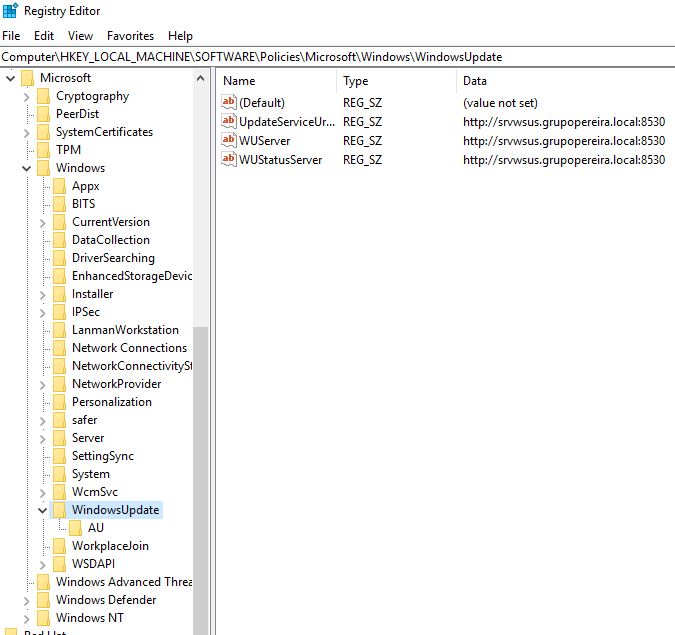
-
Rita Hu -MSFT 9,661 Reputation points
2021-11-08T06:16:36.04+00:00 Thanks for your response.
It seems that you have ticked the Set the alternate download server option. It is recommeded to untick it first:
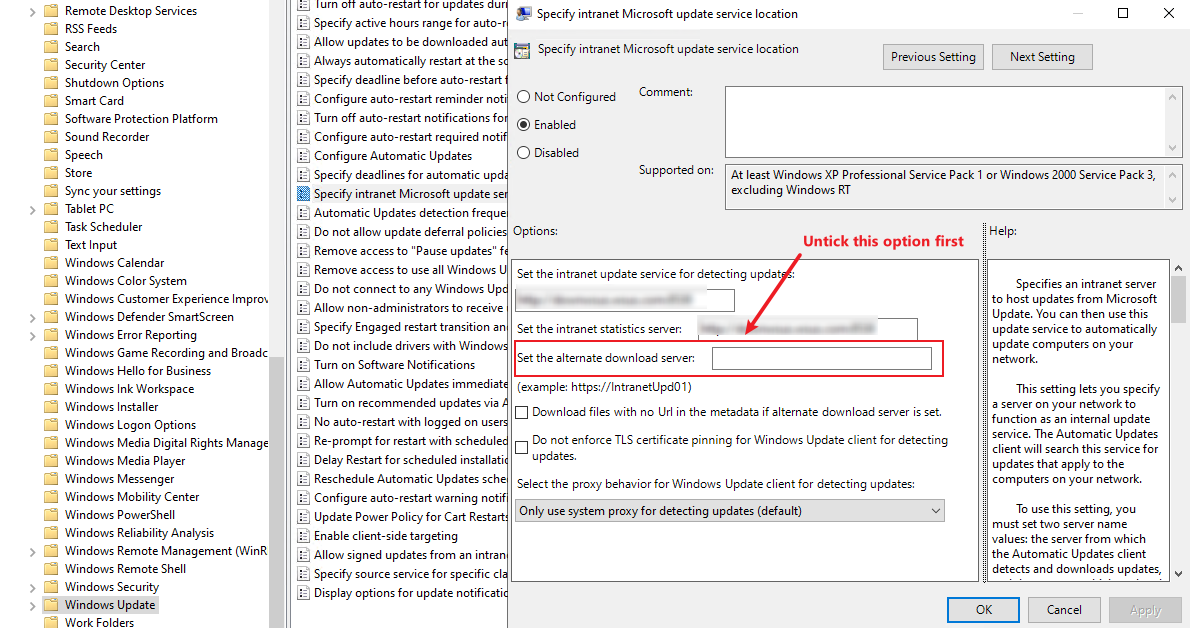
Then please follow this link to Reindex the WSUS database, Decline superseded updates and Run the WSUS Server Cleanup Wizard.
Last, please try to delete the below file on the WSUS server
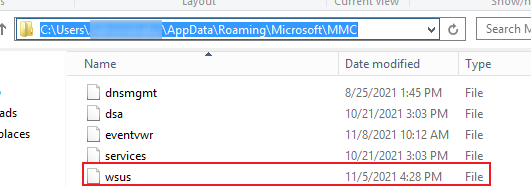
Hope the above will be helpful.
Regards,
Rita -
Ricardo Ito 191 Reputation points
2021-11-09T17:50:47.94+00:00 Hi Rita!
Thanks for last procedures.
I executed but the issue persists.
I noted the most equipment with this problem is windows 10 and windows 2019 -
Rita Hu -MSFT 9,661 Reputation points
2021-11-10T01:18:42.457+00:00 What is the type of the WSUS server database? WID or SQL Server?
In the past, a lot of customer feedback that the computers failed to report due the database issue. And the issue will be resolved by cleannig up the database, Reindex the database and decline the superseded updates.
I suggest to set up a new WSUS server as the downstream WSUS and delete the problematic computers on the Old WSUS. Then please point the problematic computers to the New WSUS. Then we could review whether the issue will be resolved or not.
Regards,
Rita -
Ricardo Ito 191 Reputation points
2021-11-16T12:56:37.717+00:00 Hi Rita!
Good news!
After followed your advices I also migrated MS SQL Server instance for license purposes and then the most clients do not show report issue. Thank you very much!
Have a good day -
Rita Hu -MSFT 9,661 Reputation points
2021-11-17T01:34:59.513+00:00 It is my pleasure. Please let me know if you have any questions next time.
Have a good day :)
Regards,
Rita
Sign in to comment
Sign in to answer