

SQL Server install unable to find access path

Pablo 96 Reputation points
2021-10-31T19:39:47.04+00:00

Hi

Trying to install in my Win10 SQL Server Express (Developer too) I find this error:

Exit code (Decimal): -2147024893
Exit message: No se puede encontrar una parte de la ruta de acceso 'C:\Program Files\Microsoft SQL Server\150\Setup Bootstrap\Log\20211031_145834'.

The exit message translates as something like "Impossible to find access path".

This happens trying to install it either in C or in D.

SQL Server | Other
{count} votes

Answer accepted by question author
  1. Pablo 96 Reputation points
    2021-10-31T20:29:41.73+00:00

    I've changed the default new programs path in the friendly UI more than once (from C to D and viceversa), but the registers are setted like this:
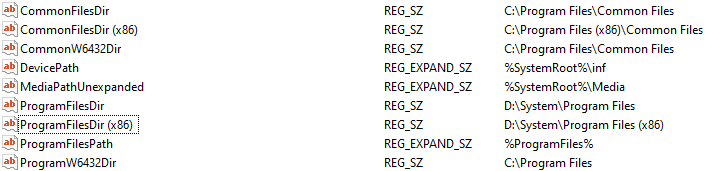
    145220-imagen.png

    It does not matter if I try to install on C or D, the folders are created in the same way (some in C, others in D) and the error keeps unchanged.

    After the attempt to install it is created in C this path: 'C:\Program Files\Microsoft SQL Server\150', but then the coincidence with the required path ends, because that folder only contains another one called "SSEI".

    Maybe it is the ProgramFilesDir register, as you say...


1 additional answer

Sort by: Most helpful
  1. henry crist 0 Reputation points
    2022-02-17T13:38:25+00:00

    It also worked for me. Thanks.

    0 comments No comments

Your answer

Answers can be marked as 'Accepted' by the question author and 'Recommended' by moderators, which helps users know the answer solved the author's problem.