Microsoft 365 and Office | Excel | For business | Windows
A family of Microsoft spreadsheet software with tools for analyzing, charting, and communicating data

This browser is no longer supported.
Upgrade to Microsoft Edge to take advantage of the latest features, security updates, and technical support.
' cx='32' cy='32' r='32' /%3E%3Ctext x='50%25' y='55%25' dominant-baseline='middle' text-anchor='middle' fill='%23FFF' %3EKF%3C/text%3E%3C/svg%3E)
Hi Sir,
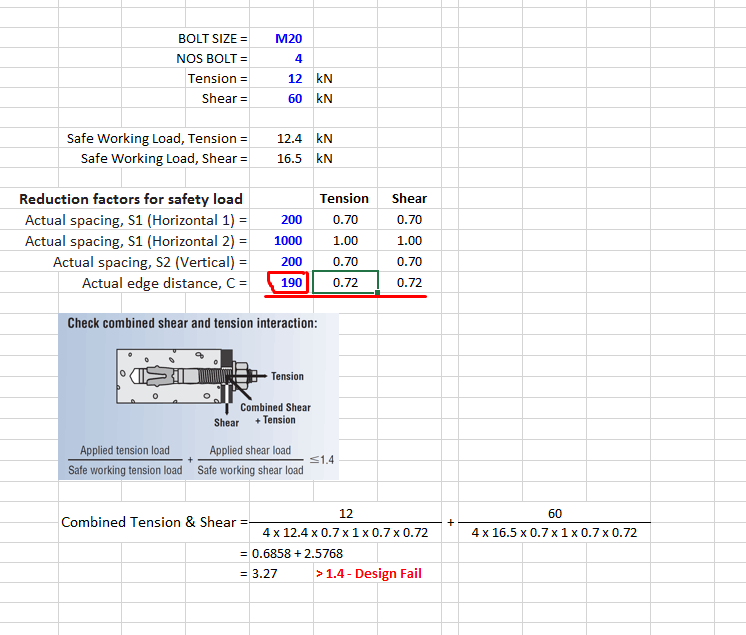
I have created a formula using index and match formula as per picture & attachment. However, the answer didn't reflect the correct value. Kindly advise.
For your info, Tension and Shear reduction factors are similar as per columns F & G, therefore the formulas were similar. I have no issue with the reduction factors at columns F & G, rows 12 to 14 where data was index from table RFCS.
However, the reduction factor at cell F15 is referenced with table RFED. Cell F15 shows incorrect answers from the data and formula given. For example, 190 in cell E15 shall indicate the value 0.89 instead of 0.72 at cell F15. Kindly advise what is adjustment required that cell F15 shows 0.89.
File as per link:
https://mega.nz/file/VaxGkBLD#duauhTPqiW3q6gZUpeq2gwitp4CqP9ec062S0RYJPQM
' cx='32' cy='32' r='32' /%3E%3Ctext x='50%25' y='55%25' dominant-baseline='middle' text-anchor='middle' fill='%23FFF' %3ED%3C/text%3E%3C/svg%3E)
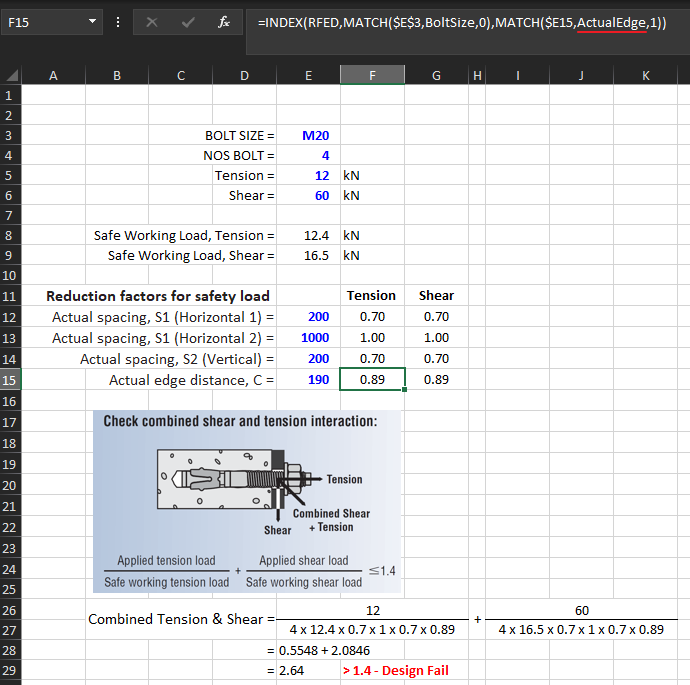
Hello @KAR FUNG in formula of cell F15, in second MATCH should you not reference ActualEdge (instead of ActualSpacing)? That would return value 0.89.

Hi @KAR FUNG ,
Welcome to Q&A forum!
Per my test, please refer to dF9JYLaf's reply to reference ActualEdge instead of ActualSpacing in cell F15.
If the answer is helpful, please click "Accept Answer" and kindly upvote it. If you have extra questions about this answer, please click "Comment".
Note: Please follow the steps in our documentation to enable e-mail notifications if you want to receive the related email notification for this thread.