Developer technologies | Windows Presentation Foundation
A part of the .NET Framework that provides a unified programming model for building line-of-business desktop applications on Windows.
This browser is no longer supported.
Upgrade to Microsoft Edge to take advantage of the latest features, security updates, and technical support.
' cx='32' cy='32' r='32' /%3E%3Ctext x='50%25' y='55%25' dominant-baseline='middle' text-anchor='middle' fill='%23FFF' %3EAB%3C/text%3E%3C/svg%3E)
Hello,
I'm working on a big project(big for me), where I've one main window that host 3 usercontrols using a library like avalondock to have an IDE-like apparance like visualstudio.
The app should work like this: the main window is loaded and ask with a openfiledialog to open a binary log file, then this log it's displayed in the 3 usercontrols in differtent way (pie chart,line chart and text), if the user change some value in the text view the other have to reflect it. Then if the user want, he can save the changed log with a savefiledialog.
So, I have more than 4k line of code for each usercontrol now; and things start to be a little messy..
So I'm planing to refactor it. For UI reasons I opted to wpf instead of winform; Now the thing that I would avoid is that:
I defined a shared array in the main window, and then to manipulate it from the usercontrol (placed into the mainwindow), I have to refer it as instance, that is not very readable.
I searched and tryed to implement MVVM pattern using a framwork (test done with caliburnmicro and stylet), but I'm struggling to understand how to share data between VMs. Considering that, test after test I had already rewrite the all project 6 time, I'm looking for some advice to made the code more readable and how structure the app, like use or not user design pattterns like mvvm, etc..
So anyone have any advice?
A part of the .NET Framework that provides a unified programming model for building line-of-business desktop applications on Windows.
An object-oriented programming language developed by Microsoft that can be used in .NET.
Answer accepted by question author

Hi Ajeje,
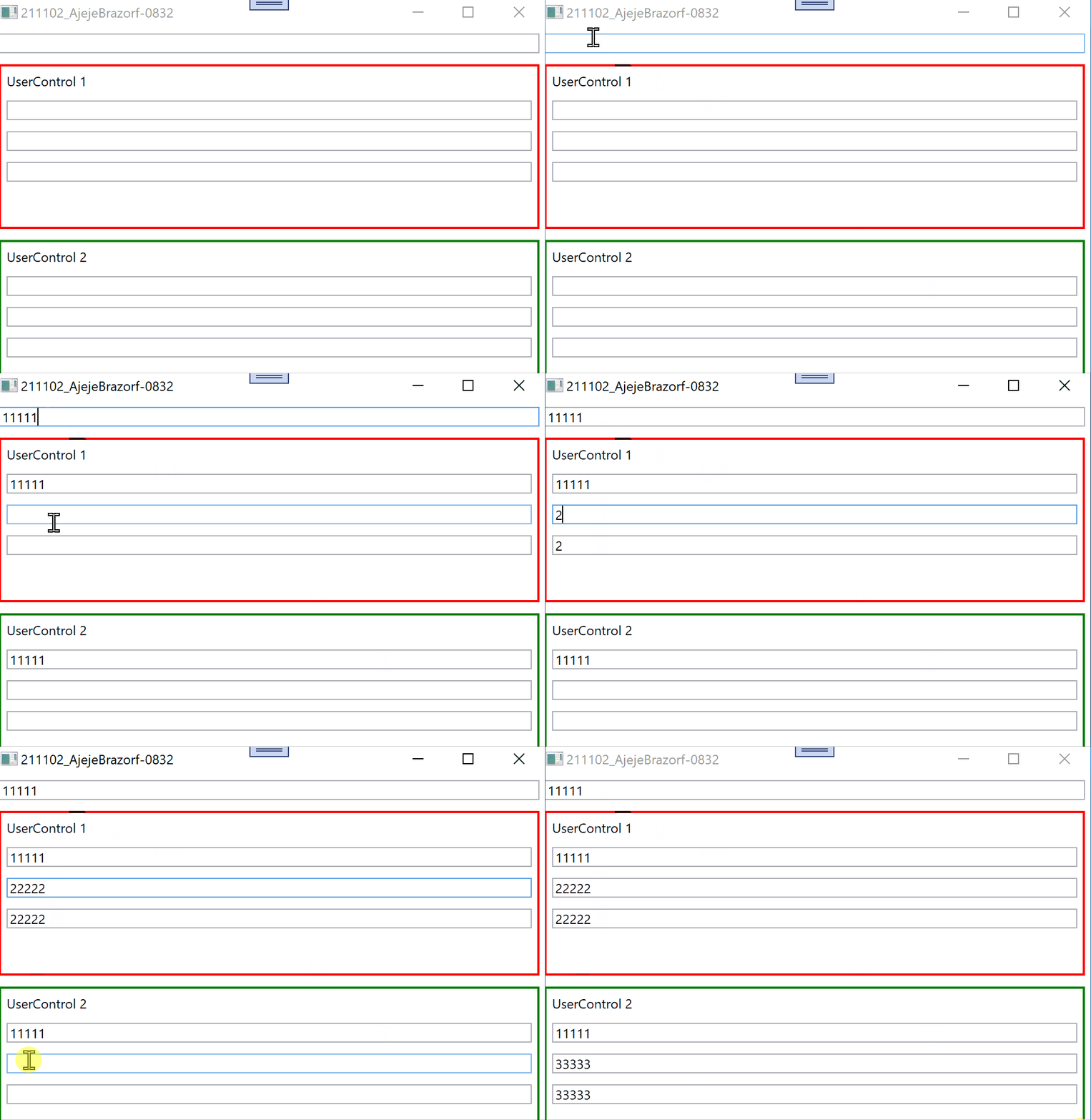
try following demo with 2 UserControls and 3 ViewModels; ViewModel0 - main ViewModel, ViewModel1 - for UserControl1, ViewModel2 - for UserControl2.
XAML Main Window:
<UserControl x:Class="Window096UC2"
             xmlns="http://schemas.microsoft.com/winfx/2006/xaml/presentation"
             xmlns:x="http://schemas.microsoft.com/winfx/2006/xaml"
             xmlns:mc="http://schemas.openxmlformats.org/markup-compatibility/2006"
             xmlns:d="http://schemas.microsoft.com/expression/blend/2008"
             xmlns:local="clr-namespace:WpfControlLibrary1.WpfApp096"
             mc:Ignorable="d"
             d:DesignHeight="450" d:DesignWidth="800">
  <UserControl.Resources>
    <local:ViewModel2 x:Key="vm2"/>
  </UserControl.Resources>
  <Border BorderBrush="Green" BorderThickness="2">
    <StackPanel>
      <Label Content="UserControl 2"/>
      <TextBox Text="{Binding Text0, UpdateSourceTrigger=PropertyChanged}"
               Margin="5"/>
      <TextBox Text="{Binding Text2, Source={StaticResource vm2}, UpdateSourceTrigger=PropertyChanged}"
               Margin="5"/>
      <TextBox Text="{Binding Text2, Source={StaticResource vm2}, UpdateSourceTrigger=PropertyChanged}"
               Margin="5"/>
    </StackPanel>
  </Border>
</UserControl>
XAML UserControl1:
<UserControl x:Class="Window096UC1"
             xmlns="http://schemas.microsoft.com/winfx/2006/xaml/presentation"
             xmlns:x="http://schemas.microsoft.com/winfx/2006/xaml"
             xmlns:mc="http://schemas.openxmlformats.org/markup-compatibility/2006"
             xmlns:d="http://schemas.microsoft.com/expression/blend/2008"
             xmlns:local="clr-namespace:WpfControlLibrary1.WpfApp096"
             mc:Ignorable="d"
             d:DesignHeight="450" d:DesignWidth="800">
  <UserControl.Resources>
    <local:ViewModel1 x:Key="vm1"/>
  </UserControl.Resources>
  <Border BorderBrush="Red" BorderThickness="2">
    <StackPanel>
      <Label Content="UserControl 1"/>
      <TextBox Text="{Binding Text0, UpdateSourceTrigger=PropertyChanged}"
               Margin="5"/>
      <TextBox Text="{Binding Text1, Source={StaticResource vm1}, UpdateSourceTrigger=PropertyChanged}"
               Margin="5"/>
      <TextBox Text="{Binding Text1, Source={StaticResource vm1}, UpdateSourceTrigger=PropertyChanged}"
               Margin="5"/>
    </StackPanel>
  </Border>
</UserControl>
XAML UserControl2:
<UserControl x:Class="Window096UC2"
             xmlns="http://schemas.microsoft.com/winfx/2006/xaml/presentation"
             xmlns:x="http://schemas.microsoft.com/winfx/2006/xaml"
             xmlns:mc="http://schemas.openxmlformats.org/markup-compatibility/2006"
             xmlns:d="http://schemas.microsoft.com/expression/blend/2008"
             xmlns:local="clr-namespace:WpfControlLibrary1.WpfApp096"
             mc:Ignorable="d"
             d:DesignHeight="450" d:DesignWidth="800">
  <UserControl.Resources>
    <local:ViewModel2 x:Key="vm2"/>
  </UserControl.Resources>
  <Border BorderBrush="Green" BorderThickness="2">
    <StackPanel>
      <Label Content="UserControl 2"/>
      <TextBox Text="{Binding Text0, UpdateSourceTrigger=PropertyChanged}"
               Margin="5"/>
      <TextBox Text="{Binding Text2, Source={StaticResource vm2}, UpdateSourceTrigger=PropertyChanged}"
               Margin="5"/>
      <TextBox Text="{Binding Text2, Source={StaticResource vm2}, UpdateSourceTrigger=PropertyChanged}"
               Margin="5"/>
    </StackPanel>
  </Border>
</UserControl>
ViewModels:
Imports System.ComponentModel
Imports System.Runtime.CompilerServices

Namespace WpfApp096

  Public Class ViewModel0
    Inherits ViewModelBase
    Private _text0 As String
    Public Property Text0 As String
      Get
        Return Me._text0
      End Get
      Set(value As String)
        Me._text0 = value
        OnPropertyChanged()
      End Set
    End Property
  End Class

  Public Class ViewModel1
    Inherits ViewModelBase
    Private _text1 As String
    Public Property Text1 As String
      Get
        Return Me._text1
      End Get
      Set(value As String)
        Me._text1 = value
        OnPropertyChanged()
      End Set
    End Property
  End Class

  Public Class ViewModel2
    Inherits ViewModelBase
    Private _text2 As String
    Public Property Text2 As String
      Get
        Return Me._text2
      End Get
      Set(value As String)
        Me._text2 = value
        OnPropertyChanged()
      End Set
    End Property
  End Class

  Public Class ViewModelBase
      Implements INotifyPropertyChanged
      Public Event PropertyChanged As PropertyChangedEventHandler Implements INotifyPropertyChanged.PropertyChanged
    Protected Sub OnPropertyChanged(<CallerMemberName> Optional propName As String = "")
      RaiseEvent PropertyChanged(Me, New PropertyChangedEventArgs(propName))
    End Sub
  End Class

End Namespace
Result: