Azure Logic Apps
An Azure service that automates the access and use of data across clouds without writing code.
This browser is no longer supported.
Upgrade to Microsoft Edge to take advantage of the latest features, security updates, and technical support.
' cx='32' cy='32' r='32' /%3E%3Ctext x='50%25' y='55%25' dominant-baseline='middle' text-anchor='middle' fill='%23FFF' %3EAZ%3C/text%3E%3C/svg%3E)
Hi,
I have this scheduled flow with a recurrence trigger as follows:
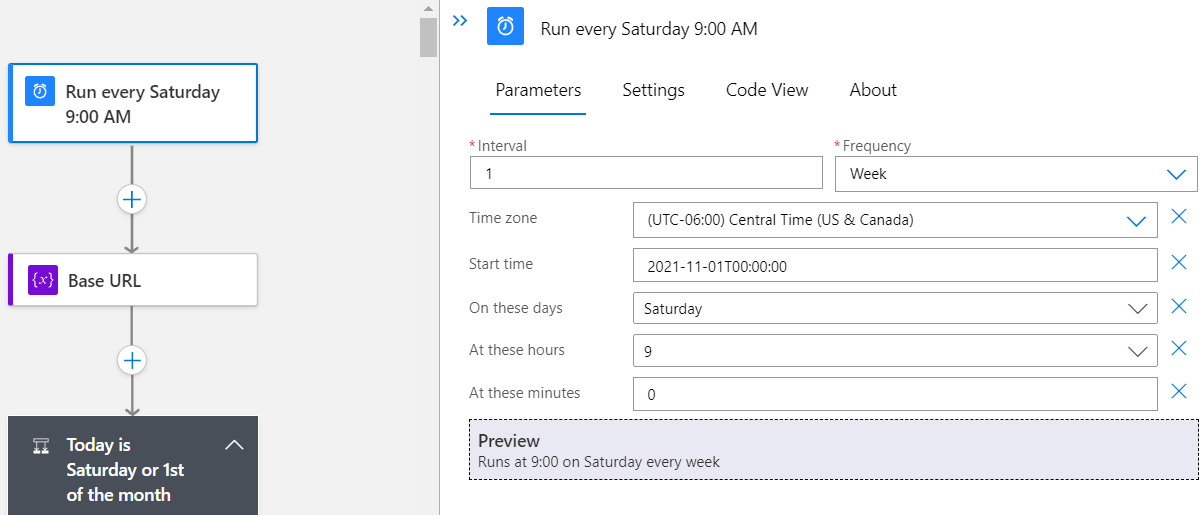
but it doesn't run at all and when I manually trigger the flow I get the above error mentioned in the title.
Any idea why I'm getting this error ?
Thank you.
An Azure service that automates the access and use of data across clouds without writing code.
' cx='32' cy='32' r='32' /%3E%3Ctext x='50%25' y='55%25' dominant-baseline='middle' text-anchor='middle' fill='%23FFF' %3ER%3C/text%3E%3C/svg%3E)
I solved this issue by adding the
"FUNCTIONS_WORKER_RUNTIME" = "node"
"WEBSITE_NODE_DEFAULT_VERSION" =" ~14"
application settings

@Alsalahi, Zakarya - Vendor Looks like there is an issue with your workflow and saving your workflow doesn't show the actual error message. Can you navigate to the developer tools (F12) --> Network and start recording the network logs. Reproduce the issue and verify if you are able to see any 400 requests when you execute your timmer trigger workflow. The 400 requests should return the actual error from the backend service. If you are not able to find the cause then please open a support ticket with us and if you don't have the support plan then please refer to my private comment to assist you further.