Windows 10
A Microsoft operating system that runs on personal computers and tablets.
10,705 questions
This browser is no longer supported.
Upgrade to Microsoft Edge to take advantage of the latest features, security updates, and technical support.

Using Dism /Online /Export-DefaultAppAssociations:"c:\temp\DefaultAssociationsConfiguration.xml" does not register Google Chrome as default browser, see picture for more info. I thought that was walk in the park. I can't just type values manually because I don't have a clue about the ID value.
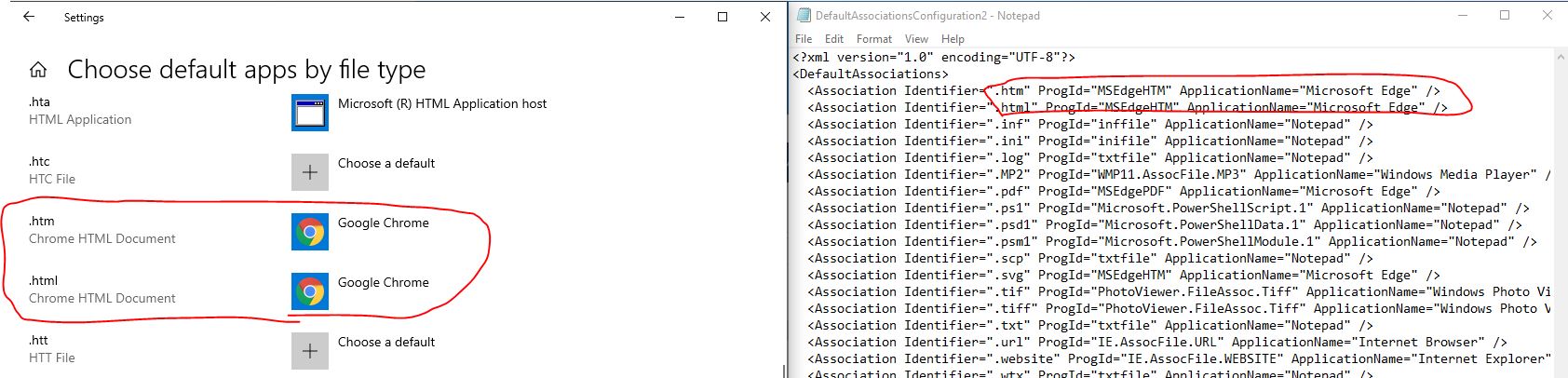

Progid=ChromeHTML
ApplicationName=Google Chrome

@Pavel yannara Mirochnitchenko Thanks for posting in our Q&A.
For this issue, we appreciate your help to clarify some information:
The chrome Progid is in the following picture:

If the answer is the right solution, please click "Accept Answer" and kindly upvote it. If you have extra questions about this answer, please click "Comment".
Note: Please follow the steps in our documentation to enable e-mail notifications if you want to receive the related email notification for this thread.
I did change Google Chrome to default web browser manually, ran the dism command but still seing Edge in xml.
I have solved this by finding Google Chrome data in web guides, but I wonder why this dism solution does not work anymore.
@Pavel yannara Mirochnitchenko I'm glad to hear that you have solved it by yourself. I have no helpful idea, because everything is normal when I run the command and I cannot reproduce your problem.
Thanks for understanding.