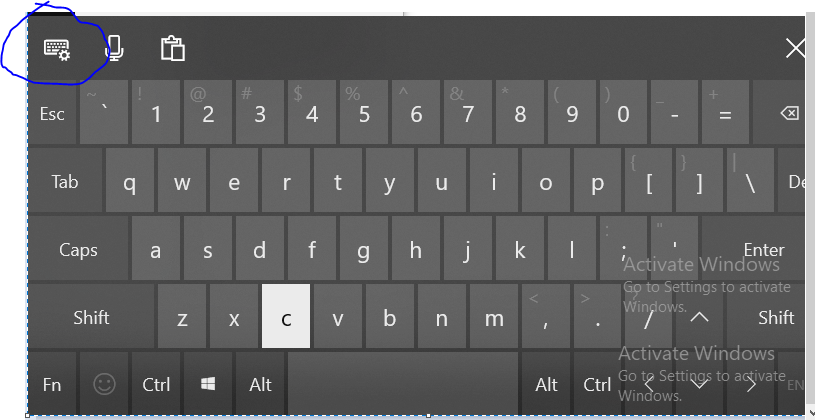
Configure On Screen Keyboard to disable settings button

Jeff Nelson 1 Reputation point
2021-11-04T20:38:39.68+00:00

Hi,

I am developing an application for a client that utilizes a touch screen and the on screen keyboard for text input. We are using Windows 10 IoT Enterprise. We need to lock the system down so users can only access the application. One issue I'm having is the on screen keyboard has a settings button that brings you in to the settings page and I need to find a way to disable or remove this button. I don't see anything in the registry or group policy editor that can achieve this. I also looked in to Keyboard filters, but I'm not sure what this settings key would be.

Any help would greatly be appreciated!

146682-capture.png

Windows for business | Windows Client for IT Pros | User experience | Other
0 comments No comments
{count} votes

1 answer

Sort by: Most helpful
  1. Limitless Technology 40,081 Reputation points
    2021-12-21T17:16:23.777+00:00

    Hi @Jeff Nelson

    If you’re using Windows Enterprise, the easiest way to settings interface is by using the Local Group Policy Editor.

    In the Group Policy window for those users, on the left-hand side, drill down to User Configuration > Administrative Templates > Control Panel. On the right, find the “Prohibit access to Control Panel and PC settings” item and double-click it to open its properties dialog.

    In the setting’s properties window, click the “Enabled” option and then click “OK.”

    You can now exit the Local Group Policy Editor. Changes should take place immediately, so there’s no need to restart Windows first. The Settings interface should no longer be accessible to the user.

    -----
    --If the reply is helpful, please Upvote and Accept it as an answer--

    0 comments No comments

Your answer

Answers can be marked as 'Accepted' by the question author and 'Recommended' by moderators, which helps users know the answer solved the author's problem.