Azure SQL Database
An Azure relational database service.
This browser is no longer supported.
Upgrade to Microsoft Edge to take advantage of the latest features, security updates, and technical support.
' cx='32' cy='32' r='32' /%3E%3Ctext x='50%25' y='55%25' dominant-baseline='middle' text-anchor='middle' fill='%23FFF' %3ES%3C/text%3E%3C/svg%3E)
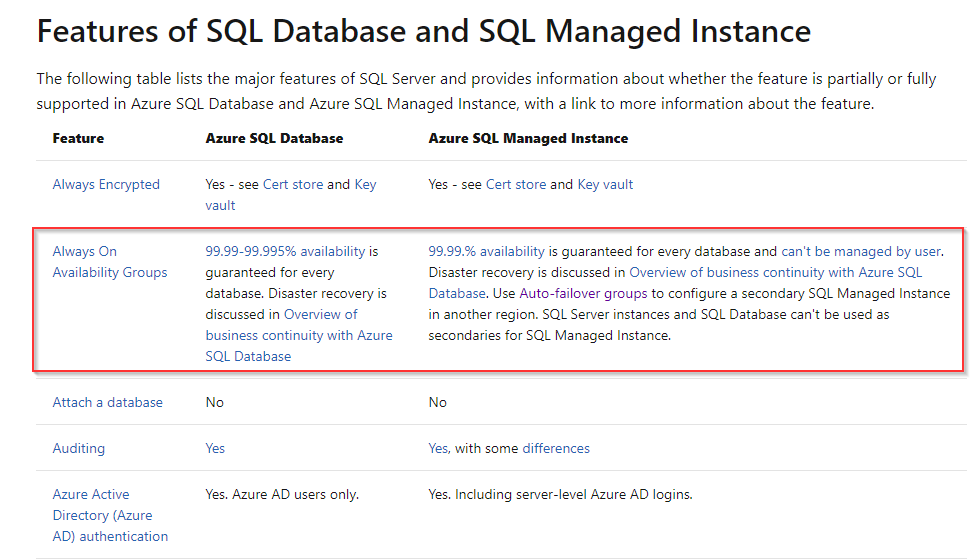
Hi, We are planning to migrate SQL server 2008r2 running on Windows 2008r2 to Azure SQL managed instance. I have read Microsoft documentation some of TSQL like Always on availability group, CLR functions (with restriction) are not available in Azure SQL managed instance.
What options we can take to rectify this. We are also looking at considering hybrid deployments of Azure SQL (both IaaS and PaaS) on cloud.

Most of registry based applications are not supported PaaS SQL Database on Azure, you have to check the compatibility
Check this.
https://learn.microsoft.com/en-us/sql/t-sql/statements/alter-database-transact-sql-compatibility-level?view=sql-server-ver15
Please do not forget to "Accept the answer" and Upvote on the post that helps you, this can be beneficial to other community members.
http://www.moamenhany.com

Hi @Sam - I want to follow up to you post with some additional information. Well, it's not necessarily additional in the context of what was previously provided as an answer. This information should have been provided to you as the answer and providing this information here.
The primary two docs you should be sourcing are the the following, as they cover the specific capabilities for Azure SQL Database Managed Instance:
Because Managed Instance is essentially a bundled IaaS deployment (via ARM) provided as a PaaS service, it is helpful to understand the connectivity architecture with the VNET/Subnet and UDRs.
And finally, with regard to resource limits, the following document details the current resource limitations for the Managed Instance service and details the process for requesting a quota increase.
To address the specific concerns with regard to CLR and TDE functionality, here is that specific information:
LIMITATION of TDE: You can't execute BACKUP DATABASE ... WITH COPY_ONLY on a database that's encrypted with service-managed Transparent Data Encryption (TDE). Service-managed TDE forces backups to be encrypted with an internal TDE key. The key can't be exported, so you can't restore the backup. Use automatic backups and point-in-time restore, or use customer-managed (BYOK) TDE instead. You also can disable encryption on the database. A SQL Managed Instance can't access file shares and Windows folders, so the following constraints apply:
Only CREATE ASSEMBLY FROM BINARY is supported. See CREATE ASSEMBLY FROM BINARY.
CREATE ASSEMBLY FROM FILE isn't supported. See CREATE ASSEMBLY FROM FILE.
ALTER ASSEMBLY can't reference files. See ALTER ASSEMBLY.
#Always On Availability Groups
' cx='32' cy='32' r='32' /%3E%3Ctext x='50%25' y='55%25' dominant-baseline='middle' text-anchor='middle' fill='%23FFF' %3EA%3C/text%3E%3C/svg%3E)