Microsoft 365 and Office | SharePoint | For business | Windows
A group of Microsoft Products and technologies used for sharing and managing content, knowledge, and applications.

This browser is no longer supported.
Upgrade to Microsoft Edge to take advantage of the latest features, security updates, and technical support.
' cx='32' cy='32' r='32' /%3E%3Ctext x='50%25' y='55%25' dominant-baseline='middle' text-anchor='middle' fill='%23FFF' %3ENA%3C/text%3E%3C/svg%3E)
I have two Yes/No columns as below:
1st Dose
2nd Dose
And a third column Full Vaccincated with Choices (Vaccinated, Not Vaccinated)
I want to achieve below on 3rd columns
If the values of 1st Dose and 2nd Dose are YES, then third column should be Vaccinated otherwise Not Vaccinated
Please help in formula as i tried multiple attempts but failed
A group of Microsoft Products and technologies used for sharing and managing content, knowledge, and applications.

I'm looking into your issue now and I will reply you as soon as possible.
Thanks for your understanding and patience :-)
Hi @Naqash Ahmed , welcome to Q&A forum!
Per my test, if you use Yes/No column, then the corresponding formula is True and False, like this:
=IF(AND([1st Dose]=TRUE,[2nd Dose]=TRUE),"Vaccinated","Not Vaccinated")
Test Result:

============================
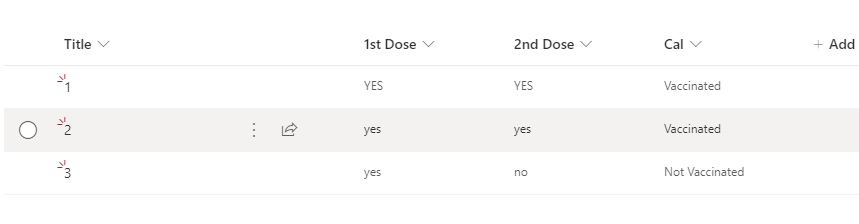
If you are using Single line of text column, then you can use Yes/No, like this:
=IF(AND([1st Dose]="YES",[2nd Dose]="YES"),"Vaccinated","Not Vaccinated")
Test Result:
If the answer is helpful, please click "Accept Answer" and kindly upvote it. If you have extra questions about this answer, please click "Comment".
Note: Please follow the steps in our documentation to enable e-mail notifications if you want to receive the related email notification for this thread.
Hi @Naqash Ahmed ,
Good day!
Have you tried my suggestion? Is it helpful? I am willing to hear from you.
Thanks,
Elsie Lu
Hi @Naqash Ahmed , how are things going on? Any updates are welcomed.