Microsoft 365 and Office | SharePoint Server | Development
The process of building custom solutions for SharePoint Server.

This browser is no longer supported.
Upgrade to Microsoft Edge to take advantage of the latest features, security updates, and technical support.
' cx='32' cy='32' r='32' /%3E%3Ctext x='50%25' y='55%25' dominant-baseline='middle' text-anchor='middle' fill='%23FFF' %3ESR%3C/text%3E%3C/svg%3E)
Good day,
I have Sharepoint List Form. I have choice drop down field "Type". The "Type" field has values "Process", "Question", "Order"...
I must show or hide some form fields when the "Type" field is changing.
If I select "Process", I must show "Field A" and hide "Field B"
If I select "Question", I must show "Field B" and hide "Field A" and "Field C"
If I select "Order", I must show "Field E" and "Field F" and hide all another fields.
I found this topic [how-to-hideshow-fields-based-on-checkbox-selection-on-newformaspx-][2][][3]
But how does look like the code for dropdown menu?
$("input[Title='Department1']").bind('click',function() {
  if($(this).is(':checked')) {
Would be grateful

Code idea:After the drop-down box is changed, we display all the columns, and then hide the column according to the value of the drop-down box.code.txt
Test Result:
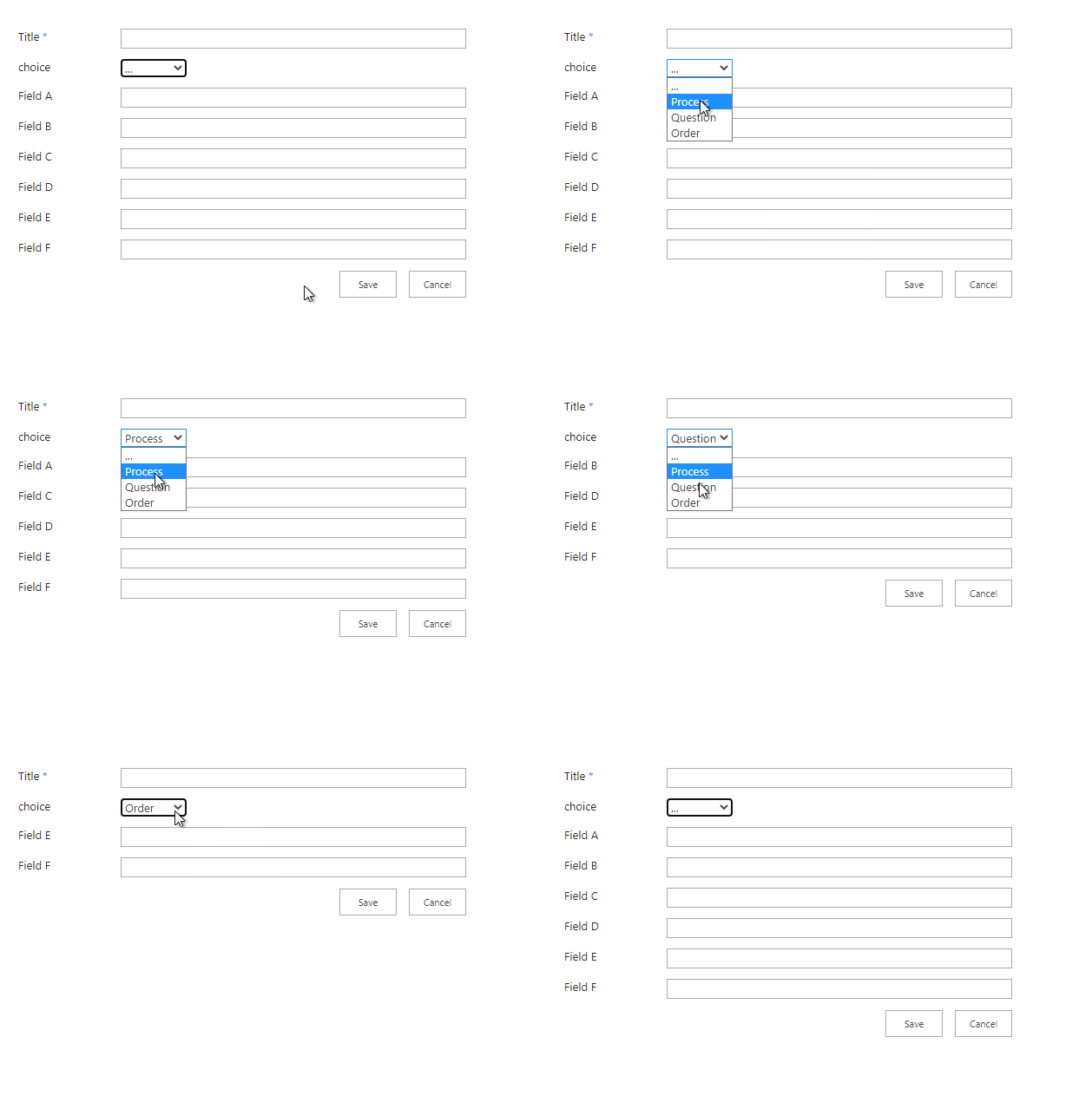
Tip:you need to change the title value in $("select[title='choice']) to your drop down column display name.
Thanks,
But I can't understand what is wrong in my script16629-code1.txt

My Code and my field in F12
The part of code you shared is about the input element.The drop down element is select.
You could try the code I shared in attachment.
If you need further help,please share your full code.
I modify your code to adapt to my environment,it works well.
Is it not running at all or the implementation function does not meet your needs?Could you describe the problems occurred in detail when the code runs?
The File "code1.txt" is your code. The fields "DocDesc" and "DocOrg" don't hide. It in the file "Code1.png"
My first code version looks like the attachment "Full Code .PNG" ! 16792-full-code.png

I use "select[id ^='DocType']" in both...
The jQuery selector is not the key point. Different column types will affect the execution result of the code. Please show the html code of DocDesc column and DocOrg column and the type of them.
Now I use select[title='Document Type'
My steps:
I found the script problem. This script doesn't work
$('nobr:contains("DocDesc")').closest('td').hide(); $('nobr:contains("DocOrg")').closest('td').hide();
DocOrg is a field SPFieldMultiChoice
DocDesc is a field SPFieldNote - textarea
Have you solved this issue?
