Microsoft Security | Intune | Configuration Manager | Application
Managing applications through Configuration Manager in Intune

This browser is no longer supported.
Upgrade to Microsoft Edge to take advantage of the latest features, security updates, and technical support.
' cx='32' cy='32' r='32' /%3E%3Ctext x='50%25' y='55%25' dominant-baseline='middle' text-anchor='middle' fill='%23FFF' %3EN%3C/text%3E%3C/svg%3E)
Hello all - We have a Task Sequence to remove several software components. It contains 8 steps. Some users have restarted (from smsts.log) their PCs on their own in the middle of the TS running. To be clear, the TS doesn’t force a reboot. In the log, it says: "Task sequence failed due to an external shutdown request received during execution and the Task Sequence action is not configured for retry on reboot."
How can we configure the task sequence (or deployment?) to retry the TS if there is a reboot? Almost everything online I found when searching was for MDT or OSD deployments. In MS documentation it does reference Task Sequence variables. This:
SMSTSRebootRequested
Indicates that a restart is requested after the current task sequence step is completed. If a restart is required, just set this variable to true, and the task sequence manager will restart the computer after this task sequence step. The task sequence step must set this task sequence variable if it requires the restart to complete the task sequence step. After the computer is restarted, the task sequence will continue to run from the next task sequence step.
SMSTSRetryRequested
Requests a retry after the current task sequence step is completed. If this task sequence variable is set, the SMSTSRebootRequested must also be set to true. After the computer is restarted, the task sequence manager will rerun the same task sequence step.
However, these two variables don't seem to apply. What am I missing?
Thanks!

Hi @net1994 ,
Task sequence steps for 'Install Application' and 'Install Updates' have had a new option added which can be found on the 'option' tab of the step; We could set as this:
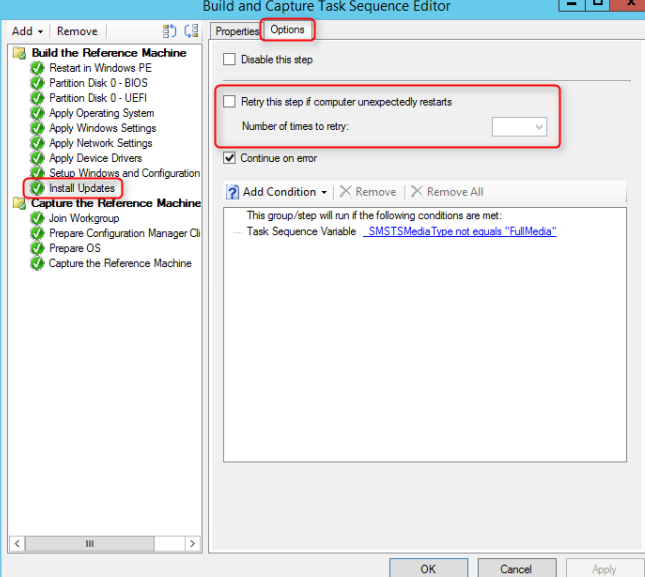
Detailed information could be referred to this link:
https://blog.krissmilne.tech/configmgr/configmgr-2012/configmgr-task-sequence-retry/
Note: Non-Microsoft link, just for the reference.
Besides, here is the link that this little script will rerun the task sequence by connecting to the remote machine:
https://smsagent.blog/2014/01/23/re-running-a-task-sequence/
Note: Non-Microsoft link, just for the reference.
If the answer is the right solution, please click "Accept Answer" and kindly upvote it. If you have extra questions about this answer, please click "Comment".
Note: Please follow the steps in our documentation to enable e-mail notifications if you want to receive the related email notification for this thread.
Nice! Though two things:
Thanks!
Hi,
Thanks for your reply. I check the method above, it may not be work.
To achieve this, we may need to modify the logic.
For example, the original (simplified) TS is as below:
uninstall S1
uninstall S2
uninstall S3
uninstall S4
We need add some external condition before and after each task, for example, a SMB shared file, a customized registry value, etc.
if \fileserver\test.txt NOT EXIST then
uninstall S1
set \fileserver\test.txt content as 1
end if
if (\fileserver\test.txt NOT EXIST) or (\fileserver\test.txt content <2) then
uninstall S2
set \fileserver\test.txt content as 2
end if
if (\fileserver\test.txt NOT EXIST) or (\fileserver\test.txt content <3) then
uninstall S3
set \fileserver\test.txt content as 3
end if
if (\fileserver\test.txt NOT EXIST) or (\fileserver\test.txt content =3) then
uninstall S4
set \fileserver\test.txt content as 4
end if
Hope the above information helps.
If the answer is the right solution, please click "Accept Answer" and kindly upvote it. If you have extra questions about this answer, please click "Comment".
Note: Please follow the steps in our documentation to enable e-mail notifications if you want to receive the related email notification for this thread.
Hi,
Hope everything goes well. May we know the current status of the question? If there is any other assistance we can provide, please feel free to let us know, we will do our best to help you.
Thanks and regards,
Amanda