Developer technologies | C#
An object-oriented and type-safe programming language that has its roots in the C family of languages and includes support for component-oriented programming.
This browser is no longer supported.
Upgrade to Microsoft Edge to take advantage of the latest features, security updates, and technical support.
' cx='32' cy='32' r='32' /%3E%3Ctext x='50%25' y='55%25' dominant-baseline='middle' text-anchor='middle' fill='%23FFF' %3EM%3C/text%3E%3C/svg%3E)
Hi All.
I have two combobox .I need to multiply comboBox1 and comboBox2 then the result in comboBox3.
somebody show me the code.Below the code what I try to do.
using System;
using System.Collections.Generic;
using System.ComponentModel;
using System.Data;
using System.Drawing;
using System.Linq;
using System.Text;
using System.Threading.Tasks;
using System.Windows.Forms;

namespace Office_aa
{
    public partial class Form1 : Form
    {
        List<string> Quantity = new List<string>();
        List<string> Unit_Price = new List<string>();
        public Form1()
        {
            InitializeComponent();

            for (int i = 1; i < 100; i++)
                Quantity.Add(i.ToString());

            foreach (string item in Quantity)
            {
                comboBox1.Items.Add(item);
                comboBox4.Items.Add(item);
            }

            for (int i = 50; i < 500; i++)
                Unit_Price.Add(i.ToString("$#,##0.00"));

            foreach (string item in Unit_Price)
            {
                comboBox2.Items.Add(item);
                comboBox5.Items.Add(item);
            }
        }

        private void comboBox3_SelectedIndexChanged(object sender, EventArgs e)
        {

            var Amount = new List<double>();

            double Result = double.Parse(comboBox1.Text) * double.Parse(comboBox2.Text);
            Amount.Add(Result);

            foreach (var item in Amount)
            {
                comboBox3.Items.Add(item);
                comboBox6.Items.Add(item);
            }


        }
    }
}

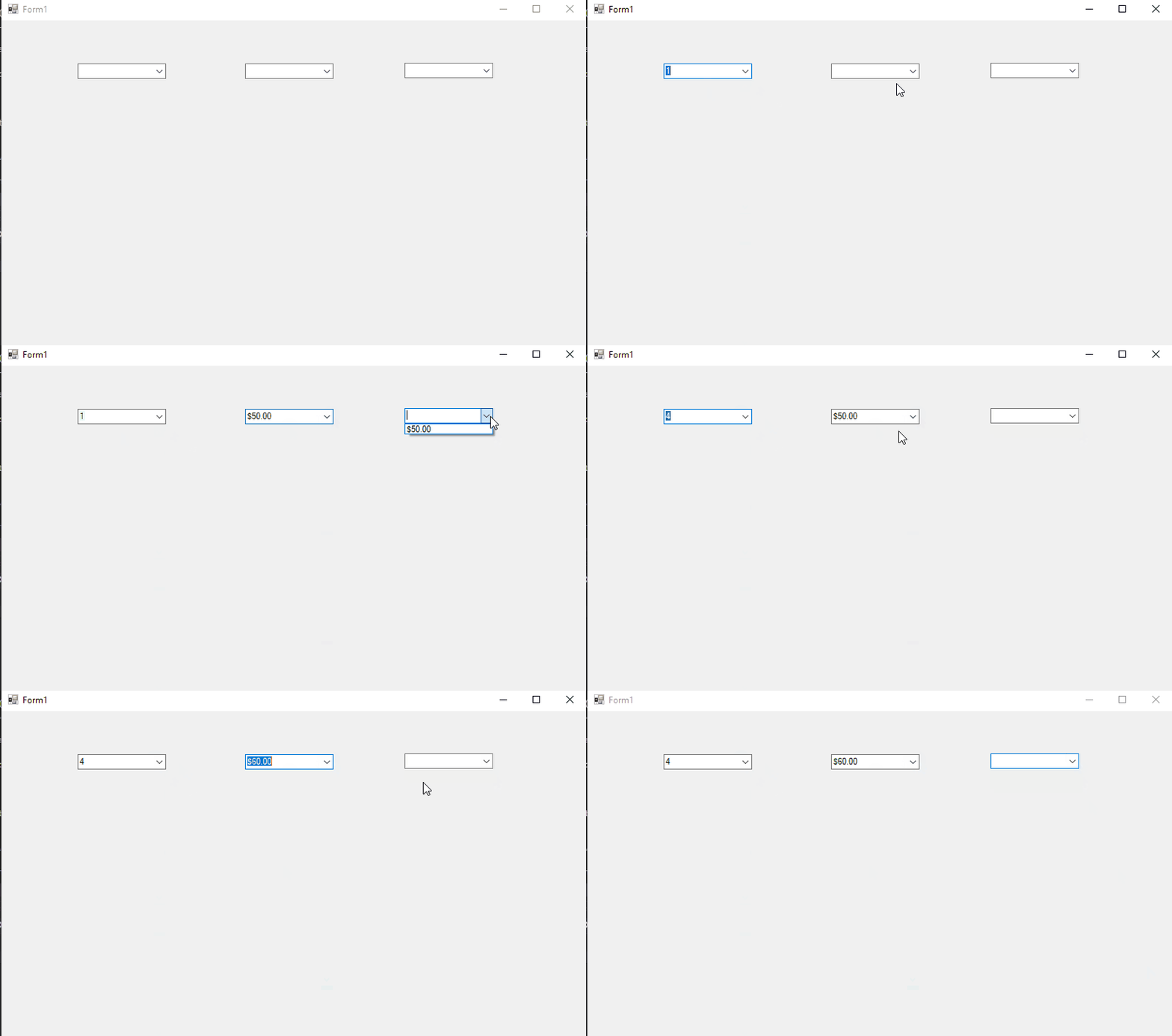
@MiPakTeh , you could try the following code to get the result after you choose the value from combobox1 and combobox2.
 public partial class Form1 : Form
    {
        List<string> Quantity = new List<string>();
        List<string> Unit_Price = new List<string>();

        NumberStyles currencyStyle = NumberStyles.Currency;
        NumberFormatInfo numberFormat = CultureInfo.CurrentCulture.NumberFormat;
        public Form1()
        {
            InitializeComponent();
            CultureInfo.CurrentCulture = new CultureInfo("en-US");

            for (int i = 1; i < 100; i++)
                Quantity.Add(i.ToString());

            foreach (string item in Quantity)
            {
                comboBox1.Items.Add(item);

            }

            for (int i = 50; i < 500; i++)
                Unit_Price.Add(i.ToString("$#,##0.00"));

            foreach (string item in Unit_Price)
            {
                comboBox2.Items.Add(item);

            }
        }
        int firstvalue;
        bool t;
        private void comboBox1_SelectedIndexChanged(object sender, EventArgs e)
        {
            if(int.TryParse(comboBox1.Text, out firstvalue))
            {
                t = true;
            }

        }

        private void comboBox2_SelectedIndexChanged(object sender, EventArgs e)
        {
            if(double.TryParse(comboBox2.Text, currencyStyle, numberFormat, out var secondvalue)&&t)
            {
                double Result_ = firstvalue*secondvalue;
                comboBox3.Items.Add(Result_.ToString("$#,##0.00"));
            }
        }
    }
Result:
If the answer is the right solution, please click "Accept Answer" and kindly upvote it. If you have extra questions about this answer, please click "Comment".
Note: Please follow the steps in our documentation to enable e-mail notifications if you want to receive the related email notification for this thread.
' cx='32' cy='32' r='32' /%3E%3Ctext x='50%25' y='55%25' dominant-baseline='middle' text-anchor='middle' fill='%23FFF' %3EPA%3C/text%3E%3C/svg%3E)
In your comboBox3_SelectedIndexChanged method you're parsing comboBox2.Text as a double but the Parse method needs to be told that the input string is an en-US-style currency string, or it'll end up throwing a FormatException, so you'd probably want to do something like this to parse comboBox2.Text:
Console.WriteLine(500000.ToString("$#,##0.00")); // $500,000.00
Console.WriteLine(double.Parse("$500,000.00", NumberStyles.Currency, new CultureInfo("en-US").NumberFormat)); // 500000.00
You'd also probably want to avoid calculating Result if either two values fail to parse, so something like this:
NumberStyles currencyStyle = NumberStyles.Currency;
NumberFormatInfo numberFormat = new CultureInfo("en-US").NumberFormat;

if (!int.TryParse(comboBox1.Text, out var value1) || !double.TryParse(comboBox2.Text, currencyStyle, numberFormat, out var value2))
    return;

double Result = value1 * value2;
If you'd rather not have to refer to a hard-coded new CultureInfo("en-US") every time you parse a date, you just need to make sure you're setting the current culture in your app on startup, then you can just pass in the current culture when you parse your amounts:
CultureInfo.CurrentCulture = new CultureInfo("en-US");

// ...

NumberStyles currencyStyle = NumberStyles.Currency;
NumberFormatInfo numberFormat = CultureInfo.CurrentCulture.NumberFormat;

if (!int.TryParse(comboBox1.Text, out var value1) || !double.TryParse(comboBox2.Text, currencyStyle, numberFormat, out var value2))
    return;

double Result = value1 * value2;

I don't have a solution but instead code that shows a better approach that there is no guessing of types. Note also I use SelectionChangeCommitted rather than SelectionChanged
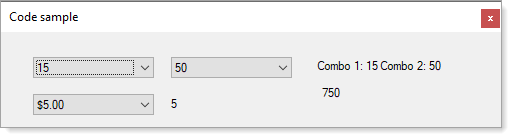
using System;
using System.Collections.Generic;
using System.Linq;
using System.Windows.Forms;

namespace CodeSample_1
{
    public partial class Form1 : Form
    {
        public Form1()
        {
            InitializeComponent();

            Shown += OnShown;
        }

        private void OnShown(object sender, EventArgs e)
        {
            comboBox1.DataSource = Enumerable.Range(1, 100).ToList();
            comboBox2.DataSource = Enumerable.Range(50, 500).ToList();

            comboBox1.SelectionChangeCommitted += ComboBoxOnSelectionChangeCommitted;
            comboBox2.SelectionChangeCommitted += ComboBoxOnSelectionChangeCommitted;
            SelectionChange_C1_C2();

            List<NumberItem> numberItems = new List<NumberItem>();
            for (int index = 5; index < 10; index++)
            {
                numberItems.Add(new NumberItem()
                {
                    Display = index.ToString("$#,##0.00"),
                    Value = index
                });
            }

            comboBox3.DataSource = numberItems;
            comboBox3.SelectionChangeCommitted += ComboBox3OnSelectionChangeCommitted;
            Combo3Changed();

        }

        private void ComboBox3OnSelectionChangeCommitted(object sender, EventArgs e)
        {
            Combo3Changed();
        }

        private void Combo3Changed()
        {
            label3.Text = ((NumberItem)comboBox3.SelectedItem).Value.ToString();
        }

        private void ComboBoxOnSelectionChangeCommitted(object sender, EventArgs e)
        {
            SelectionChange_C1_C2();
        }

        private void SelectionChange_C1_C2()
        {
            var c1 = (int)comboBox1.SelectedItem;
            var c2 = (int)comboBox2.SelectedItem;
            label1.Text = $"Combo 1: {c1} Combo 2: {c2}";
            var result = c1 * c2;
            label2.Text = result.ToString();
        }
    }

    public class NumberItem
    {
        public string Display { get; set; }
        public int Value { get; set; }
        public override string ToString() => Display;
    }
}
Thank paul,
problem solve in calculate but 2 thing can't do.
1.when use event
private void comboBox3_SelectedIndexChanged(object sender, EventArgs e)
{
}
this method cannot fire
2.Always caculate everytime push button_1
using System;
using System.Collections.Generic;
using System.ComponentModel;
using System.Data;
using System.Drawing;
using System.Globalization;
using System.Linq;
using System.Text;
using System.Threading.Tasks;
using System.Windows.Forms;

namespace Office_aa
{
    public partial class Form1 : Form
    {
        List<string> Quantity = new List<string>();
        List<string> Unit_Price = new List<string>();

        NumberStyles currencyStyle = NumberStyles.Currency;
        NumberFormatInfo numberFormat = CultureInfo.CurrentCulture.NumberFormat;

        public Form1()
        {
            InitializeComponent();

            CultureInfo.CurrentCulture = new CultureInfo("en-US");

            for (int i = 1; i < 100; i++)
                Quantity.Add(i.ToString());

            foreach (string item in Quantity)
            {
                comboBox1.Items.Add(item);
                comboBox4.Items.Add(item);
            }

            for (int i = 50; i < 500; i++)
                Unit_Price.Add(i.ToString("$#,##0.00"));

            foreach (string item in Unit_Price)
            {
                comboBox2.Items.Add(item);
                comboBox5.Items.Add(item);
            }
        }

        private void button1_Click(object sender, EventArgs e)
        {
            if (!int.TryParse(comboBox1.Text, out var value1) || !double.TryParse(comboBox2.Text, currencyStyle, numberFormat, out var value2))
                return;
            double Result = value1 * value2;
            if (!int.TryParse(comboBox4.Text, out var value1_) || !double.TryParse(comboBox5.Text, currencyStyle, numberFormat, out var value2_))
                return;
            double Result_ = value1_ * value2_;

            comboBox3.Items.Add(Result);
            comboBox6.Items.Add(Result_);

        }

        private void comboBox3_SelectedIndexChanged(object sender, EventArgs e)
        {

        }
    }
}
1.when use event
private void comboBox3_SelectedIndexChanged(object sender, EventArgs e)
{} this method cannot fire
Which method do you want to fire?
2.Always caculate everytime push button_1
Don't you want to get the result by clicking the button?
Hi jackjjun,
If I remove all code from button1_click to comboBox3_SelectedIndexChanged then we fill the comboBox1 and comboBox2 the result not appear in comboBox3.
what I need when we fill the comboxBox1 and comboBox2 the comboBox3 automatic show the result.
Thank you very much.