


Configuring PowerShell to always use Constrained Language Mode and script block logging, and transcription functionality

EnterpriseArchitect 6,301 Reputation points
2021-11-09T11:13:40.757+00:00

Hi All,

I need some guidance to configure my PowerShell environment to enable the following:

  • Constrained Language Mode every script startup
  • Module logging, script block logging, and transcription functionality.

What are the steps or the script to do that?

Thanks.

Windows for business | Windows Server | User experience | PowerShell
Windows for business | Windows Server | Devices and deployment | Configure application groups
0 comments No comments
{count} votes

Answer accepted by question author
  1. Pierre Audonnet - MSFT 10,201 Reputation points Microsoft Employee Moderator
    2021-11-09T15:12:40.113+00:00

    For the first point you can use AppLocker or DeviceGuard to enforce it: https://devblogs.microsoft.com/powershell/powershell-constrained-language-mode/ (doc for DeviceGuard/Windows Defender Application Control: https://learn.microsoft.com/en-us/windows/security/threat-protection/windows-defender-application-control/understand-windows-defender-application-control-policy-design-decisions)

    For the second point, you can use a group policy (Computer configuration/Administrative Templates/Windows Components/Windows PowerShell):
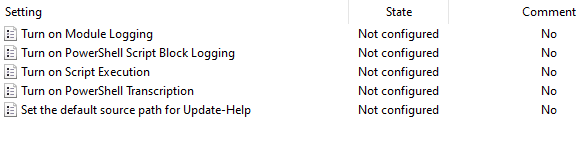
    147815-image.png

    1 person found this answer helpful.

1 additional answer

Sort by: Most helpful
  1. Limitless Technology 40,076 Reputation points
    2021-11-12T08:58:33.207+00:00

    Hi there,

    You can place a PowerShell session into Constrained Language mode simply by setting a property:

    PS C:\> $ExecutionContext.SessionState.LanguageMode
    FullLanguage
    PS C:\> $ExecutionContext.SessionState.LanguageMode = "ConstrainedLanguage"
    PS C:\> $ExecutionContext.SessionState.LanguageMode
    ConstrainedLanguage

    PS C:\> [System.Console]::WriteLine("Hello")
    Cannot invoke method. Method invocation is supported only on core types in this language mode.
    At line:1 char:1

    • [System.Console]::WriteLine("Hello")
    • ~~~~~~~~~~~~~~~~~~~~~~~~~~~~~~~~~~~~
    • CategoryInfo : InvalidOperation: (:) [], RuntimeException
    • FullyQualifiedErrorId : MethodInvocationNotSupportedInConstrainedLanguage

    You can get more info from here
    https://devblogs.microsoft.com/powershell/powershell-constrained-language-mode/


    --If the reply is helpful, please Upvote and Accept it as an answer--

    1 person found this answer helpful.

Your answer

Answers can be marked as 'Accepted' by the question author and 'Recommended' by moderators, which helps users know the answer solved the author's problem.
