Developer technologies | Windows Presentation Foundation
A part of the .NET Framework that provides a unified programming model for building line-of-business desktop applications on Windows.
This browser is no longer supported.
Upgrade to Microsoft Edge to take advantage of the latest features, security updates, and technical support.
' cx='32' cy='32' r='32' /%3E%3Ctext x='50%25' y='55%25' dominant-baseline='middle' text-anchor='middle' fill='%23FFF' %3ENS%3C/text%3E%3C/svg%3E)
Hi Team,
Replication Procedure:
Code snippet:
Xaml
   <Grid>
        <Grid.ColumnDefinitions>
            <ColumnDefinition Width="50"/>
            <ColumnDefinition Width="*"/>
            <ColumnDefinition Width="100"/>
        </Grid.ColumnDefinitions>

        <ScrollViewer  x:Name="ScrollViewer_1" Grid.Column="0" Width="50" Background="White"
                       IsDeferredScrollingEnabled="False" VerticalScrollBarVisibility="Disabled">
            <local:CustomStackPanel x:Name="customStackPanel1" Width="50" AutoHeight="False"/>
        </ScrollViewer>
        <ScrollViewer x:Name="ScrollViewer_2"  ScrollChanged="ScrollViewer_2_ScrollChanged"  Grid.Column="1" Background="White"
                      IsDeferredScrollingEnabled="False" VerticalScrollBarVisibility="Visible" HorizontalScrollBarVisibility="Visible" >
            <local:CustomStackPanel x:Name="customStackPanel2" Width="50" AutoHeight="False"/>
        </ScrollViewer>
        <Button Grid.Column="2" Height="40" Width="70" Content="Auto" Click="Button_Click"/>
    </Grid>
C#
public partial class MainWindow : Window
{
public MainWindow()
{
InitializeComponent();
}

private void Button_Click(object sender, RoutedEventArgs e)
{
        if (this.customStackPanel1.AutoHeight == true)
        {
            this.customStackPanel1.AutoHeight = false;
            this.customStackPanel2.AutoHeight = false;
        }
else
{
            this.customStackPanel1.AutoHeight = true;
            this.customStackPanel2.AutoHeight = true;
        }

}

private void ScrollViewer_2_ScrollChanged(object sender, ScrollChangedEventArgs e)
{
        this.ScrollViewer_1.ScrollToVerticalOffset(e.VerticalOffset);
}
}

public class CustomStackPanel : Panel, INotifyPropertyChanged
{

    private bool autoHeight = false;

    public event PropertyChangedEventHandler PropertyChanged;

    public bool AutoHeight
    {
        get
        {
            return autoHeight;

        }
        set
        {
            autoHeight = value;
            OnAutoHeightChanged();
        }
    }

    private void OnAutoHeightChanged()
    {
        this.InvalidateMeasure();
    }

    protected override Size MeasureOverride(Size availableSize)
    {
        double height;
        var scrollViewer = this.Parent as ScrollViewer;
        if (AutoHeight)
        {
            height = scrollViewer.ViewportHeight / 24;
        }
        else
        {
            height = 100;
        }

        if (this.Children.Count == 0)
        {
            this.GenerateCells();
            scrollViewer.ScrollChanged += ScrollViewer_ScrollChanged;
        }
        else
        {
            this.UpdateCells();
        }

        for (int i = 0; i < this.Children.Count; i++)
        {
            this.Children[i].Measure(new Size(50, height));
        }

        return new Size(availableSize.Width, height * this.Children.Count);
    }

    private void ScrollViewer_ScrollChanged(object sender, ScrollChangedEventArgs e)
    {
        this.InvalidateMeasure();
    }

    protected override Size ArrangeOverride(Size finalSize)
    {
        double height;
        var scrollViewer = this.Parent as ScrollViewer;
        if (AutoHeight)
        {
            height = scrollViewer.ViewportHeight / 24;
        }
        else
        {
            height = 100;
        }

        for (int i = 0; i < this.Children.Count; i++)
        {
            var cell = this.Children[i] as CustomBorder;

            cell.Arrange(new Rect(cell.ColumnIndex * 50, cell.RowIndex * height, 50, height));
        }

        return base.ArrangeOverride(finalSize);
    }

    private void GenerateCells()
    {
        for (int i = 0; i < 24; i++)
        {
            this.Children.Add(new CustomBorder()
            {
                IsEnsured = true,
                ColumnIndex = 0,
                RowIndex = i,
                Content = i.ToString(),
                Background = new SolidColorBrush(Colors.Gray),
                BorderThickness = new Thickness() { Left = 5, Bottom = 5, Right = 5, Top = 5 }
            });
        }
    }

    private void UpdateCells()
    {
        var cells = new List<CustomBorder>();
        foreach (CustomBorder item in this.Children)
        {
            item.IsEnsured = false;
            cells.Add(item);

        }

        for (int i = 0; i < 24; i++)
        {
            CustomBorder cell = cells.FirstOrDefault(_cell => (_cell as CustomBorder).RowIndex == i && (_cell as CustomBorder).ColumnIndex == 0) as CustomBorder;

            if (cell != null)
            {
                cell.IsEnsured = true;
            }
            else
            {
                CustomBorder resuseingCell = cells.FirstOrDefault(_cell => !(_cell as CustomBorder).IsEnsured) as CustomBorder;

                if (resuseingCell == null)
                {
                    this.Children.Add(new CustomBorder()
                    {
                        IsEnsured = true,
                        ColumnIndex = 0,
                        RowIndex = i,
                        Content = i.ToString(),
                        Background = new SolidColorBrush(Colors.Gray),
                        BorderThickness = new Thickness() { Left = 5, Bottom = 5, Right = 5, Top = 5 }

                    });;
                }
                else
                {
                    resuseingCell.ColumnIndex = 0;
                    resuseingCell.RowIndex = i;
                    resuseingCell.IsEnsured = true;
                }
            }

        }
    }
}

public class CustomBorder : Button
{
    internal int ColumnIndex { get; set; }
    internal int RowIndex { get; set; }
    internal bool IsEnsured { get; set; }

    public CustomBorder()
    {
        this.VerticalAlignment = VerticalAlignment.Stretch;
        this.HorizontalAlignment = HorizontalAlignment.Stretch;
    }
}
Sample: https://www.syncfusion.com/downloads/support/directtrac/general/ze/SCROLL~31173881063
Note: Here, VerticalScrollBarVisibility of ScrollViewer_1 is Disabled.
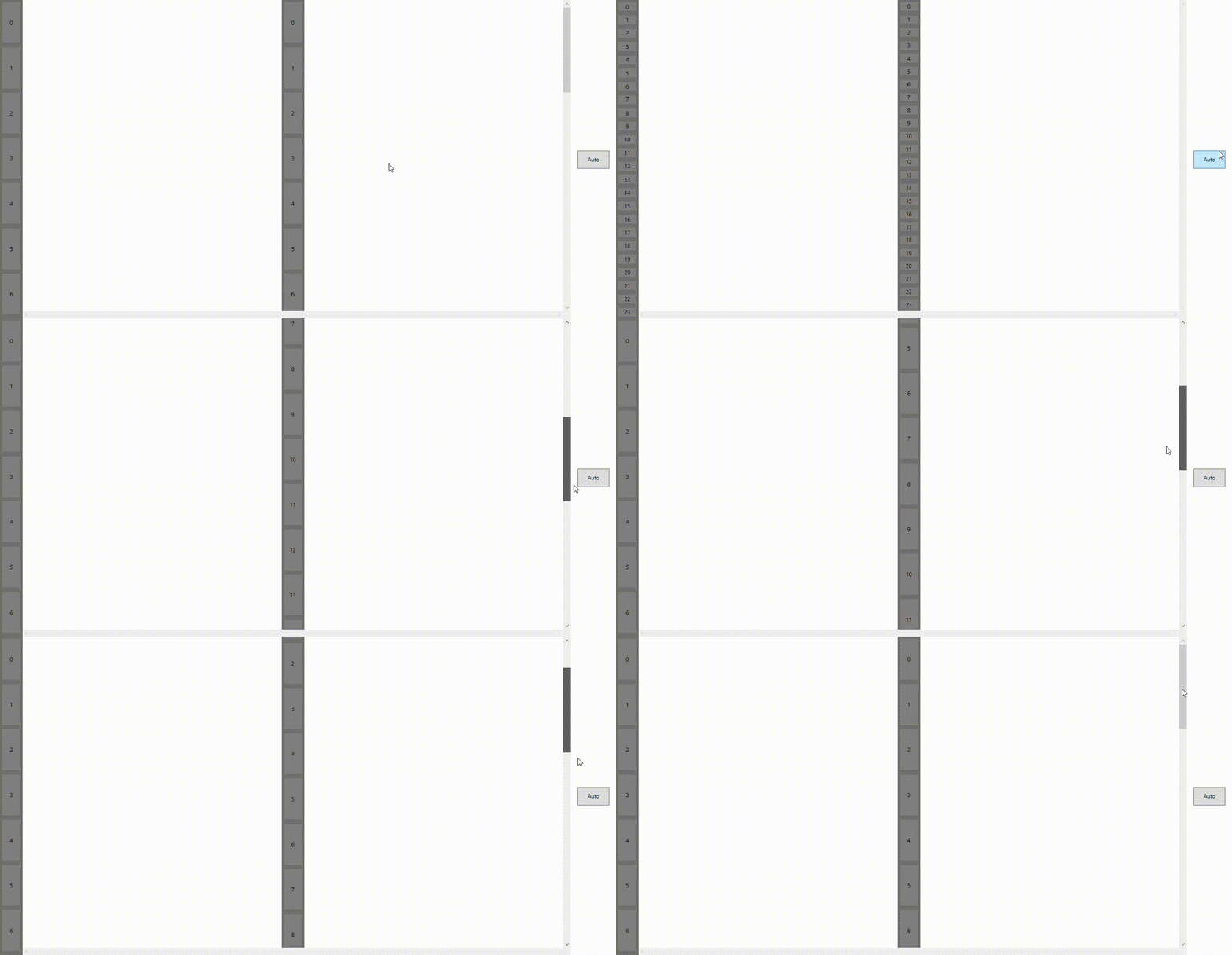
Could you please check and provide a solution for this?
' cx='32' cy='32' r='32' /%3E%3Ctext x='50%25' y='55%25' dominant-baseline='middle' text-anchor='middle' fill='%23FFF' %3EHL%3C/text%3E%3C/svg%3E)
Hi,@Naveenkumar Sanjeevirayan . Could you specify how the ScrollViewer needs to be updated? Do you want ScrollViewer_1 and ScrollViewer_2 to scroll and update child elements simultaneously? The VerticalScrollBar is displayed normally before and after the size of the child element is changed. When the size of the child element starts, the ScrollViewer can contain all child elements. Did I misunderstand or miss something?
Hi @Hui Liu-MSFT .
I have updated description details for this query. Could you check this.
Hi,@Naveenkumar Sanjeevirayan .
As my requirement I need to disable the first scroll viewer vertical bar disabled (as the sticky left header for 2nd scroll viewer , its sticky in 2nd scroll viewer horizontal bar scrolled), so when scroll changed to 2nd Scroll viewer the left header scroll viewer scroll offset changed, but as the extent height not updated for vertical bar disabled , left header scroll viewer not scrolled properly.
What does as the sticky left header for 2nd scroll viewer, its sticky in 2nd scroll viewer horizontal bar scrolled mean? Does the first scroll viewer scroll with the horizontal scroll bar of the second scroll viewer?
Or the first scroll viewer scrolls with the vertical scroll bar of the second scroll viewer?
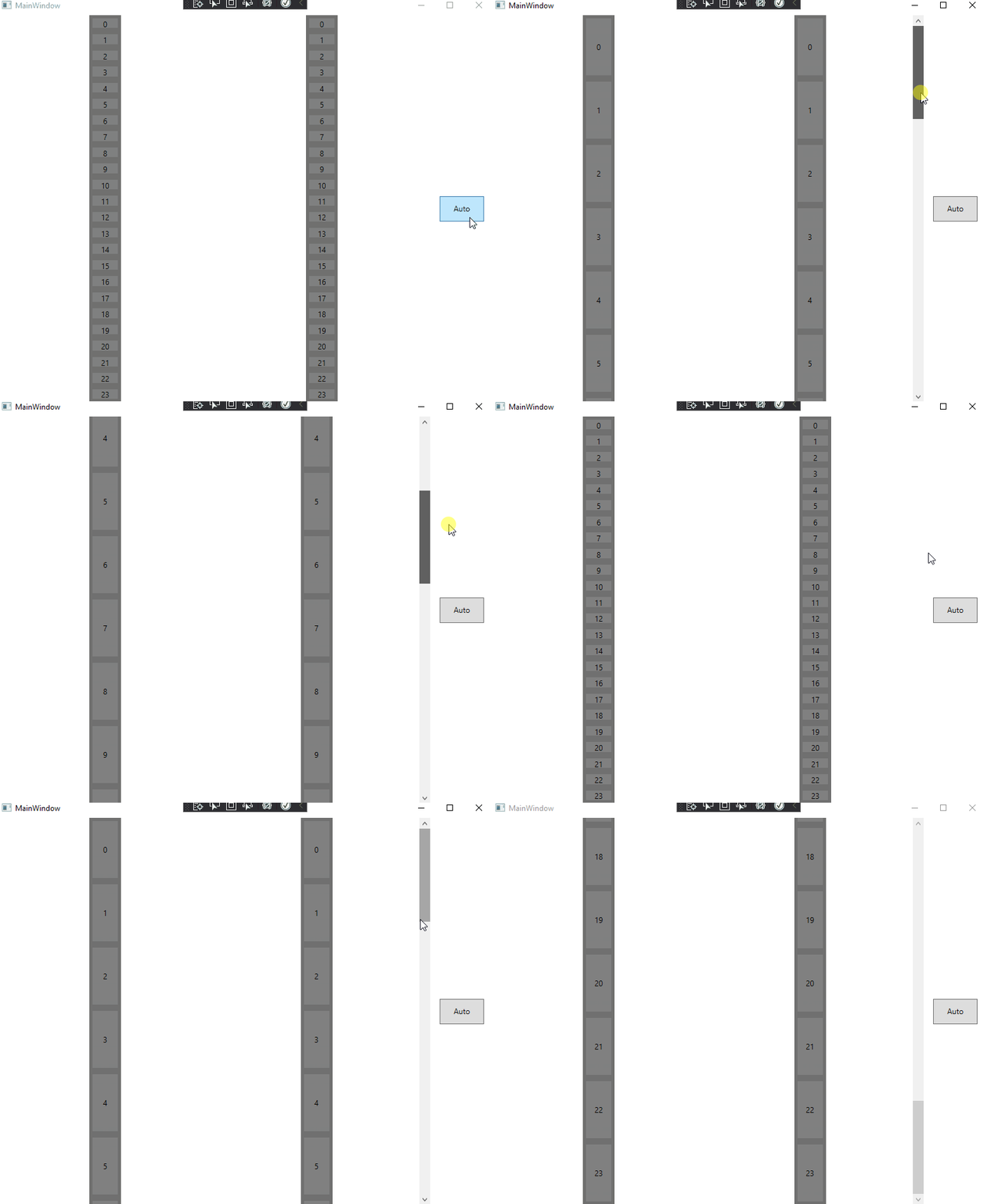
Do you want the scroll effect below or something else? If you want to scroll like the following, the first scroll viewer needs to set VerticalScrollBarVisibility="Hidden".
Hi,@Naveenkumar Sanjeevirayan . Are there any updates? If you have any questions, please let me know.