Microsoft 365 and Office | SharePoint | For business | Windows
A group of Microsoft Products and technologies used for sharing and managing content, knowledge, and applications.

This browser is no longer supported.
Upgrade to Microsoft Edge to take advantage of the latest features, security updates, and technical support.
' cx='32' cy='32' r='32' /%3E%3Ctext x='50%25' y='55%25' dominant-baseline='middle' text-anchor='middle' fill='%23FFF' %3EJT%3C/text%3E%3C/svg%3E)
Hello,
I have tried to add a Calculated column with below formula in Calendar list:
="<a href='http://test.sharepoint.com/sites/Test/_vti_bin/owssvr.dll?CS=109&Cmd=Display&List=%7B32F2AA86-D748-42CC-919C-973BF179244D%7D&CacheControl=1&ID="&[ID]&"&Using=event.ics'>Ical</a>"
Column Data Type : Number
But it's simple displaying as below:
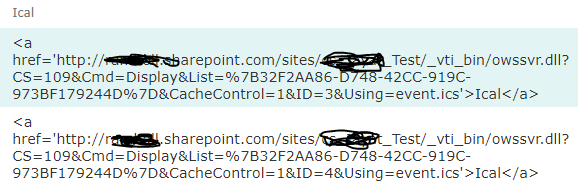
Can you please guide how to proceed further.
Thanking you in advance.
Regards,
Jayashri
' cx='32' cy='32' r='32' /%3E%3Ctext x='50%25' y='55%25' dominant-baseline='middle' text-anchor='middle' fill='%23FFF' %3ECM%3C/text%3E%3C/svg%3E)
Hi @Jayashri Thorat ,
You could try to add some JSON codes to format the column markup as HTML.
For Example:
{
   "$schema": "https://developer.microsoft.com/json-schemas/sp/v2/column-formatting.schema.json",
   "elmType": "a",
   "txtContent": "your document name",
   "attributes": {
      "target": "_blank",
      "href": "='http://xxx.sharepoint.com/sites/xxx/' + @currentField"
   }
}
For Reference: SharePoint Online: Format Calculated Column as Hyperlink
Note: Microsoft is providing this information as a convenience to you. The sites are not controlled by Microsoft. Microsoft cannot make any representations regarding the quality, safety, or suitability of any software or information found there. Please make sure that you completely understand the risk before retrieving any suggestions from the above link.
If the answer is helpful, please click "Accept Answer" and kindly upvote it. If you have extra questions about this answer, please click "Comment".
Note: Please follow the steps in our documentation to enable e-mail notifications if you want to receive the related email notification for this thread.