Developer technologies | ASP.NET | ASP.NET Core
A set of technologies in the .NET Framework for building web applications and XML web services.
This browser is no longer supported.
Upgrade to Microsoft Edge to take advantage of the latest features, security updates, and technical support.
' cx='32' cy='32' r='32' /%3E%3Ctext x='50%25' y='55%25' dominant-baseline='middle' text-anchor='middle' fill='%23FFF' %3EAK%3C/text%3E%3C/svg%3E)
I have three table
Employee Attendance Col ( Empid,Daily_Date,INTIME,OUTTIME,Day)
Employee Leave Application col(ApplyDate,Empid,StartDate,EndDate,Noofday)
Holidays (HolidayDate)
I want that
If Employee Day=1 then (P) is marked in attendance Register.
If Holiday date is mentioned in holidays table then (H) mark in attendance Register.
if employee application date is 03-1-2019 to 04-1-2019 then (CL) is marked as Emp1
If Employee Day=0 then (A) is marked in attendance Register.
i want this regiter output in mvc index page in mvc core
Attendance Register
Date 01-1-2019 02-1-2019 03-1-2019 04-1-2019 05-1-2019 06-1-2019 07-1-2019 08-1-2019 09-1-2019
Emp1 P P CL CL H H p p p
Emp2 CL SL P P H H P p p
Emp3 A A A P H H P P P
' cx='32' cy='32' r='32' /%3E%3Ctext x='50%25' y='55%25' dominant-baseline='middle' text-anchor='middle' fill='%23FFF' %3EA%3C/text%3E%3C/svg%3E)
Hi @anil kumar ,
From your description, I think there should have an Employee table which contains the Employee Name. So, I create a sample with the following model:
public class Employee {
    [Key]
    public int Empid { get; set; }
    public string Name { get; set; }
}
public class EmployeeAttendance
{
    [Key]
    public int Id { get; set; }
    public int Empid { get; set; }
    public DateTime Daily_Date { get; set; }
    public string InTime { get; set; }
    public string OutTime { get; set; }
    public int Day { get; set; }
}
public class EmployeeLeave
{
    [Key]
    public int Id { get; set; }
    public string ApplyDate { get; set; }
    public int Empid { get; set; }
    public DateTime StartDate { get; set; }
    public DateTime EndDate { get; set; }
    public string Noofday { get; set; }
}
public class Holidays
{
    [Key]
    public int Id { get; set; }
    public DateTime HolidayDate { get; set; }
}
And add the seed data as below:
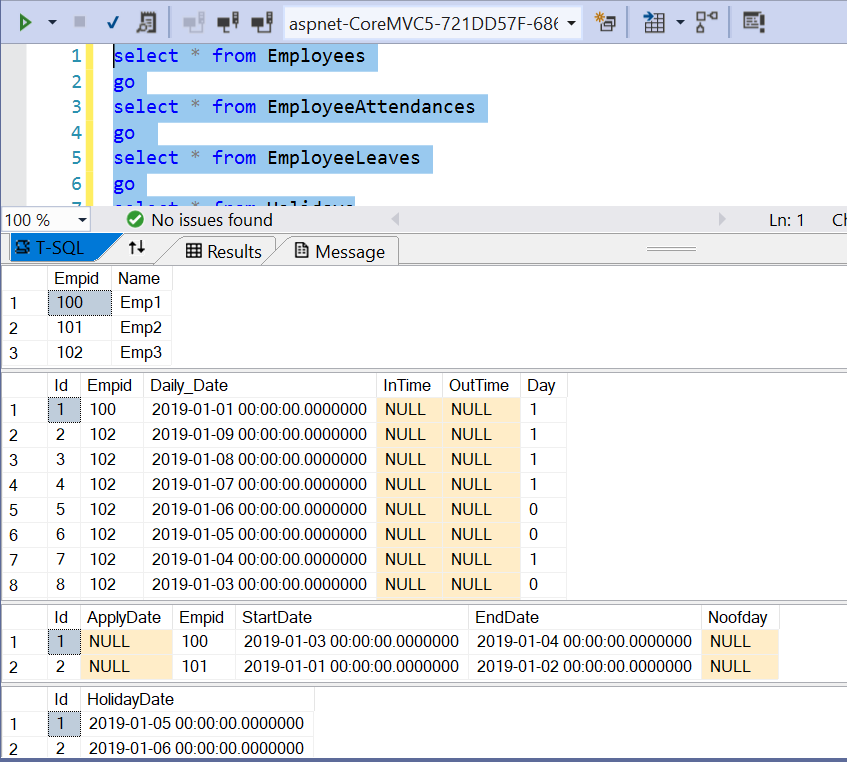
Next, we could create the following view model to display the query result:
public class EmployeeTemp
{
    public int Empid { get; set; }
    public string Name { get; set; }
    public DateTime Date { get; set; }
    public string Status { get; set; }
}
public class EmployeeViewModel
{
    public string Name { get; set; }
    public Dictionary<string,string> Attendance { get; set; }
}
Then, in the controller, we could use the following code to query the database:
public class HomeController : Controller
{
    private readonly ILogger<HomeController> _logger;
    private readonly ApplicationDbContext _dbcontext;
    public HomeController(ILogger<HomeController> logger,  ApplicationDbContext context)
    {
        _logger = logger;
        _dbcontext = context;
    }

    public IActionResult Index()
    {
        //first, we join the Employees and EmployeeAttendances table to get the employee name and the daily_date,
        // then, in the select statement, we could query the employeeleave table and holiday table to set the status.
        var queryresult = (from empatt in _dbcontext.EmployeeAttendances
                      join emp in _dbcontext.Employees
                      on empatt.Empid equals emp.Empid
                      select new EmployeeTemp()
                      {
                          Empid = emp.Empid,
                          Name = emp.Name,
                          Date = empatt.Daily_Date,
                          Status = (
                          empatt.Day == 1 ? "P" :
                          _dbcontext.EmployeeLeaves.Any(c => c.Empid == emp.Empid && empatt.Daily_Date >= c.StartDate && empatt.Daily_Date <= c.EndDate) ? "CL" :
                          _dbcontext.Holidays.Any(h => h.HolidayDate == empatt.Daily_Date) ? "H" :
                          empatt.Day == 0 ? "A" : "Unknown"
                          )
                      }).OrderBy(e=>e.Name).ThenBy(c=>c.Date).ToList();
        //the queryresult as below:
        // Emp1 2019/1/1 p
        // Emp1 2019/1/2 P
        // Emp1 2019/1/3 CL
        //...

        //Then, we could use the following code convert result to your required
        var result = queryresult.GroupBy(c => c.Name).Select(g =>
        {
            var empvm = new EmployeeViewModel();
            empvm.Name = g.Key;
            empvm.Attendance = new Dictionary<string, string>();
            foreach(var i in g)
                empvm.Attendance.Add(i.Date.ToShortDateString(), i.Status);
            return empvm;
        }).ToList();

        return View(result);
    }
Finally, in the view page, we could use foreach statement to loop through the dictionary and display the date and status.
@model IEnumerable<CoreMVC5.Models.EmployeeViewModel>

@{
    ViewData["Title"] = "Index";
}

<h1>Index</h1>

<p>
    <a asp-action="Create">Create New</a>
</p>
<table class="table">
    <thead>
        <tr>
            <th>
                @Html.DisplayNameFor(model => model.Name)
            </th>
            @foreach(var date in Model.FirstOrDefault().Attendance)
            {
                <th>@date.Key</th>
            }
        </tr>
    </thead>
    <tbody>
@foreach (var item in Model) {
        <tr>
            <td>
                @Html.DisplayFor(modelItem => item.Name)
            </td>
             @foreach(var atten in item.Attendance)
                {
                    <td>@atten.Value</td>
                }
        </tr>
}
    </tbody>
</table>
The result as below:
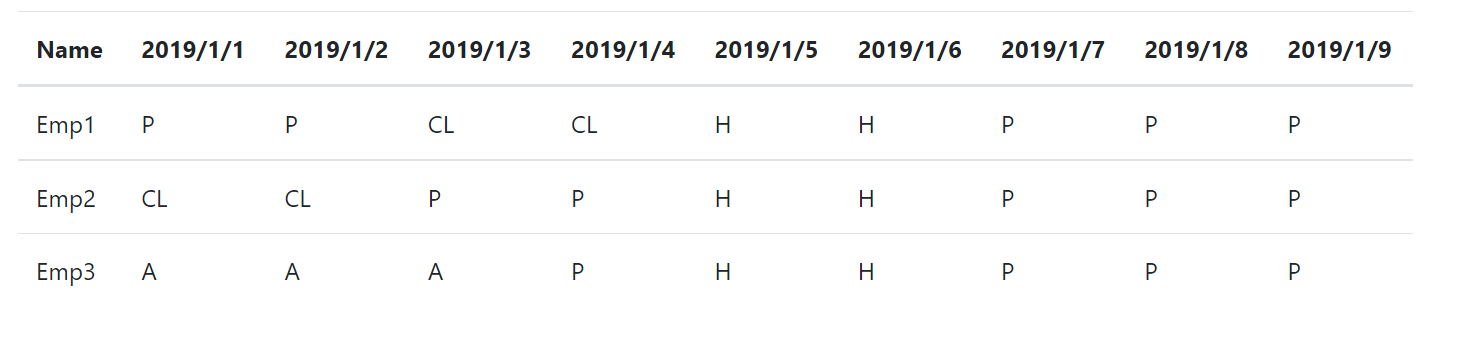
If the answer is the right solution, please click "Accept Answer" and kindly upvote it. If you have extra questions about this answer, please click "Comment".
Note: Please follow the steps in our documentation to enable e-mail notifications if you want to receive the related email notification for this thread.
Best regards,
Dillion