Microsoft Teams | Microsoft Teams for business | Other
Additional features, settings, or issues not covered by specific Microsoft Teams categories

This browser is no longer supported.
Upgrade to Microsoft Edge to take advantage of the latest features, security updates, and technical support.
' cx='32' cy='32' r='32' /%3E%3Ctext x='50%25' y='55%25' dominant-baseline='middle' text-anchor='middle' fill='%23FFF' %3EPK%3C/text%3E%3C/svg%3E)
The Blocked functionality on When Active on Desktop seems to have changed.
I now get Notifications on my mobile device even if I have already read and responded to the notifications on the desktop.
Is there a way to sync notifications so that if they have been read on desktop you don't receive them again as Unread on mobile (and vice versa)?
Additional features, settings, or issues not covered by specific Microsoft Teams categories
' cx='32' cy='32' r='32' /%3E%3Ctext x='50%25' y='55%25' dominant-baseline='middle' text-anchor='middle' fill='%23FFF' %3EL%3C/text%3E%3C/svg%3E)
Yes, this is kind of an important feature we need, considering the amount of corporates using Teams on mobile as well as in laptop.
' cx='32' cy='32' r='32' /%3E%3Ctext x='50%25' y='55%25' dominant-baseline='middle' text-anchor='middle' fill='%23FFF' %3EMH%3C/text%3E%3C/svg%3E)
I too get confused by this.
If I have WhatsApp open on the desktop (but doing something else) my phone will notify me as well as the laptop.
If I read the message on the laptop - the notification disappears from the phone without me doing anything.
And, of course, vice versa
I think this is what JimmyYang and I are after!
E.g. auto immediate synch
' cx='32' cy='32' r='32' /%3E%3Ctext x='50%25' y='55%25' dominant-baseline='middle' text-anchor='middle' fill='%23FFF' %3EJM%3C/text%3E%3C/svg%3E)
Hi @Paige King
You could check your notification on your mobile device settings. If the notifications are set to "Always" you might end up with some duplication. So if you are active on your computer, you could set these settings to "When I am not active on desktop". For more details about it, you could read this part "You might currently be active on the Teams web or desktop app."
If the answer is helpful, please click "Accept Answer" and kindly upvote it. If you have extra questions about this answer, please click "Comment".
Note: Please follow the steps in our documentation to enable e-mail notifications if you want to receive the related email notification for this thread.
It has been a while, how is everything going?
If you have any update about this issue, please feel free to post back.
Just checking in to see if above information was helpful. If you have any further updates on this issue, please feel free to post back.
' cx='32' cy='32' r='32' /%3E%3Ctext x='50%25' y='55%25' dominant-baseline='middle' text-anchor='middle' fill='%23FFF' %3EMD%3C/text%3E%3C/svg%3E)
@JimmyYang-MSFT
After following your instructions, I'm still having the same issue. This is really annoying.
Your instructions are also out of date:
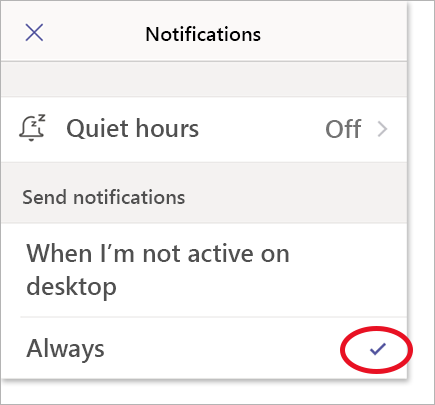
Now it's the opposite, the section is called "Block notifications" and you have a toggle for "When active on desktop".
That's it. It doesn't change the fact that new message label are not synced between desktop and mobile at the moment.