Azure Data Factory
An Azure service for ingesting, preparing, and transforming data at scale.
This browser is no longer supported.
Upgrade to Microsoft Edge to take advantage of the latest features, security updates, and technical support.
' cx='32' cy='32' r='32' /%3E%3Ctext x='50%25' y='55%25' dominant-baseline='middle' text-anchor='middle' fill='%23FFF' %3EGA%3C/text%3E%3C/svg%3E)
I have been working with GIT in Azure Data Factory for about one year. Now I have created another data factory and I would like to link it to the same repository, but use a different collaboration branch. My idea is to establish a PROD branch to collect the things which should go to the production system, which contains only a subset of items I have in the main (collaboration) branch, which I use in my existing data factory (our development factory).
The PROD branch already exists and can be browsed in the existing data factory by switching the branch, and the items, like pipelines, are also visible in the Repository in DevOps (where our GIT resides).
However, after having linked the GIT repository, the new data factory remains empty. I don't get any error messages. I can see the various branches I have in my repository, but no matter which I choose, the data factory does not show any pipeline, dataset or linked service.
Does anybody have experience with GIT linking to multiple data factories.

Hi @Gieger, Alfred ,
If possible would you please share the DataFactory --> Manage --> Git configuration you have for the two DataFactories. Thanks!
Stupid me! Thank you for the question. I failed to specify the root folder, because in my original configuration there is only one folder. Now it works.
nasreen-akter has answered my question by asking a question.
I have failed to specify the root folder of my repository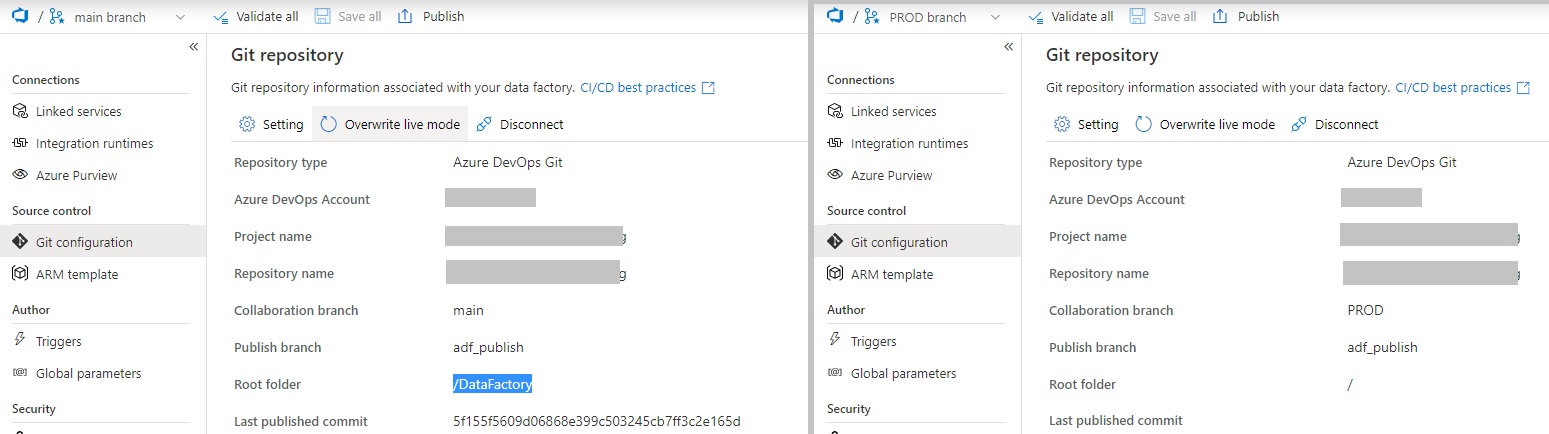
@Gieger, Alfred , glad that it helped! :)