Exchange | Exchange Server | Management
The administration and maintenance of Microsoft Exchange Server to ensure secure, reliable, and efficient email and collaboration services across an organization.
This browser is no longer supported.
Upgrade to Microsoft Edge to take advantage of the latest features, security updates, and technical support.
' cx='32' cy='32' r='32' /%3E%3Ctext x='50%25' y='55%25' dominant-baseline='middle' text-anchor='middle' fill='%23FFF' %3EIM%3C/text%3E%3C/svg%3E)
Hi All,
We have implemented Automated hiring process using SAP Identity Management tool.
So if any new employee joins, then SAP IDM will create his Active Directory User ID and also setup new mailbox automatically.
The new user ID and mailbox are created successfully. But I observed that new user is not showing in outlook ( Global address list).
When I checked the AD attribute (ShowinAddressBook) it is not showing Global Address list. Please see below screenshot.
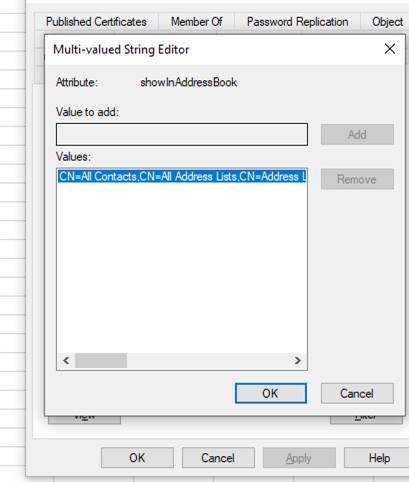
Now how can i add these new users ( without GAL) to GAL in exchange server manually ? I read it is using some power shell script command but I could not find any command for single user to add to GAL list ?
Please help

Copy the attributes from the existing user who is showing in the GAL.
$AddressListDN=(Get-ADUser <user> -Properties *).showInAddressBook
Run the below CMD to set the attribute for the New User.
Set-ADUser <otheruser> -Add @{showInAddressBook=$AddressListDN}
' cx='32' cy='32' r='32' /%3E%3Ctext x='50%25' y='55%25' dominant-baseline='middle' text-anchor='middle' fill='%23FFF' %3EA%3C/text%3E%3C/svg%3E)
Hi @Imran Mullani ,
I think for the AD part you could follow the cmdlets provided by Andy.
But actually I have a question on the process of creating new mailbox for the user.
If you use New-Mailbox, then I think it will be automatically added to the GAL so you don't have to manually set this value for them.
Best regards,
Lou
If the response is helpful, please click "Accept Answer" and upvote it.
Note: Please follow the steps in our documentation to enable e-mail notifications if you want to receive the related email notification for this thread.
Hi @Imran Mullani ,
Do the suggestions above help? If the issue has been resolved, please click “Accept as answer” to mark the helpful reply as an answer, this will make answer searching in the forum easier and be beneficial to other community members as well.
If you are still stuck in this issue, please feel free to post your questions.
Regards,
Lou
If the response is helpful, please click "Accept Answer" and upvote it.
Note: Please follow the steps in our documentation to enable e-mail notifications if you want to receive the related email notification for this thread.
' cx='32' cy='32' r='32' /%3E%3Ctext x='50%25' y='55%25' dominant-baseline='middle' text-anchor='middle' fill='%23FFF' %3EBB%3C/text%3E%3C/svg%3E)
Adding a new mailbox in Exchange 2016 for a user that does not already exist in AD doesn't always add the new to the GAL, so it would be useful to see a succinct example of adding a single user to the GAL