Microsoft Security | Microsoft Entra | Microsoft Entra ID
A cloud-based identity and access management service for securing user authentication and resource access

This browser is no longer supported.
Upgrade to Microsoft Edge to take advantage of the latest features, security updates, and technical support.
' cx='32' cy='32' r='32' /%3E%3Ctext x='50%25' y='55%25' dominant-baseline='middle' text-anchor='middle' fill='%23FFF' %3ETD%3C/text%3E%3C/svg%3E)
Hi,
I have registered Managed identity app with following api permissions,
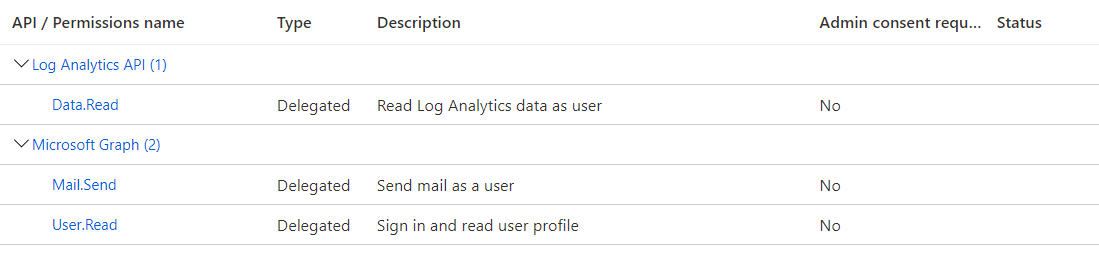
then I was trying to generate the token as the follows, from the on-premise in powerhsell.
$tokenBody = @{
Grant_Type = "client_credentials"
Scope = "https://graph.microsoft.com/.default"
Client_Id = 'xxxx' // client ID
Client_Secret = 'xxxx' // cleint seceret
}
$tokenResponse = Invoke-RestMethod -Uri "https://login.microsoftonline.com/xxxxxxxxxx(tenantid)/oauth2/v2.0/token" -Method POST -Body $tokenBody
Token is successfully generated, then I try the following to send email,
$headers = @{
"Authorization" = "Bearer $($tokenResponse.access_token)"
"Content-type" = "application/json"
}
$MailSender = "xxxxxxxxxx@xxxxxx .com"
$URLsend = "https://graph.microsoft.com/v1.0/users/$MailSender/sendMail"
$jsonrequest=@'
{
"subject":"Did you see last night's game?",
"importance":"Low",
"body":{
"contentType":"HTML",
"content":"They were <b>awesome</b>!"
},
"toRecipients":[
{
"emailAddress":{
"address":"yyyyyyyyyyyyyy@永爱不变 .com"
}
}
]
}
'@
$Response = Invoke-RestMethod -Uri $URLsend -Headers $headers -Body $jsonrequest -Method Post
But the above http post failed with authentication error. Please help if I am missing something.
I also tried the api for createderaft - no help. its the same error.

' cx='32' cy='32' r='32' /%3E%3Ctext x='50%25' y='55%25' dominant-baseline='middle' text-anchor='middle' fill='%23FFF' %3EGS%3C/text%3E%3C/svg%3E)
Your trying to use the Client Credentials flow
Grant_Type = "client_credentials"
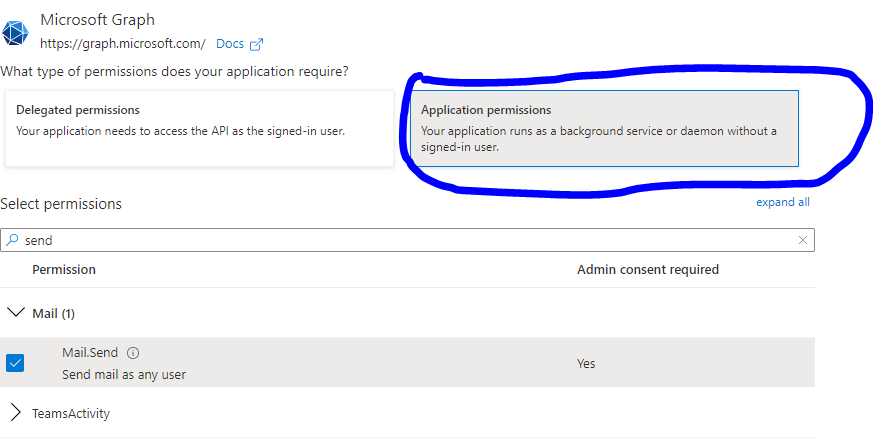
But in your screen shot your using Delegate permissions, for this flow you must use Application permissions (and have them consented to) eg