Exchange Online
A cloud-based service included in Microsoft 365, delivering scalable messaging and collaboration features with simplified management and automatic updates.
This browser is no longer supported.
Upgrade to Microsoft Edge to take advantage of the latest features, security updates, and technical support.
' cx='32' cy='32' r='32' /%3E%3Ctext x='50%25' y='55%25' dominant-baseline='middle' text-anchor='middle' fill='%23FFF' %3EC%3C/text%3E%3C/svg%3E)
Public Folder Deletion Issue with Exchange Online.
Trying to do a Public Folder Migration to Exchange Online, Figured I try the not recommended method of PST export via Outlook and Import.
I have the public folder mailbox created and the proper permissions set, tested creating a few public folders and deleting them. I can't seem to delete a few of the test folders.
Receiver Failed to delete \test with exceptions:
Microsoft.Exchange.Data.StoreObjects.OjectNotFoundException: Could not find dumpster for public folder.
I tried via powershell and getting the same error.
Has anyone ran into this issue or have recommendations on what to try next?
' cx='32' cy='32' r='32' /%3E%3Ctext x='50%25' y='55%25' dominant-baseline='middle' text-anchor='middle' fill='%23FFF' %3EJS%3C/text%3E%3C/svg%3E)
According to your information above, you have used the export and import PST method to migrate your public folders to Exchange online. Then you tested creating some public folders and deleting them but few of them failed.
Deleting Items from Public Folders are stored in the Dumspter, have you checked the Dumpster folder size using below command?
Get-PublicFolder \NON_IPM_SUBTREE\DUMPSTER_ROOT -Recurse -ResultSize:unlimited | ?{$_.FolderClass -ne “$null”} | ft name,foldersize
You could also try Update the public folder hierarchy
Get-Mailbox -PublicFolder | Update-PublicFolderMailbox -InvokeSynchronizer -SuppressStatus
Any update?
All Folder size is Zero.
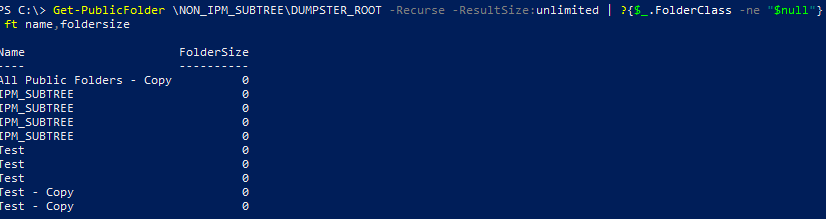
Also, tried to update the hierarchy as well. Still they same error when trying to remove the folder
The list above shows the public folders you have deleted, did you create them again after you successfully deleted them? They still show in EAC and not able to remove?
Any progress so far?
' cx='32' cy='32' r='32' /%3E%3Ctext x='50%25' y='55%25' dominant-baseline='middle' text-anchor='middle' fill='%23FFF' %3EDW%3C/text%3E%3C/svg%3E)
I am seeing the same issue with my 365 public folders. They were created under Exchange Public folder via O365.
This what I just did to get past this:
Set-PublicFolder "\PublicFolder-to-delete" -Path "\NON_IPM_SUBTREE\DUMPSTER_ROOT"
Took care of the issue
' cx='32' cy='32' r='32' /%3E%3Ctext x='50%25' y='55%25' dominant-baseline='middle' text-anchor='middle' fill='%23FFF' %3EJW%3C/text%3E%3C/svg%3E)
I was facing the same error, but after a failed PF migration attempt from Exchange 2016 to Exchange Online. Looks like old public folder mailboxes were not deleted properly.
DannyW-1138 solution with Set-PublicFolder and path to NON_IPM_SUBTREE\DUMPSTER_ROOT worked for me as well.
' cx='32' cy='32' r='32' /%3E%3Ctext x='50%25' y='55%25' dominant-baseline='middle' text-anchor='middle' fill='%23FFF' %3EFT%3C/text%3E%3C/svg%3E)
Holy Hell. Finally a fix that works.
Thank you very much for posting this.