Developer technologies | Small BASIC
A programming language created by Microsoft that serves a stepping stone for beginners from block-based coding languages to more complex text-based languages.
This browser is no longer supported.
Upgrade to Microsoft Edge to take advantage of the latest features, security updates, and technical support.
' cx='32' cy='32' r='32' /%3E%3Ctext x='50%25' y='55%25' dominant-baseline='middle' text-anchor='middle' fill='%23FFF' %3EJ%3C/text%3E%3C/svg%3E)
I'm Playing around with small basic and I'm trying to add two Buttons at the end of the program, but these don't do anything. I currently only know how to do things with If- and while-loops.
This is the code:
ButtonRestart = Controls.AddButton("Restart", 10, 10)
ButtonExit = Controls.AddButton("Exit", 90, 10)
Controls.SetSize(ButtonRestart, 70, 26)
Controls.SetSize(ButtonExit, 70, 26)
  If Controls.LastClickedButton = ButtonRestart Then
    GraphicsWindow.Clear()
    GraphicsWindow.Hide()
    Goto Start
  ElseIf Controls.LastClickedButton = ButtonExit Then
    GraphicsWindow.Hide()
    Program.End()
  EndIf
' cx='32' cy='32' r='32' /%3E%3Ctext x='50%25' y='55%25' dominant-baseline='middle' text-anchor='middle' fill='%23FFF' %3ES%3C/text%3E%3C/svg%3E)
The ButtonClick event should be captured in a subroutine and processed via a variable in the main program.
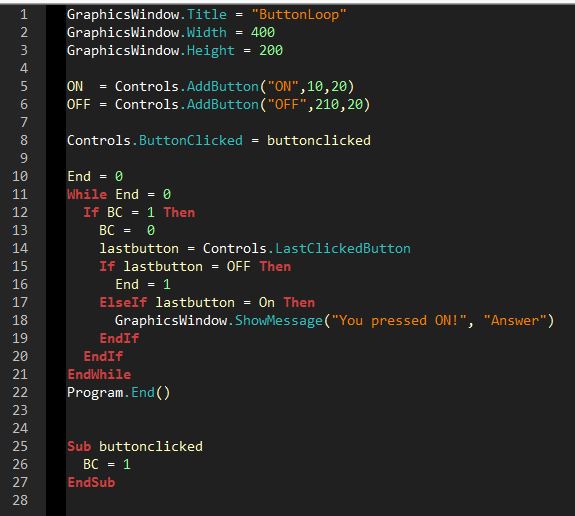

To make it easier for someone to use your program it is better to publish it as code instead as an image:
Use the fifth button on the top of the answerform ( marked with 001 010 ) It is then easy to copy.
GraphicsWindow.Title = "Buttonloop"
GraphicsWindow.Width = 400
GraphicsWindow.Height = 200

ON = Controls.AddButton("ON",10,20)
OFF = Controls.AddButton("OFF",200,20)

Controls.ButtonClicked = buttonclicked

End=0
While End = 0
  If BC=1 Then
    BC = 0
    lastbutton = Controls.LastClickedButton
    If lastbutton = OFF Then
      End = 1
    ElseIf lastbutton = ON Then
      GraphicsWindow.ShowMessage("You pressed ON","Answer")
    EndIf
  EndIf
EndWhile
Program.End()


Sub buttonclicked
  BC = 1
EndSub
 Start:
 'WIDTH
 TextWindow.Show()
 InputWidth:
 TextWindow.WriteLine("Width:")
 input1 = TextWindow.Read()
 If (input1+0 = input1) Then
 Else
    TextWindow.WriteLine(input1+" isn't a number")
    Goto InputWidth
 EndIf

'HEIGHT
InputHeight:
TextWindow.WriteLine("Height:")
input2 = TextWindow.Read()
If(input2+0 = input2) Then
Else
    TextWindow.WriteLine(input2+" isn't a number")
    Goto InputHeight
EndIf

'DRAW
GraphicsWindow.Title = "Random Image"
GraphicsWindow.Width = input1
GraphicsWindow.Height = input2
GraphicsWindow.Show()

For y = 1 To input2
For x = 1 To input1
    r = Math.GetRandomNumber(256) - 1
    g = Math.GetRandomNumber(256) - 1
    b = Math.GetRandomNumber(256) - 1
    GraphicsWindow.PenColor = GraphicsWindow.GetColorFromRGB(r,g,b)
    GraphicsWindow.DrawLine(x,y,x + 1,y +1)
EndFor
EndFor

'CLEAR IMG
Program.Delay(3000)
GraphicsWindow.Clear()

'BUTTONS
ButtonRestart = Controls.AddButton("Restart", 10, 10)
ButtonExit = Controls.AddButton("Exit", 90, 10)
Controls.SetSize(ButtonRestart, 70, 26)
Controls.SetSize(ButtonExit, 70, 26)

If ButtonRestart = Controls.LastClickedButton Then
    GraphicsWindow.Clear()
    GraphicsWindow.Hide()
    Goto Start
ElseIf ButtonExit = Controls.LastClickedButton Then
    GraphicsWindow.Hide()
    Program.End()
EndIf