Microsoft 365 and Office | SharePoint | Development
The process of building custom applications and tools that interact with Microsoft SharePoint, including SharePoint Online in Microsoft 365.

This browser is no longer supported.
Upgrade to Microsoft Edge to take advantage of the latest features, security updates, and technical support.
' cx='32' cy='32' r='32' /%3E%3Ctext x='50%25' y='55%25' dominant-baseline='middle' text-anchor='middle' fill='%23FFF' %3ENS%3C/text%3E%3C/svg%3E)
When I create a new app using the predefined "Tasks" app it gives me the option of creating sub tasks (there are several different ways to create a subtask). However, this type of list doesn't seem to give me the filtering capability that I would like. So I tried creating a custom list, added the predefined "Task" as a content type available in the new custom list. Now I have the filtering / grouping capability that I want but I cannot create any subtasks, that option is not even available. I deleted "Item" as an available content type from the new list so the only content type available is "Task". It looks like every new task I create is still being treated as an "Item" instead of a task. Any ideas?
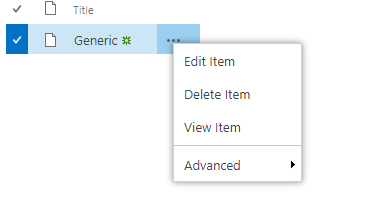
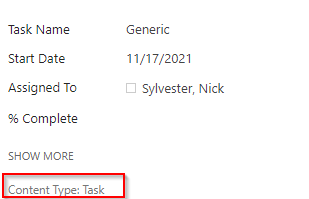

Hi @Nick Sylvester , welcome to Q&A forum!
This is the behavior by defualt.
A SharePoint content type pulls together an item and information about the item. The item might be one of many different kinds of files, a document, an excel workbook, or even a status indicator for a progress report.
A task list is a type of list, it includes task, canlendar.... And yes, in a task list we cannot have a sort set for that view.
See this similar post:
can't create subtask
============================================
A custom list with task content type:
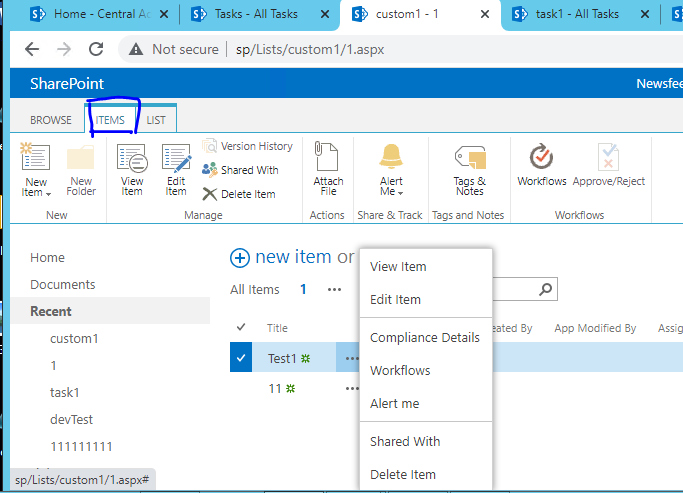
A task list:
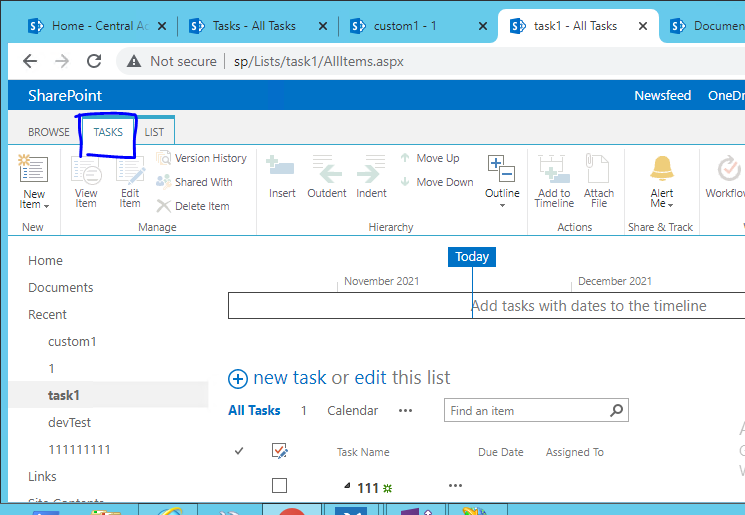
Reference:
Introduction to content types and content type publishing
Create and manage a project task list
If the answer is helpful, please click "Accept Answer" and kindly upvote it. If you have extra questions about this answer, please click "Comment".
Note: Please follow the steps in our documentation to enable e-mail notifications if you want to receive the related email notification for this thread.
Thankyou for the info. So is there no way to get a task content type in a custom list to behave like a task content type in the task list app? If not, is there anyway to create folders in a task list?
Hi @Nick Sylvester ,
Q1: It is currently not supported to get a task content type in a custom list to behave like a task content type in the task list.
Q2: Usually a list is used to create items and a library in SharePoint is essentially a special list, explicitly created to store files/documents. If you want to create folders, the short answer is to use a library. In a library we can also use filtering / grouping and create a sub folder...
For your reference:
Introduction to libraries
SharePoint lists vs. libraries
Note: Microsoft is providing this information as a convenience to you. The sites are not controlled by Microsoft. Microsoft cannot make any representations regarding the quality, safety, or suitability of any software or information found there. Please make sure that you completely understand the risk before retrieving any suggestions from the above link.
==============================
For a better user experience, I will convert the answer to comment. And if you find my answer useful, you could accept it as "Accept Answer".
Hi @Nick Sylvester , is my suggestion helpful? I am willing to hear from you.