Azure Logic Apps
An Azure service that automates the access and use of data across clouds without writing code.
This browser is no longer supported.
Upgrade to Microsoft Edge to take advantage of the latest features, security updates, and technical support.
' cx='32' cy='32' r='32' /%3E%3Ctext x='50%25' y='55%25' dominant-baseline='middle' text-anchor='middle' fill='%23FFF' %3EPN%3C/text%3E%3C/svg%3E)
I have a requirement where we need to schedule a logic app at 1.15 pm and then there is a gap of 2 hours , next scheduled time will be 3,3.30,4,4.30 subsequently. Using Recurrence trigger.
How will I achieve this using recurrence trigger in the logic app

@prajakta nawale Just following up to see if my response helps
It didn't work as logic app was not retriggered at any interval
Thank you for your response.I have another query, we have set recurrence at all hours except 2 AM and minutes are given 0,30 then also it is running at 2 Am, 2.30 Am. So recurrence is not happening as per schedule it runs at every 30 min. Please do the needful here as


This can be achieved with a combination of the following configuration of the trigger and a trigger condition.
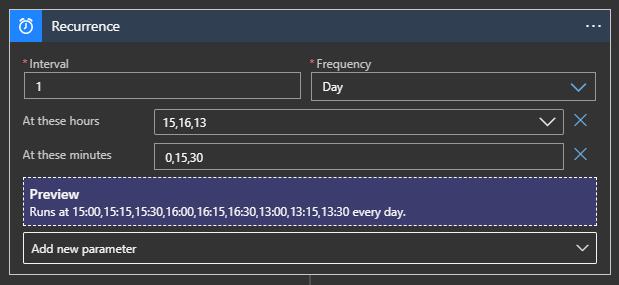
Here is the trigger condition
@{if(equals(split(split(trigger().scheduledTime, 'T')[1],':')[0],13),if(equals(split(split(trigger().scheduledTime, 'T')[1],':')[1],15),true,false),if(equals(split(split(trigger().scheduledTime, 'T')[1],':')[1],15),false,true))}
Here is the same trigger condition expanded for readability
   if(
     equals(
       split(
         split(trigger().scheduledTime, 'T')[1],
         ':'
       )[0],
       13
     ),
     if(
       equals(
         split(
           split(trigger().scheduledTime, 'T')[1],
           ':'
         )[1],
         15
       ),
       true,
       false
     ),
     if(
       equals(
         split(
           split(trigger().scheduledTime, 'T')[1],
           ':'
         )[1],
         15
       ),
       false,
       true
     )
   )
Thank you for your response.I have another query , we have set recurrence at all hours except 2 AM and minutes are given 0,30 then also it is running at 2 Am, 2.30 Am.So recurrence is not happening as per schedule it run at every 30 min. Please do the needful here as
The trigger defaults to UTC. You will have to set the time zone property for local time as below.

Also, I've answered your follow post for this query.