Microsoft Security | Intune | Configuration
Setting up and managing device configurations using Intune

This browser is no longer supported.
Upgrade to Microsoft Edge to take advantage of the latest features, security updates, and technical support.
' cx='32' cy='32' r='32' /%3E%3Ctext x='50%25' y='55%25' dominant-baseline='middle' text-anchor='middle' fill='%23FFF' %3EPC%3C/text%3E%3C/svg%3E)
I am currently in the process of trying to migrate my GPO settings to Intune and running into a few issues when I am using Device Configuration Profiles.
My test scenario is as follows:
Two Computers - PC1 and PC2 both with the same setup
Multiple Users
Intune Configuration Profile Settings
No GPO settings being applied except for Domain Password Policy (which is Enforced)
Here are the details when each user logs on to each computer
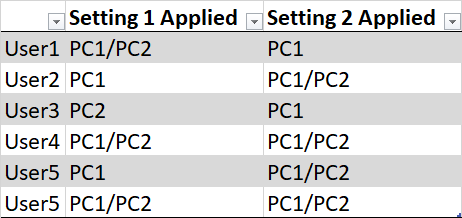
To help understand the table for example if User1 logs into PC1 he will get Setting 1 and Setting 2 applied, however if User 1 logs into PC2 he will only get Setting 1 applied.
I have already checked View Report and it shows it applied Successfully except for a blank logged in user. I also went to Troubleshooting and Support and got no info from there.
I been working on this for days trying to figure it out, and I thought it had to do with being a Mail User vs an Office 365 mailbox, but that didn't seem to make a difference. I am open to any suggestions on how to troubleshoot this.
Setting up and managing device configurations using Intune
Other Intune-related topics, including unsupported scenarios and platform-specific behaviors
' cx='32' cy='32' r='32' /%3E%3Ctext x='50%25' y='55%25' dominant-baseline='middle' text-anchor='middle' fill='%23FFF' %3ERJ%3C/text%3E%3C/svg%3E)
"For both Setting 1 and Setting 2, the Intune Configuration Profiles are all being to Device Groups." - I will suggest to deploy against user based groups.
"They are Hybrid devices, however I blocked Inheritance for test purposes to ensure there are no GPO conflicts." - Check in the MDM diagnostics report if the settings from Intune are applying. I will still suggest to use MDMwinoverGPO CSP to ensure that MDM policies take precedence.
"I can confirm that the Configuration Profiles are showing "Succeeded" for all users." - Doesn't always mean that the settings are applying as intended.
@Rahul Jindal thanks for the info. I will work on this with User Groups and use Filters. Hopefully I have more success.
@Rahul Jindal and @Lu Dai-MSFT to answer your questions:
I am trying to avoid using Filters and work with Device Groups, but not sure that will be an option.

@Prescimone, Chris Thanks for posting in our Q&A.
To clarify this issue, we appreciate your help to collect some information:
If there is anything update, feel free to let us know.
If the answer is the right solution, please click "Accept Answer" and kindly upvote it. If you have extra questions about this answer, please click "Comment".
Note: Please follow the steps in our documentation to enable e-mail notifications if you want to receive the related email notification for this thread.
Are the Device Config policies assigned to device based group or users? Also, if the devices are Hybrid joined then you may want to throw in the CSP of MDM win over GPO policy just to make sure that MDM policies you deploy takes precedence over GPO.