Azure Internet of Things
A category of Azure services for internet of things devices.
This browser is no longer supported.
Upgrade to Microsoft Edge to take advantage of the latest features, security updates, and technical support.
' cx='32' cy='32' r='32' /%3E%3Ctext x='50%25' y='55%25' dominant-baseline='middle' text-anchor='middle' fill='%23FFF' %3EAJ%3C/text%3E%3C/svg%3E)
Hai,
I'm using MQTTBox for testing the device to cloud connection. I have registered on Azure. I try to establish a connection to the cloud using MQTTBox. But Connection error is shown on there.
Host =iothubhostname
username={iothubhostname}/RIOD_GREECE_TEST1/api-version=2016-11-14
client id=RIOD_GREECE_TEST1
password =SAS token generated using "visual studio code"(using shared access policies)
it has been saying connection error
is the parameters are correct?
is there is any other method for generating a password? with example?
A category of Azure services for internet of things devices.

Thanks for your question @Akhil joy . Let me setup MQTTBox on my Windows machine to test it.
In the meantime I can notice that your username may be incorrect. As described here "Using the MQTT protocol directly (as a device)":

' cx='32' cy='32' r='32' /%3E%3Ctext x='50%25' y='55%25' dominant-baseline='middle' text-anchor='middle' fill='%23FFF' %3EQ%3C/text%3E%3C/svg%3E)
Hello @Akhil joy , Just checking back, could you please let us know if you need further help in this matter.
Hello @Akhil joy , Just checking back, could you please let us know if you need further help in this matter.Please accept the below helpful response as 'Answer', which will be helpful to others as well with similar question, so that we can close this thread.
Hello @Akhil joy , Please accept helpful responses as 'Answer', which will be helpful to others as well with similar question.
Hello @Akhil joy , Thanks for reaching out to us!
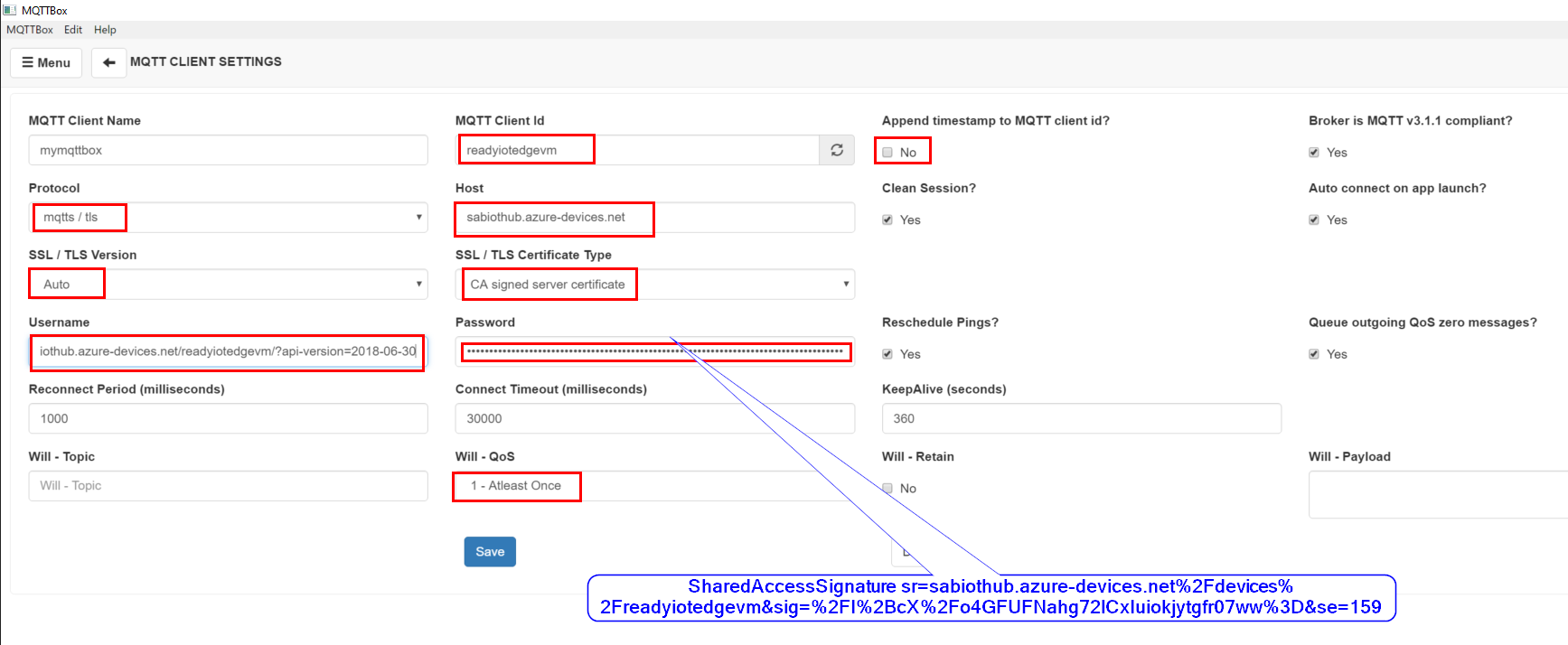
Here is my MQTTbox connection how I am connecting to IoTHub and sending messages..
Please verify your IoT Hub Host name and use only one MQTTbox connection at a time.
The right host should be the fully qualified name: sabiothub.azure-devices.net
• MQTT Connection Name - This is any name that you want to give the connection, only visible in MQTTBox.
• MQTT Client ID - This is the Azure IoT Device name from above.
• Host - This is the Azure IoT Hub URI, and we will need to modify this a little bit. The entire connection string should look like:
{IoT Hub Name}.azure-devices.net/$iothub/websocket
Or
{IoT Hub Name}.azure-devices.net
• Username - is the FQDN name of the IoT Device, with some additional information. It should look like the following:
{IoT Hub Name}.azure-devices.net/{Device Name}/?api-version=2018-06-30
• Password - is the SAS token that was generated from above.
Example: SharedAccessSignature sr=sabiothub.azure-devices.net%2Fdevices%2Freadyiotedgevm&sig=%Fo4Gty07ww%3D&se=1598
• Append timestamp to MQTT client id -This should be set to "No".
• SSL/TLS Version - This should be set to Auto.
• Will - QoS - This should be set to 1
• SSL/TSL Certificate Type - This should be set to CA signed server certificate.
I have included the image which gives all details on MQTTBox.
Connection Over:
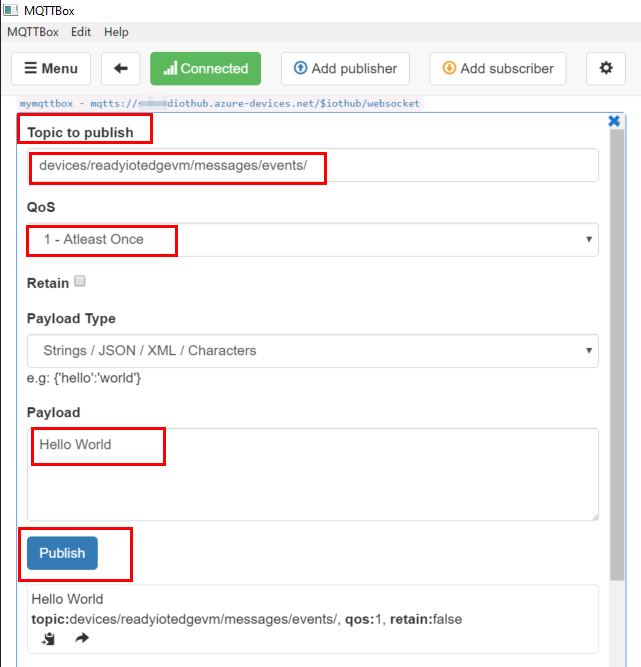
Sending messages from MQTTBox to cloud:
Hello @Akhil joy ,Just checking back, could you please let us know if you need further help in this matter.
Hello @Akhil joy , Here is another way to generate the SAS token via Azure Device Explorer tool:
We can quickly make use of the Device Explorer tool. Make use of SetupDeviceExplorer.msi located at the bottom of the page.
Open the tool, Update with your IoT Hub Connection string

Go to the Management tab, select your Device from the list, and click the SAS Token button.

Pop up window opens and then select your device + number of days of validity, and then click Generate button.

Hello @Akhil joy , Just checking back, could you please let us know if you need further help in this matter.
Hello @Akhil joy , Just checking back, could you please let us know if you need further help in this matter. Please accept helpful responses as 'Answer', which will be helpful to others as well with similar question.
' cx='32' cy='32' r='32' /%3E%3Ctext x='50%25' y='55%25' dominant-baseline='middle' text-anchor='middle' fill='%23FFF' %3EGD%3C/text%3E%3C/svg%3E)
Hi, can i use this same process to connect MQTT Box to Azure IoT Central