Developer technologies | Windows Presentation Foundation
A part of the .NET Framework that provides a unified programming model for building line-of-business desktop applications on Windows.
This browser is no longer supported.
Upgrade to Microsoft Edge to take advantage of the latest features, security updates, and technical support.
' cx='32' cy='32' r='32' /%3E%3Ctext x='50%25' y='55%25' dominant-baseline='middle' text-anchor='middle' fill='%23FFF' %3EMK%3C/text%3E%3C/svg%3E)
I have a WPF application. Which is Re sizable. But I want to hide the Resize cursor on left edges of the Window and some specific position of the window. Someone suggest me to call the Win32 API but I don't know how to do that.

Another similar way is to test the return of DefWindowProc in WM_NCHITTEST
                int nRet = DefWindowProc(hWnd, WM_NCHITTEST, 0, lParam);
                switch (nRet)
                {
                    case HTLEFT:
                    case HTTOP:
                    case HTBOTTOM:
                    case HTRIGHT:
                    case HTBOTTOMLEFT:
                    case HTBOTTOMRIGHT:
                    case HTTOPLEFT:
                    case HTTOPRIGHT:
                        {
                            handled = true;
                            return new IntPtr(HTNOWHERE);
                        }
                }
with :
        [DllImport("User32.dll", SetLastError = true, CharSet = CharSet.Unicode)]
        public static extern int DefWindowProc(IntPtr hWnd, int msg, int wParam, IntPtr lParam);
Your Code is not working, I am still able to resize my WPF main Window. Please give another solution.
I (re)tested it on my OS (Windows 10 21H1) and it works for me
(this method was used in old MS SDK C++ samples and has always worked...)
ok, then give me your demo project please. share the download link or any git hub link.
Test WPF Project (VS 2019, .NET Framework 4.7.2) : WPF_NCHITTEST.zip
Comment the "case" to allow other sides, like :
//case HTRIGHT:
etc...
Thank you sir, you save my life. Now the resize cursor is totally gone. But I want to remove from the left side or some other specif portion of the edges.
How I can do that.
I am not a pro code but please give example with proper code snippet.
Thank you once again.
I don't understand very well "But I want to remove from the left side or some other specif portion of the edges"
If you want to remove just cursor on the left side, you can comment all other cases :
  switch (nRet)
                {
                    case HTLEFT:
                    //case HTTOP:
                    //case HTBOTTOM:
                    //case HTRIGHT:
                    //case HTBOTTOMLEFT:
                    //case HTBOTTOMRIGHT:
                    //case HTTOPLEFT:
                    //case HTTOPRIGHT:
                        {
                            handled = true;
                            return new IntPtr(HTNOWHERE);
                        }
                }
Thank your very much sir. But one problem is your code is perfectly working in your project which you give me but your code is not working in my project. simply I copy paste but still not working. May be the Handle initializes cause the problem. Do I need to do something in window_Load event and give some try catch exception?
Can you please reply?
Is there other code in your project ?
Did you copy exactly all the code, with SourceInitialized += HandleInitialized, the HandleInitialized function and checked with a Break Point that it is callled ?
(same thing inside WndProc with a BP)
Yes, sir there are other code in my project. I already tried using breakpoints but no error found.
If we can contact on social media, so I can share my laptop screen with any desk and you can help me. Sir Can I contact you?
The Breakpoints are used to check that the code is really called
Is it the case for WndProc when you move the mouse ? , like :
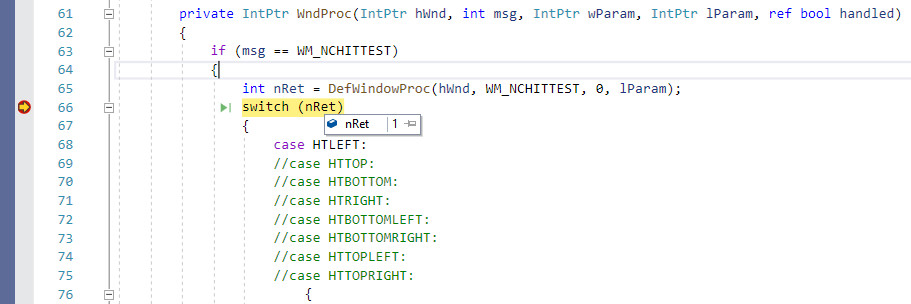
Yes, nothing works. May be some other code conflict with the handle. We have to do something in window Load event.
Yes, nothing works.
You mean that the BP inside WndProc is not fired ?
HwndSource.AddHook is it called ?
Yes, exactly the WndProc is not fired. void HandleInitialized this is not working. Instead of that we have to do is window load event.
But do you call SourceInitialized += HandleInitialized in MainWindow constructor,
or "override void OnSourceInitialized" ?
Yes, sir I already called the SourceInitialized += HandleInitialized in MainWindow constructor but still it's not loading in my application.
The application is slightly working on OnSourceInitialized but it crashes after some time. How I overcome that?
There must be other code to make it crash, as I don't see how it can crash with just WM_NCHITTEST handling...
Thank you sir, for your enormous effort. I understand that, the other code crash it.
I have another one question that, as you see previously that just comment // case to remove the cursor. But I have another important question is suppose I want to remove the cursor from a small part of the left side not total left side. Then what I do?
Test the mouse position
For example, for half left : half HTLEFT
Sir, I mark your question as Accepted.
Now, please tell me with an code example that how I use the half HTLEFT that means how I take the mouse input on a specific position.
Suppose, in left corner of the window I want to disable the mouse cursor for very small margin. How I do modification in my code? How I define the half HTLEFT?
But did you click on "half HTLEFT" link ?
I could not post in comments, so I posted the code in this link, where I compare mouse position (pt) with Rectangle of the window (rc)
(rc.bottom - rc.top) /2 for the test with the half height of the window
Thank you sir, But this time there no output may be you do some code error and mistake. I copy paste your code but does not work.
Can you please give me again with the project download link with this code solve.
It is just an update of WndProc in the same WPF_NCHITTEST.zip project I posted
Just replace this function and add the declarations (in the class, like others) that I posted after " with :"
Thank you sir. But I already tested that but it does not give any output. I suggest you to try in your computer and if the output window appear in your case then give me the download link of that project after code modification.
I am sorry sir, if I irritate you.
I don't understand what you mean by "output" as it is a Form...
I updated the sample by adding a message in a TextBlock when the cursor is removed or not on the left : WPF_NCHITTEST.zip

Try adding these functions to your window:
protected override void OnSourceInitialized( EventArgs e )
{
    base.OnSourceInitialized( e );
    HwndSource s = (HwndSource)PresentationSource.FromVisual( this );
    s.AddHook( WndProc );
}

private IntPtr WndProc( IntPtr hwnd, int msg, IntPtr wParam, IntPtr lParam, ref bool handled )
{
    const int WM_NCHITTEST = 0x0084;
    const int HTNOWHERE = 0;

    switch( msg )
    {
    case WM_NCHITTEST:

        int x = lParam.ToInt32( ) & 0xffff;
        int y = lParam.ToInt32( ) >> 16;

        var p = new Point( x, y );
        p = PointFromScreen( p );

        if( p.X < SystemParameters.ResizeFrameVerticalBorderWidth )
        {
            handled = true;

            return new IntPtr( HTNOWHERE );
        }
        break;
    }

    return IntPtr.Zero;
}
It disable the resizing at left. Add more tests for p.X and p.Y (the local coordinates of mouse pointer) according to your needs.
Your Code is not working, I am still able to resize my WPF main Window. Please give another solution.
Are you able to resize your window in this experimental case?
protected override void OnSourceInitialized( EventArgs e )
{
    base.OnSourceInitialized( e );
    HwndSource s = (HwndSource)PresentationSource.FromVisual( this );
    s.AddHook( WndProc );
}

private IntPtr WndProc( IntPtr hwnd, int msg, IntPtr wParam, IntPtr lParam, ref bool handled )
{
    const int WM_NCHITTEST = 0x0084;
    const int HTNOWHERE = 0;

    switch( msg )
    {
    case WM_NCHITTEST:

        handled = true;

        return new IntPtr( HTNOWHERE );
    }

    return IntPtr.Zero;
}
Do you have more code in your window that maybe affects the behaviour?
This time your code freeze my WPF application window. But somehow I found a way to remove the Resize cursor but the problem is I don't know how to apply in left side of a window. Because the code totally remove the resize cursor from all edges that means left, right, top and bottom.
Please see this Stack overflow post : https://stackoverflow.com/questions/3386486/wpf-make-window-unresizeable-but-keep-the-frame/3462746