Developer technologies | Visual Studio | Testing
A suite of integrated tools for creating, running, and managing tests to ensure code quality and reliability.
This browser is no longer supported.
Upgrade to Microsoft Edge to take advantage of the latest features, security updates, and technical support.
' cx='32' cy='32' r='32' /%3E%3Ctext x='50%25' y='55%25' dominant-baseline='middle' text-anchor='middle' fill='%23FFF' %3EO%3C/text%3E%3C/svg%3E)
In VS2022, I cannot open UI maps that were made in my SLN in prior versions of VS. The maps were opening fine in VS2019, but when I try to open them in VS2022 (double-clicking them in the solution explorer), the following dialog appears:
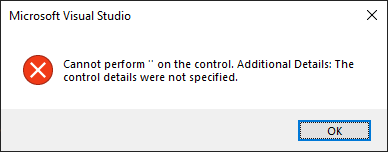
If I add a new UI map in VS2022, it will open just fine.
What can I do to resolve this?
(Note - Not ready to move from CodedUI at this time.)
' cx='32' cy='32' r='32' /%3E%3Ctext x='50%25' y='55%25' dominant-baseline='middle' text-anchor='middle' fill='%23FFF' %3EMT%3C/text%3E%3C/svg%3E)
You should use the Feedback button in the caption bar of VS 2022 to report this issue directly to the VS team. The tool can take a snapshot of the IDE along with other important data and provide you feedback quicker. You should also make sure you're running the latest update as at least one CodedUI issue has been fixed in the post-RTM release.