Azure Logic Apps
An Azure service that automates the access and use of data across clouds without writing code.
This browser is no longer supported.
Upgrade to Microsoft Edge to take advantage of the latest features, security updates, and technical support.
' cx='32' cy='32' r='32' /%3E%3Ctext x='50%25' y='55%25' dominant-baseline='middle' text-anchor='middle' fill='%23FFF' %3EOP%3C/text%3E%3C/svg%3E)
I have a logic app that has 3 instances of the excel add a row into a table connector. They add a row into a table in a .xlsx file created earlier in the logic app based on 1 of 3 templates .xlsx files, all with tables set up in them. They are all populated by the same variables (that are set to differing values based on the preceding logic app actions). 2 of the 3 connectors function completely fine, however 1 constantly returns the error in the title -
{
"status": 400,
"message": "A value must be provided for item.\r\nclientRequestId: 2b07c89d-4d9a-4316-aff1-df269785ff52",
"error": {
"message": "A value must be provided for item."
},
"source": "excelonline-we.azconn-we.p.azurewebsites.net"
}
The inputs are all valid values and none of the table items are missing. The set up between the 3 connectors is effectively identical, barring the specific content in the body, which as mentioned does not have any invalid or missing values, so I do not understand why this one connector won't work.
Any advice or suggestion to get around this error would be greatly appreciated. Thanks.

Can you include a screen shot of your Logic app model @Oscar Pickering ? My initial guess is that your issue is either a concurrency issue or a read/write lock.
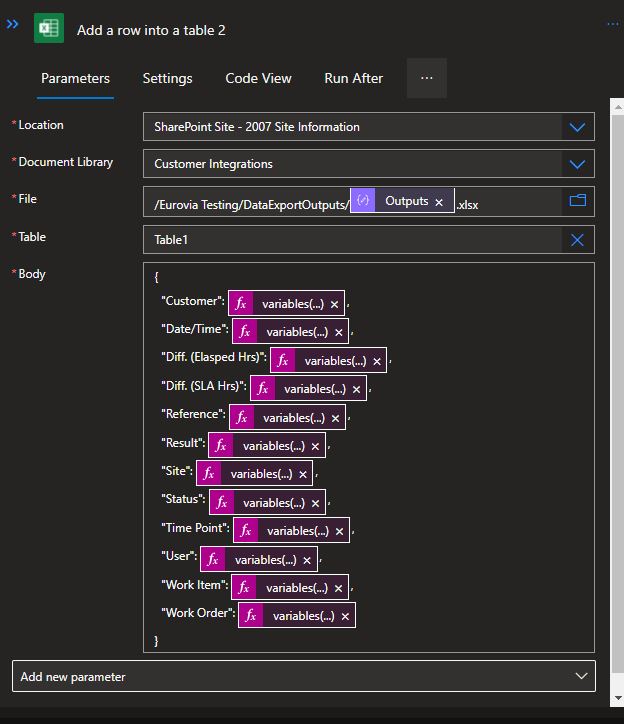
This is the connector that's failing.
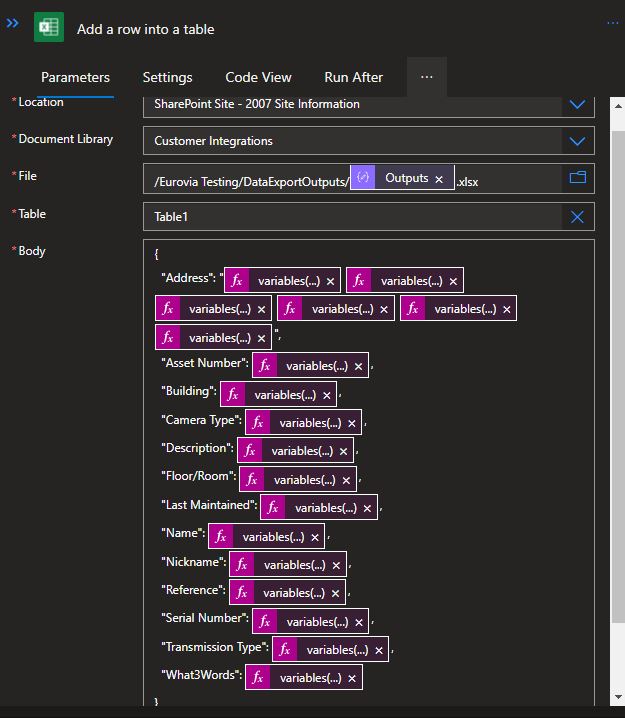
And this is one of the two that isn't. They're both nested in identical until loops, so no concurrency settings. They both write to the same sharepoint location, just using slightly different file templates. As mentioned above, there's effectively no difference between them bar the body, which is valid for both.