Microsoft Security | Intune | Configuration Manager | Other
Other Configuration Manager-related features and issues

This browser is no longer supported.
Upgrade to Microsoft Edge to take advantage of the latest features, security updates, and technical support.
' cx='32' cy='32' r='32' /%3E%3Ctext x='50%25' y='55%25' dominant-baseline='middle' text-anchor='middle' fill='%23FFF' %3ERK%3C/text%3E%3C/svg%3E)
hello ,
I am trying to export and import the task sequence .It exported well but i tried to import it it threw error
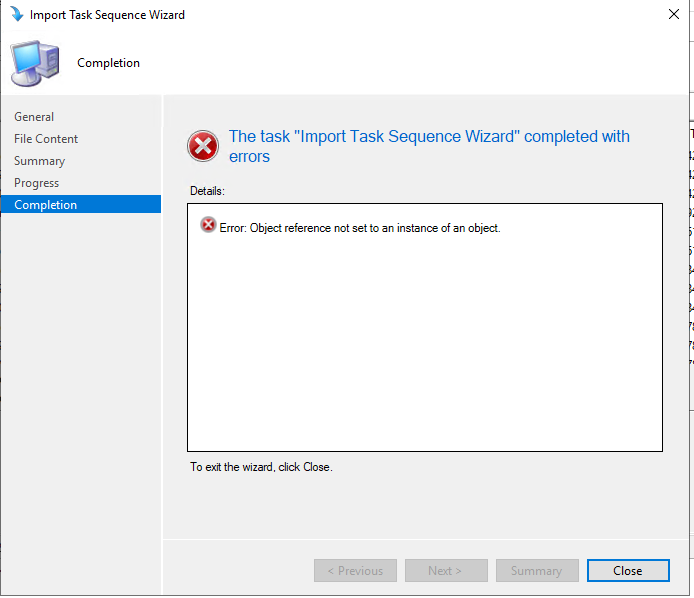
please suggest
Thank
Rich

Hi, @Richa Kumari
Thank you for posting in Microsoft Q&A forum.
It turns out that there was some changed made to the Install Software Update step and it causes the Import Wizard to fail.
You may remove the Install Software Update step before exporting your Task Sequence.
Or you may try to delete the "SMS_TaskSequence_InstallUpdateAction" Step(s) from the object.xml inside the Task Sequence ZIP like below blog mentioned:
https://miketerrill.net/2016/07/31/import-task-sequence-failure-cm-1606/
(Please note: Information posted in the given link is hosted by a third party. Microsoft does not guarantee the accuracy and effectiveness of information.)
If the answer is helpful, please click "Accept Answer" and kindly upvote it. If you have extra questions about this answer, please click "Comment".
Note: Please follow the steps in our documentation to enable e-mail notifications if you want to receive the related email notification for this thread.
May we know is there any update on this thread?