Azure SQL Database
An Azure relational database service.
This browser is no longer supported.
Upgrade to Microsoft Edge to take advantage of the latest features, security updates, and technical support.
' cx='32' cy='32' r='32' /%3E%3Ctext x='50%25' y='55%25' dominant-baseline='middle' text-anchor='middle' fill='%23FFF' %3ELS%3C/text%3E%3C/svg%3E)
Hi,
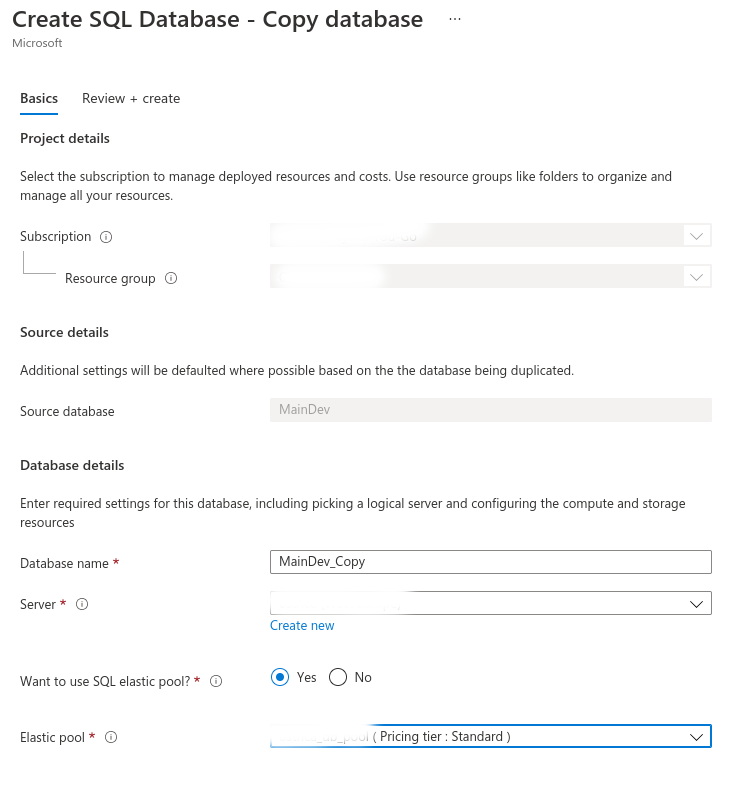
I'd like to copy a SQL database to create another with the same schema and storage procedures. To do that, I tried the Copy option of the Azure portal as you can see in the next image.

The way I tried to apply the copy operation is shown in the next image. As you can see, the copied database will be in an elastic pool with a Standard tier.
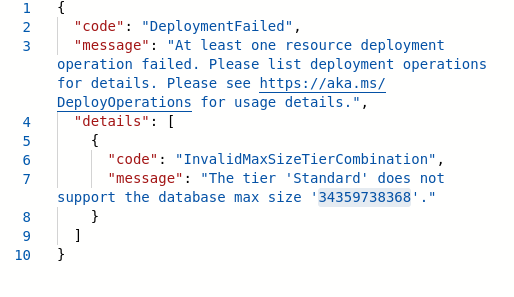
However I got this error. I searched about it but I couldn't find an explanation because the max size for a Standard tier should be 250GB, so I don't understand why the operation couldn't be done with a database of 32 GB.
Thank you in advance.

@Lidia Sánchez Are you still facing the same issue?
Regards,
Oury
In the end I copied the databases by running the SQL scripts one by one in Azure Data Studio. All the provided solutions require to purchase another storage account to run commands or scripts, so it wasn't a good option. However, I can't believe Microsoft didn't develop a good solution for a common SQL operation like copying databases.
I tried to reproduce the issue at least 3 times successfully. Please see example below from doc shared by @Alan Kinane
Database1 can be a single or pooled database. Copying between different tier pools is supported, but some cross-tier copies will not succeed. For example, you can copy a single or elastic standard db into a general-purpose pool, but you can't copy a standard elastic db into a premium pool.
Regards,
Oury

I think this might be an issue with the variable format in the JSON created by the Azure portal. If you can, maybe trying doing the database copy using a command line instead and see does it work for you - https://learn.microsoft.com/en-us/azure/azure-sql/database/database-copy?tabs=azure-powershell#copy-using-powershell-or-the-azure-cli
To do that I need to create another storage account. However, I tried copying with a SQL query and I got the same error: Failed to execute query. Error: The edition 'Standard' does not support the database data max size '34359738368'.. Could this be a JSON error too?
I did some checking on this and it seems others are reporting the issue also. It seems the "max size" must use one of the supported sizes exactly, for example 32GB or 250GB
You might have to script the copy to include to create the database and include the data max size, See here: https://learn.microsoft.com/en-us/sql/t-sql/statements/create-database-transact-sql?view=azuresqldb-current&tabs=sqlpool#arguments-1
Alternatively, could you do a database backup and restore operation instead? https://learn.microsoft.com/en-us/azure/azure-sql/database/scripts/import-from-bacpac-powershell
@Lidia Sánchez Apologies for the delayed response. Could you please open a support team so we can work closely on this matter?
Please let me know if you don't have a support plan so we can unable a free ticket for you.
Regards,
Oury